Template details
blackspike astro landing page
A free, modern, Astro landing page theme made with Tailwind to help kick start your next Astro project
About this template
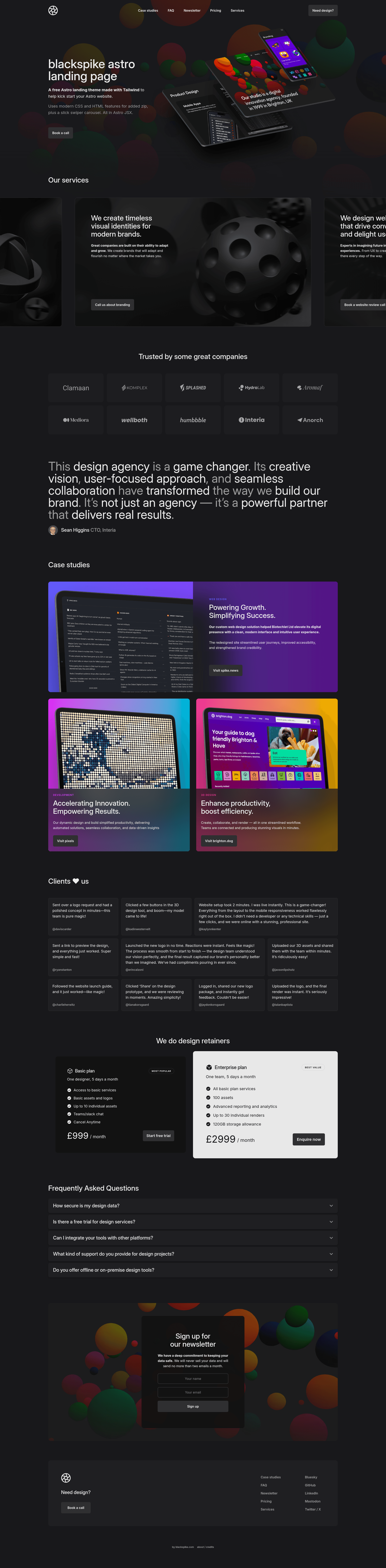
Blackspike Astro Landing Page is a free, dark-themed landing page template for the Astro framework, built with Tailwind CSS 4 and released by blackspike design to help developers launch marketing pages quickly.
What is Blackspike Astro Landing Page?
Blackspike Astro Landing Page is a free, open-source landing page template that runs on the Astro static site generator and uses Tailwind CSS 4 for styling. It takes a fresh Astro project and outputs a complete single-page landing site with a hero carousel, pricing section, and dark-mode design. The template was created by blackspike design, a web design and development team specializing in Astro, Vue, Nuxt, and WordPress, and is available as an official theme on the Astro themes page with a live demo at astro-theme.blackspike.com.
Key Features
- Astro 6 features — Uses Astro's Image component to generate optimized AVIF images, all-JSX native components, SVGs imported as components, and the released Fonts API.
- Tailwind CSS 4 — Styling built on the latest Tailwind version, including container queries, linear easing and bouncing/springing animations, and text-wrap pretty/balance utilities.
- JSON-powered content — All UI text is stored in JSON files, making it easy to edit content centrally or integrate a headless CMS later.
- JS-free interactions — Scroll-linked animations, exclusive accordions built with details/summary (animated), and an HTML modal dialog work without JavaScript.
- Swiper.js carousel — The hero section uses Swiper.js to display slides with 3D backgrounds.
- Free and open license — Licensed under Creative Commons Attribution 4.0 International, so you can use and modify it freely with attribution.
- Official Astro theme listing — Downloadable from the Astro themes page as an official community theme.
Who is it for?
- Astro developers — Get a dark landing page out of the box instead of building components from scratch.
- Agencies and freelance web designers — Use the JSON content structure and Tailwind classes to quickly adapt the page for different clients.
- Startups and product makers — Set up a launch page with a hero carousel and pricing section.
- Developers learning modern CSS — Study how the theme implements container queries, details/summary accordions, and other JS-free features.
What can you do with Blackspike Astro Landing Page?
- Launch a product or service page: Depict your offering in the hero carousel with 3D backgrounds and include a dedicated pricing section.
- Customize the theme for a brand: Edit the JSON content files to change all headings and text, and adjust colors or spacing with Tailwind utilities.
- Learn Astro best practices: Explore how the template uses the Image component, SVG components, and the Fonts API in a real project.
How does Blackspike Astro Landing Page work?
The theme installs like any Astro project: run npm install to fetch dependencies, npm run dev to start a local server at localhost:4321, and npm run build to generate a production site in the ./dist/ folder. Content changes are made by editing the JSON files and Tailwind-aware Astro components.
Pricing
Blackspike Astro Landing Page is free. It is released under the Creative Commons Attribution 4.0 International License, so you may use it for personal or commercial projects as long as you give credit to blackspike design.
FAQ
Is Blackspike Astro Landing Page free to use?
Yes, it is completely free. The theme is licensed under a Creative Commons Attribution 4.0 International Public License, which allows commercial and personal use with attribution.
What Astro version does the theme require?
The theme highlights Astro 6 features, including the now-released Fonts API, the Image component, and SVG import as components. For the full experience, use Astro 6 or a version that supports those features.
How do I edit the text on the page?
All UI text lives in JSON files, so you can update headings, descriptions, and button labels without touching component code. This also makes it easy to hook the page up to a headless CMS in the future.
Does the template use any JavaScript libraries?
The only JavaScript dependency is Swiper.js, which powers the hero carousel. Scroll-linked animations, accordions, and the modal dialog are implemented with HTML and CSS alone, using elements like details/summary and dialog.
How do I run the project locally?
Clone or download the theme, run npm install, then npm run dev to start a local development server at localhost:4321. Use npm run build for a production build and npm run preview to test it locally before deploying.