Template details
Prologue
A blog-aware Jekyll version of the Prologue single-page site template by HTML5 UP.
About this template
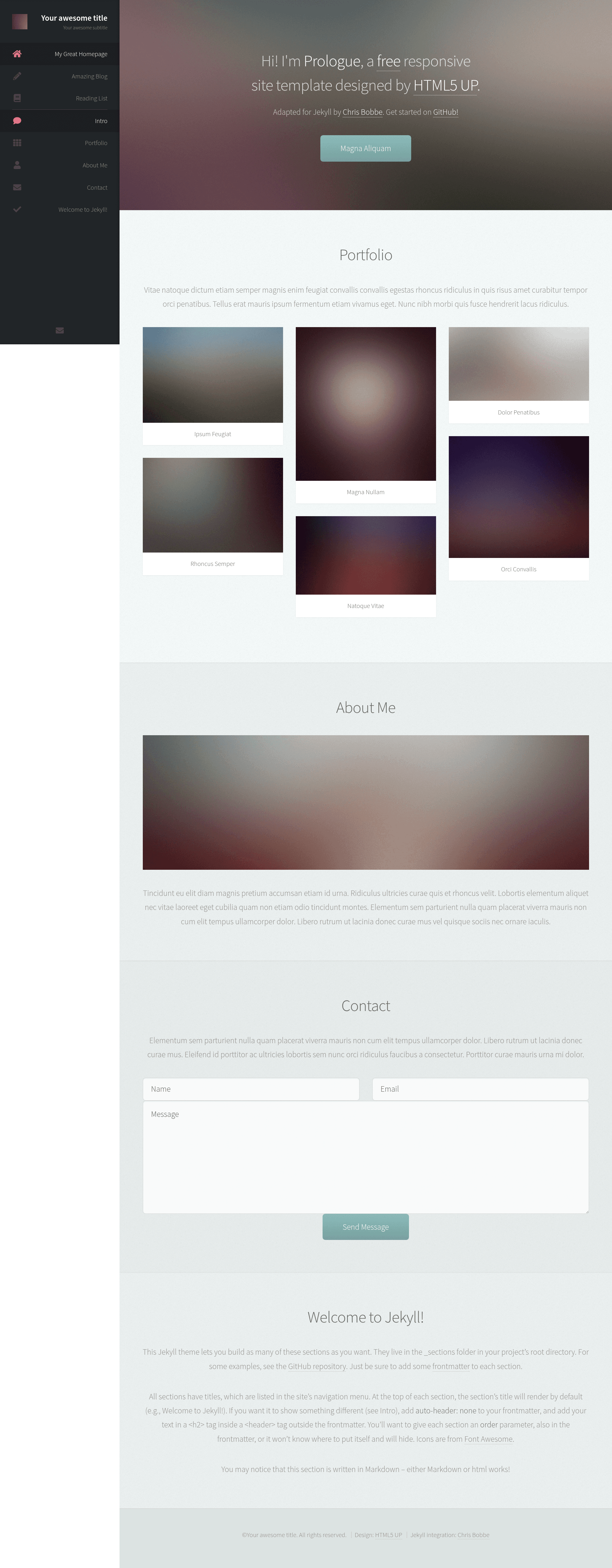
Prologue is a blog-aware Jekyll theme that ports HTML5 UP's single-page Prologue site template to Jekyll, giving you a sticky-sidebar homepage plus multi-page blogging features.
What is Prologue?
Prologue is a Jekyll theme created by Chris Bobbe, based on the Prologue design by HTML5 UP. It takes Jekyll content such as posts, pages, and homepage sections, and renders a full static site with a single-page homepage that has a sticky sidebar with navigation-linked scrolling. The theme runs on Jekyll, is available as a Ruby gem named jekyll-theme-prologue, and is also hosted on GitHub for forking. It is compatible with GitHub Pages via remote_theme.
Key Features
Prologue adds Jekyll-specific features to the original HTML5 UP design, all controlled from _config.yml and frontmatter.
- Blogging and multi-page support — Includes standard Jekyll post and page rendering, so you can write blog posts, add extra pages, and have them linked from the homepage.
- GitHub Pages compatible — Use
remote_theme: chrisbobbe/jekyll-theme-prologuein_config.yml, or fork the repository and create agh-pagesbranch. - Formspree contact form — Add your email address to
_config.ymland the included contact form works with Formspree.io, no backend code needed. - Custom scrolly sections — Build the homepage by placing documents in a
_sectionsfolder; each section can have a title, order, cover photo, icon, and custom header. - Cover photos with alt text — Set
cover-photoandcover-photo-altin section frontmatter for background images with accessible alt text for screen readers and SEO. - Social profile links — Configure your social media URLs directly in
_config.yml; they appear as icons in the sidebar. - Automatic SEO meta tags — Generated from site config and frontmatter, with extra support for
permalink,robots, andcanonicalon any page or post. - Google Analytics — Add your Tracking ID as
google_analyticsin_config.ymlto enable built-in analytics. - Custom 404 page — A 404.html file is included; move it to the project root to activate it.
Who is it for?
Prologue suits anyone who wants a static Jekyll site with a modern, single-page layout.
- Jekyll bloggers — who want a clean, single-page homepage that links to a blog index.
- Portfolio owners — use the scrolly sections to showcase projects with cover photos, icons, and custom headers.
- Developers building GitHub Pages sites — can use the
remote_themesetting for easy deployment. - Small-business or personal sites — benefit from the built-in contact form, social links, and SEO features.
What can you do with Prologue?
With its section-based homepage and standard Jekyll structures, Prologue supports several common site types.
- Build a landing or portfolio homepage — Create multiple section documents in
_sections, order them withorderin frontmatter, and they render as scrolling sections on one page. - Start a blog — Write posts and add a
blog.htmlfile withlayout: blog; the homepage navigation will show a link to the blog. - Add informational pages — Create
.mdor.htmlfiles withlayout: pageand optionalorder,icon, andhidefrontmatter to customize the sidebar nav. - Optimize SEO and analytics — Set metadata like title, description, and social profiles in
_config.ymlto generate meta tags and enable Google Analytics without plugins.
How does Prologue work?
Add collections: [sections] to your _config.yml so Jekyll knows to look in the _sections folder. Each document in that folder becomes a section on the homepage, with frontmatter controlling title, order, cover photo, and more. Blog posts and additional pages are handled by normal Jekyll workflows.
Pros and cons
The theme offers a polished design and useful integrations, but it is no longer actively maintained.
- Pros — Clean single-page design with sticky sidebar; fully configurable via
_config.yml; includes SEO and analytics support; integrates Formspree contact form; works with GitHub Pages. - Cons — The repository is marked as unmaintained, so there may be no active development or future updates.
FAQ
Is Prologue compatible with GitHub Pages?
Yes. You can use the theme with remote_theme: chrisbobbe/jekyll-theme-prologue in _config.yml, or fork the repository and switch to a gh-pages branch.
How do I add a contact form to Prologue?
The theme includes a Formspree.io contact form. Add your email address to _config.yml under the Formspree setting, and form submissions will be routed to that email.
How do I add a cover photo to a section?
In the section's frontmatter, set cover-photo to the image path (for example, assets/images/banner.jpg) and cover-photo-alt to descriptive alt text for screen readers and SEO.
How do I create a blog page?
Write one or more posts following Jekyll's post conventions, then create a file named blog.html in the project root with layout: blog and a title. The blog link will appear in the homepage navigation.