Template details
Quiqr
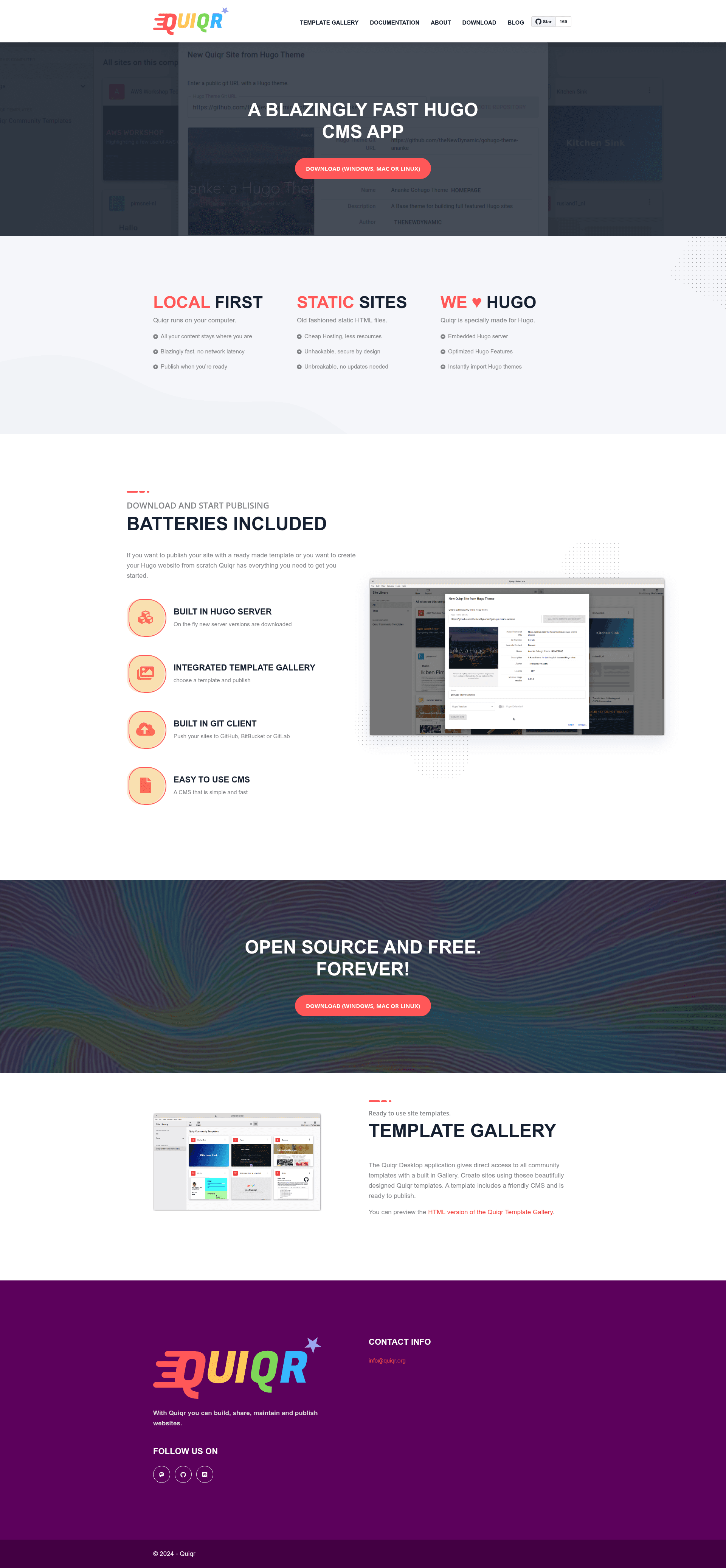
Local-first flat-file CMS and publishing application with built-in Git client for Hugo and other static site generators.
About this template
Quiqr is a local-first flat-file CMS and publishing application that runs as a desktop app (Electron) or a standalone server, built primarily for managing Hugo static sites.
What is Quiqr?
Quiqr is a content management system available as a desktop application built with Electron and as a standalone web application. It takes Markdown, JSON, and YAML content files, provides a schema-driven editing interface, and publishes the resulting site through a built-in Git client to GitHub, GitLab, or BitBucket. The application runs on macOS, Windows, and Linux via electron-builder generated installers, and is maintained by Pim Snel (mipmip) and Bert-Jan (bert-janzwanepol).
Key Features
- Local-First Architecture — All data stays on your computer for maximum privacy and zero network latency; no cloud database is required.
- Built-in Git Client — Publish directly to GitHub, GitLab, or BitBucket from inside the app without leaving the editor.
- Multi-SSG Support — Optimized for Hugo, with expanding support for Quarto, Jekyll, and Eleventy; generic builder support works with any system using static serialized data.
- Integrated Hugo Server — Preview site changes instantly via a built-in Hugo server during editing.
- Schema-Driven Forms — Content editing is controlled by schemas, making the interface customizable; the system works naturally with Markdown, JSON, and YAML.
- Template Gallery — Quick-start new projects with pre-built site templates.
- Advanced Prompt Templating System — Share and pre-write prompts to coordinate AI-assisted content teams.
Who is it for?
- Static site developers — manage Hugo-based websites with a visual editing layer while keeping the Git workflow intact.
- Content teams — use Quiqr Server for multi-user, non-technical editing with fast onboarding, while developers keep local desktop control.
- Hugo developers — use the integrated Hugo server to preview changes instantly before pushing to a repository.
Use cases
- Static Site CMS — Manage content for Hugo, Quarto, Eleventy, and Jekyll sites without touching code.
- Control Panel for Terraform clouds — Use Quiqr's schemas to edit configuration data that deploys via Terraform.
- PDF generation pipeline — Use Quiqr alongside Quarto and pandoc as a CMS for advanced PDF documents.
- Shared LLM Prompt libraries — Store and share pre-written prompts via the prompt templating system.
How does Quiqr work?
Quiqr runs in two editions: Desktop Mode (Electron) for individual developers, and Server Mode (standalone web app) for teams. Both read flat-file content in Markdown, JSON, or YAML, apply schema-driven forms for editing, and use a built-in Git client to publish to remote repositories. The standalone server runs a backend and frontend, with the frontend available at http://localhost:4002 during development.
FAQ
Is Quiqr free and open source?
Yes, Quiqr is open source under the MIT license, as shown by the repository license badge. It is available on GitHub with contributions from the community, and the project uses an OpenSpec workflow for development.
Which static site generators does Quiqr support?
Quiqr is built primarily for Hugo, with expanding support for Quarto, Jekyll, and Eleventy. The generic builder system allows any static site generator that works with static serialized data (like Markdown, JSON, or YAML) to be integrated.
Does Quiqr require a server or cloud service?
Quiqr Desktop is fully local-first — data stays on your computer. Publishing happens via a built-in Git client to GitHub, GitLab, or BitBucket. A separate Quiqr Server edition is available for multi-user team workflows.
How can I install Quiqr?
Installers are built using electron-builder for macOS (--mac), Windows (--win), and Linux (--linux). You can also run the app from source using npm run dev after cloning the repository, and a Nix flake is provided for development on Nix.