Template details
Rainblur Landing Page
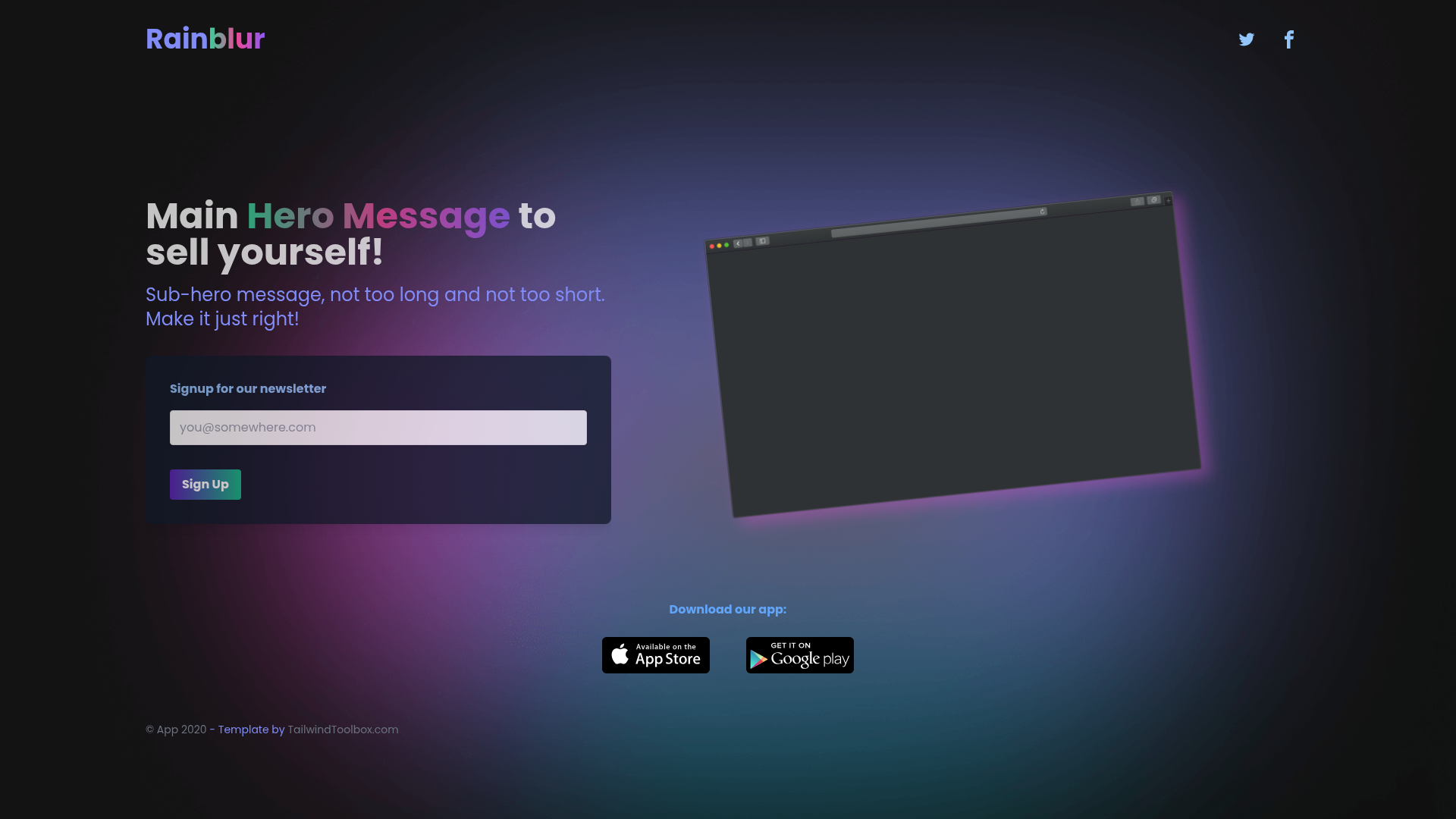
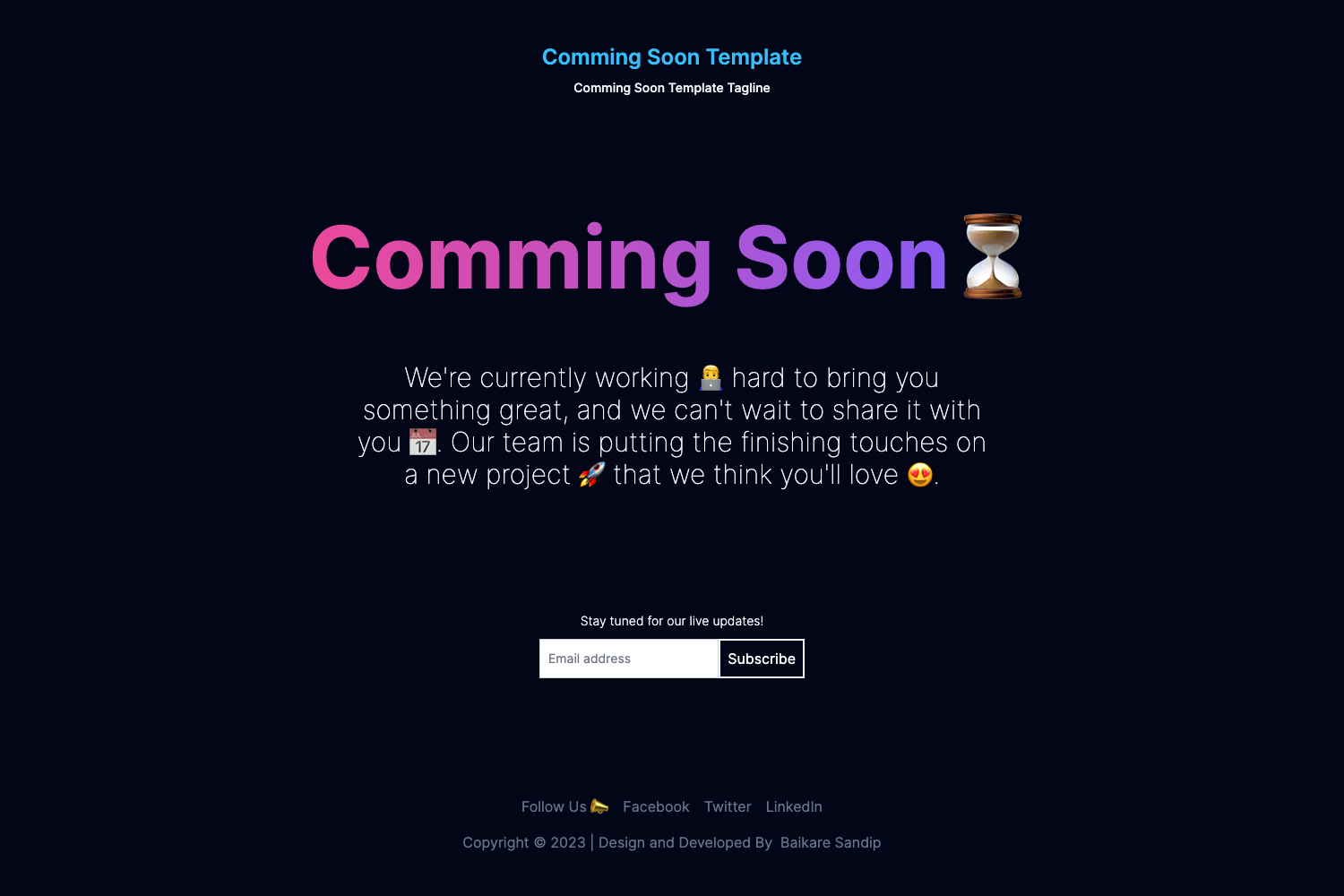
Free open-source dark mode and gradient landing page / coming soon template built with Tailwind CSS.
About this template
Rainblur Landing Page is an open-source, dark-mode and gradient-based landing page and coming soon template built with Tailwind CSS, published by Tailwind Toolbox under the MIT license.
What is the Rainblur Landing Page template?
The Rainblur Landing Page template is a free starter template for creating a generic landing page or coming soon page with a dark background and gradient colors. It is a single HTML file that loads the full Tailwind CSS framework from a CDN, so it requires no build step or local installation. The template was created by Tailwind Toolbox, a project by Amrit Nagi, and is licensed under the MIT license, allowing free use and modification. The repository currently shows 259 stars, indicating active interest from the Tailwind community.
Key Features
The template stands out because it combines a dark, gradient look with an extremely simple file structure. Here are its main characteristics:
- Single HTML file — the template is "just a HTML file" using a full CDN hosted Tailwind CSS file, so it runs directly in any modern web browser.
- CDN-hosted Tailwind CSS — Tailwind CSS is loaded from a content delivery network, meaning you do not need Node.js or a build tool to start.
- Dark mode design — the layout uses a dark color scheme as its base, giving it a modern, high-contrast look suitable for many types of pages.
- Gradient styling — the template is described as gradient based, incorporating color gradients into the visual design.
- Landing page and coming soon — it is explicitly intended as a generic landing page or coming soon template, so you can adapt it for product launches, event announcements, or placeholder pages.
- MIT license — the code is released under the MIT license by Astrava.Solutions Ltd., permitting commercial and personal use with attribution.
- Multiple ways to get it — you can download the latest release as a ZIP, clone the repository with git, or fork it on GitHub.
- Setup guide available — Tailwind Toolbox provides a setup guide to help you transition from the CDN version to a fully customized Tailwind build.
Who is it for?
This template is aimed at anyone who needs a visually distinctive landing page quickly, especially those already using Tailwind CSS. It fits several roles:
- Startups and product teams — need a quick coming soon page to publish while building their product.
- Web developers — who know Tailwind CSS and want a simple starting point to create a dark-themed landing page.
- Designers — who want to prototype a gradient-based layout without writing custom CSS from scratch.
What can you do with the template?
The template's flexible single-page layout supports several common scenarios:
- Product launches — set up a coming soon page with a dark gradient background to promote an upcoming product.
- Event pages — adapt the single-page layout to announce a conference, meetup, or webinar.
- Personal projects — use the template as a minimal portfolio or project placeholder in a dark theme.
How does the template work?
Getting started is straightforward: download the latest release or clone the repository, open the HTML file in a browser, and then edit the content directly. For deeper customization, the Tailwind Toolbox setup guide explains how to set up a proper Tailwind CSS build environment.
Pricing
The template is free and open source. It is released under the MIT license, so there are no fees for personal or commercial use.
FAQ
Is the Rainblur Landing Page template free?
Yes, it is completely free. The template is released under the MIT license, which means you can use, modify, and distribute it without paying any fees.
What do I need to run this template?
You need only a web browser, because the template is a single HTML file that loads Tailwind CSS from a CDN. No build tools or package managers are required.
Can I use this template for commercial projects?
Yes, the MIT license allows commercial use. You are only required to preserve the copyright and license notices.
How do I customize the template?
You can edit the HTML file directly to change text and layout. For more advanced Tailwind CSS customization, Tailwind Toolbox provides a setup guide that walks you through creating a local build.
Where can I report bugs or issues?
Issues can be reported by opening a new issue on the GitHub repository linked from the template page.