Template details
React Resume
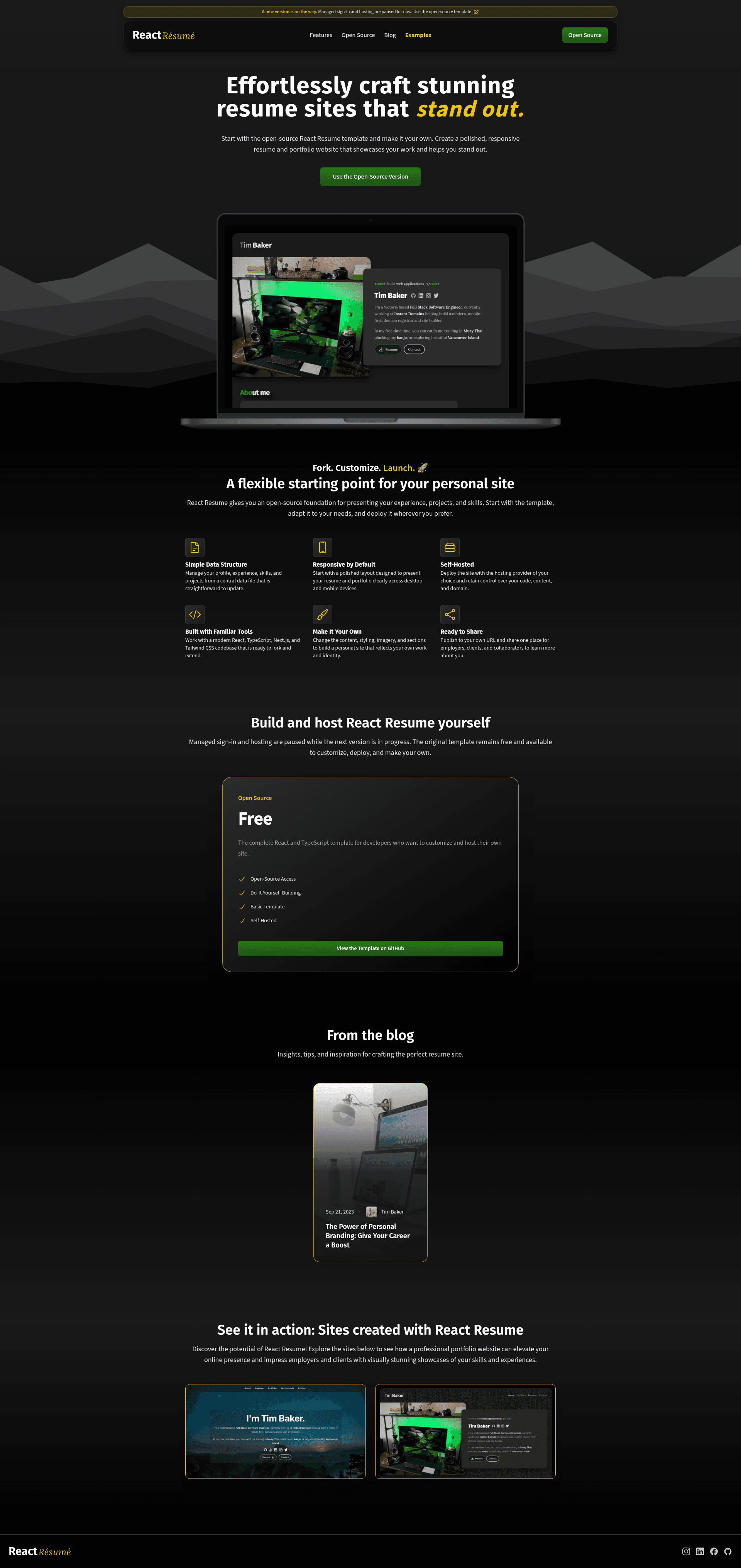
A personal resume website template built with React, TypeScript, Next.js, and Tailwind CSS, customized via a single data file.
About this template
React Resume Website Template is a free, open-source, developer-focused resume website template built on Next.js, TypeScript, and Tailwind CSS, designed to be customized from a single data file and deployed to Vercel. Created by Tim Baker (GitHub: tbakerx), it is a modern replacement for the older v1.0.0 release, which you can still download from the releases page.
What is the React Resume Website Template?
The React Resume Website Template is a personal resume website template written in React with full TypeScript support. It takes a single data file located at /src/data/data.tsx and produces a server-side-rendered, mobile-optimized resume website. The template runs on the Next.js framework and is styled entirely with Tailwind CSS. A live demo is available at reactresume.com.
Key Features
- Next.js + TypeScript — Version 2 is completely rebuilt with React and full TypeScript support, leveraging Next.js for server-side rendering, static generation, image optimization, and API routes.
- Tailwind CSS — The entire UI is styled with Tailwind CSS, providing utility-first, responsive styling across all sections.
- Single-file data population — All site content is driven through
/src/data/data.tsx, with TypeScript interfaces defined indataDef.tsin the same folder. Example images live insrc/images/and are imported in the data file. - Modernized sections — All site sections were significantly improved and modernized, including experience, projects, and contact areas.
- Built-in contact form state — The contact form handles inputs and state; you connect your own email provider (SendGrid is personally recommended) for submission.
- Easy Vercel deployment — The README walks you through deploying the Next.js site to Vercel using their official guide.
- Fully mobile-optimized — The site is server-side rendered and designed to load quickly and look clean on any device.
Who Is It For?
- Software developers — Create an online resume that highlights your experience, projects, and technical skills with minimal setup.
- Job seekers in tech — Get a clean, professional personal site up quickly by forking the repo and swapping in your data.
- Students and early-career engineers — Use a professional template to showcase student projects and internship experience without building a site from scratch.
Use Cases
- Personal portfolio: Replace the sample data in
/src/data/data.tsxwith your own work history, skills, and project links to generate a custom portfolio. - Custom-brand site: Modify the Tailwind classes and component code to match your personal brand, then deploy to Vercel.
- Learning resource: Read the TypeScript definitions in
dataDef.tsand the Next.js pages to learn how a typed, modern static site is structured.
How Does It Work?
- Install the latest stable versions of Node and Yarn.
- Fork the repository on GitHub and download it via the Code button.
- Run
yarn install, thenyarn devto start a local server, usually at localhost:3000. - Edit
/src/data/data.tsxto update your personal information; changes appear on save with hot reload. - Connect the contact form to an email provider like Sendgrid, since submission logic is not included.
- Deploy to Vercel using their Next.js deployment guide and get a live URL.
Pros and Cons
- Pros: Full TypeScript support; Next.js SSR/static generation; Tailwind CSS styling; all data in one file; mobile-optimized; actively maintained with a v2 rewrite.
- Cons: The contact form only handles inputs and state — no email sending until you integrate a provider; requires Node and Yarn to run locally.
Pricing
The React Resume Website Template is free to use. The repository is public and can be forked; the creator, Tim Baker, accepts optional support through GitHub Sponsors.
FAQ
Is the React Resume template free?
Yes, the template is free to fork and use. You can clone the public repository, customize it, and deploy it without paying a license fee.
How do I change the content on my resume site?
Edit the file /src/data/data.tsx. The README states that all site content is driven by this file, and updates appear on save while the dev server is running. Type definitions are in dataDef.ts.
Does the contact form send emails by default?
No. The form handles user input and state, but submission and email sending are left open for you to implement. The author recommends integrating Sendgrid as an email provider.
What are the prerequisites for building the site?
You need the latest stable versions of Node.js and Yarn installed. The template uses Next.js, so Node is required for the build and dev processes.
Can I deploy this to platforms other than Vercel?
The README specifically documents deployment to Vercel using the Next.js guide. Since it is a Next.js project, you could adapt other hosting platforms that support Next.js, but Vercel is the documented path.