Template details
react-vscode-portfolio
A VS Code inspired portfolio template built with React and Material UI, powered by markdown.
About this template
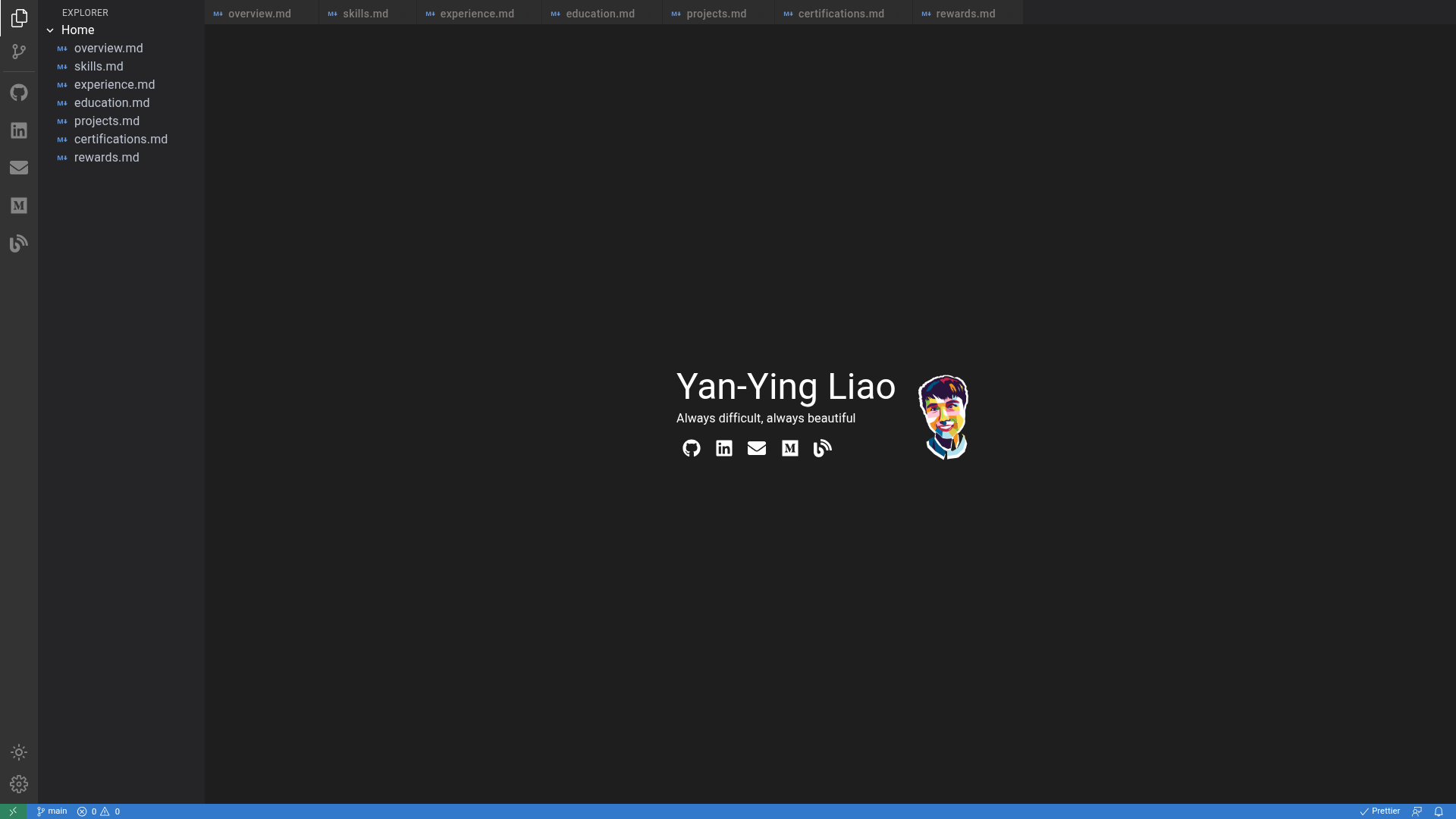
react-vscode-portfolio is an open-source portfolio template that recreates the Visual Studio Code interface inside a browser, using React.js and Material UI to turn markdown files into a personal website. It is created by Yan-Ying Liao, distributed under the MIT License, and designed to deploy to GitHub Pages.
What is react-vscode-portfolio?
react-vscode-portfolio is a single-page application built with the React.js library, styled with Material UI components, and powered by react-markdown for converting Markdown content into HTML. The template takes Markdown files placed in the public/pages directory plus a route configuration in src/app/pages/page.ts, and outputs a VS Code look-alike portfolio with a sidebar, tabbed editor area, and collapsible file explorer. The project is hosted on GitHub at noworneverev/react-vscode-portfolio, and live demos are available at the user site and project site URLs.
Key Features
The template provides several interface and workflow features:
- Markdown-driven pages — Portfolio content is authored as Markdown files in public/pages; each page appears as a tab after you register its route in src/app/pages/page.ts, and an example set includes overview, skills, experience, education, projects, certificates, and accomplishments.
- Extended Markdown support — The template uses react-markdown and adds syntax highlighting and alert callouts, with a live Markdown preview page reachable at the demo site.
- Dark and light themes — Visitors can switch between VS Code dark mode and light mode, matching the look of the code editor.
- Closable tabs and collapsible explorer — The interface mimics VS Code's tab bar and sidebar file explorer, letting visitors open several pages at once and collapse the panel for more content space.
- Responsive web design — The layout adjusts to different screen sizes, so the portfolio remains viewable on phones and tablets.
- Google Analytics integration — Add a measurement ID in .env.production to track site traffic.
- GitHub Pages auto-deploy — A GitHub Actions workflow is included, and the README shows a gh-pages deployment badge, indicating the site can be deployed automatically from a GitHub repository.
- Docker deployment option — Running docker-compose up provides an alternative to the local Node.js development server.
Who is it for?
This template suits a range of developer audiences:
- Software developers who want a portfolio that visually matches the tools they use daily; they can present projects, experience, and skills inside a VS Code–like workspace.
- Job seekers in tech roles who want a distinct, code-focused personal site that signals technical competence to recruiters.
- Developers who prefer Markdown over hand-editing JSX or HTML; content is written in simple .md files, so updating a resume or project list does not require touching component code.
- Open-source hobbyists who want a deployable site on GitHub Pages; the template handles user sites and project sites by adjusting the homepage property in package.json.
What can you do with react-vscode-portfolio?
Here are the main tasks you can accomplish:
- Software engineers: build a portfolio with predefined pages for an overview, skills, work experience, education, projects, certificates, and accomplishments, each maintained as a separate Markdown file.
- Freelance developers: customize the sidebar and homepage social links (icons from React Icons) to point to GitHub, LinkedIn, or any other profile, then track visitors with Google Analytics.
- Design-curious learners: study a working React + Material UI codebase that includes routing, theming, and Markdown rendering, and use it as a foundation for other projects.
How does react-vscode-portfolio work?
The setup follows a conventional Create React App workflow: after cloning the repository, run npm install, set your name in .env.development with the REACT_APP_NAME variable, and add Markdown pages to public/pages. You then register each page in src/app/pages/page.ts, define your social links in src/app/pages/link.tsx, and launch the development server with npm start. For production, modify the homepage property in package.json to your GitHub Pages URL, set a Google Analytics measurement ID in .env.production, and push to GitHub to trigger the included GitHub Actions deployment.
FAQ
Is react-vscode-portfolio free to use?
Yes, it is distributed under the MIT License, so you are free to use, modify, and distribute the template for personal or commercial projects.
What do I need before installing it?
You need Node.js and npm to run the development server locally, a GitHub account if you want to deploy on GitHub Pages, and optionally Docker if you prefer containerized deployment via docker-compose up.
Can I deploy react-vscode-portfolio to a custom domain?
The README focuses on GitHub Pages deployment, but since it is a static React site, you can serve the built output from any static hosting service; just adjust the homepage property in package.json accordingly.
How do I add a new page to the portfolio?
Create a new Markdown file in public/pages, then add an entry to the pages array in src/app/pages/page.ts with the filename and a route path. The new page will appear as a tab in the VS Code styled interface.
Does the template support dark mode?
Yes, the interface offers both dark and light modes, and visitors can switch between them while browsing the portfolio.