Template details
Simple-Portfolio
A simple single page portfolio which is easy to edit and easy to deploy (On Github pages and Netlify)
About this template
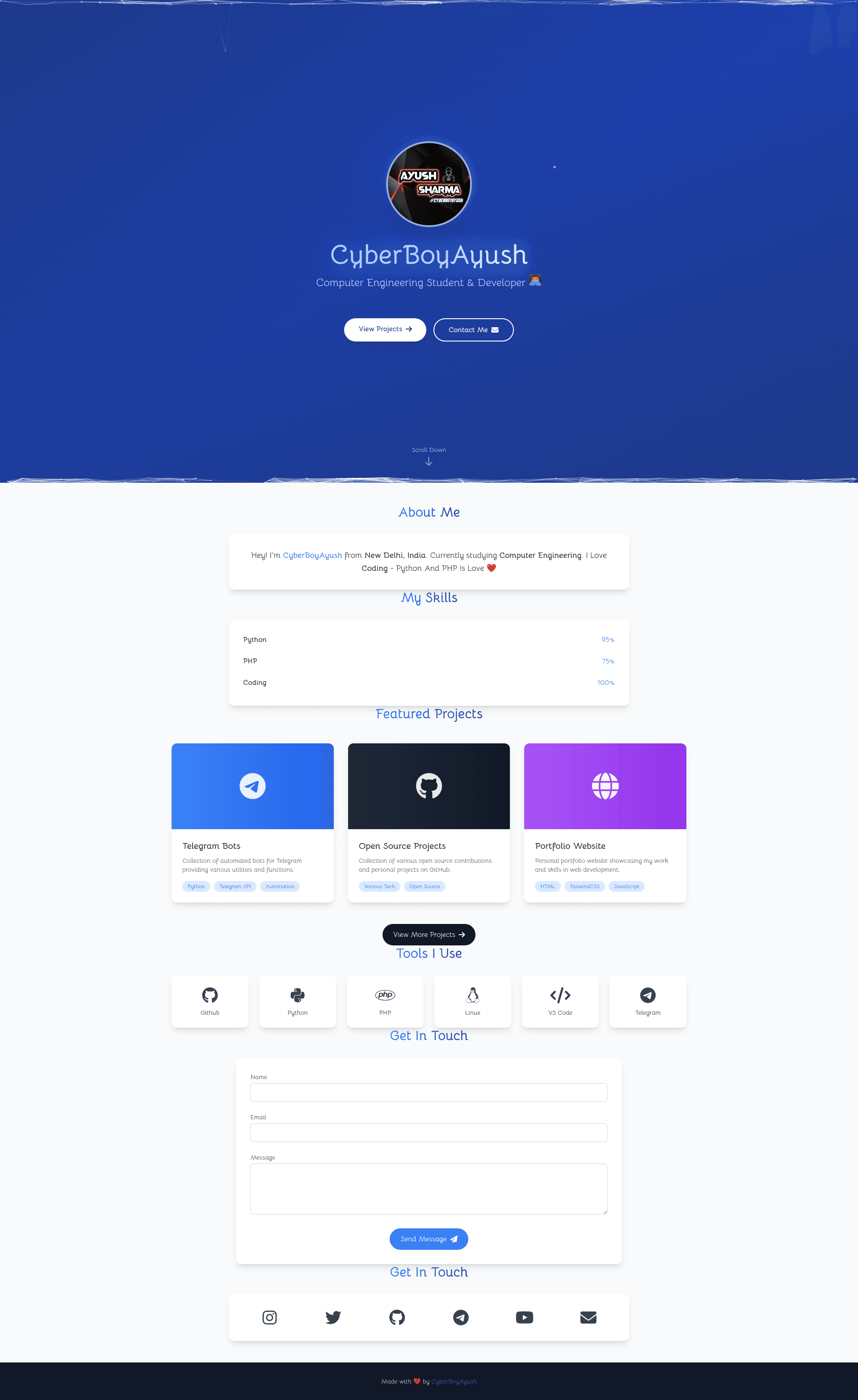
Simple-Portfolio is an open-source, single-page HTML portfolio template built with Tailwind CSS and Particles.js that lets developers showcase their skills, projects, and contact details with minimal editing effort. It takes your personal content — a profile photo, skill names and proficiency percentages, project links, and social media URLs — and turns it into a modern, animated website with hero, About, Skills, Projects, Tools, and contact sections. The template is maintained by CyberBoyAyush on GitHub and is designed to be edited directly in the index.html file with no complex build steps.
What is Simple-Portfolio?
Simple-Portfolio is a free, open-source single-page portfolio template written in plain HTML, CSS, and JavaScript, with Tailwind CSS for responsive styling. You edit one file, index.html, and your changes produce a complete portfolio page that can be hosted on GitHub Pages or Netlify. Its core function is to provide a pre-built, animated personal portfolio that developers can customize and deploy in minutes, and it includes sections for hero, About Me, Skills, Projects, Tools I Use, and a Formspree-powered contact form.
Key Features
- Single Page Layout — All content lives on one scrollable page: hero, About Me, Skills, Projects, Tools I Use, Contact Form, and contact links, so visitors never navigate away.
- Animated Hero Section — Includes a gradient background, Particles.js particle animation, floating bubbles, and a typing effect for the title text.
- Gradient Text and Hover Effects — Headings use eye-catching gradient color, while buttons and project cards animate on hover; smooth scrolling moves between sections.
- Skills with Progress Bars — Each skill displays a name, a percentage label, and an animated progress bar whose width you set by editing the inline style in the HTML.
- Projects Showcase — Each project card supports an icon or image, title, description, technology tags, a live demo link, a GitHub repo link, and a "View More Projects" button.
- Formspree Contact Form — The form is pre-integrated with Formspree; you paste your own Formspree endpoint ID into the action attribute (for example,
https://formspree.io/f/your-form-id) to start receiving submissions. - Responsive with Tailwind CSS — The layout adapts to desktop, tablet, and mobile widths out of the box, so it looks good on any device.
- Easy Deployment — Deploy to GitHub Pages by selecting the master (or main) branch with the / (root) folder in repo settings, or use the one-click Deploy to Netlify button provided in the README.
Who is it for?
- Junior developers and students — quickly stand up a portfolio to apply for internships or first jobs by editing their name, skills, and project links in one file.
- Freelancers — showcase services and past work with a contact form so potential clients can reach them directly via Formspree.
- Open-source contributors — fork the repo, replace content, and publish to GitHub Pages or Netlify at no hosting cost.
What can you do with Simple-Portfolio?
- Job seekers — build a one-page portfolio that highlights skills with animated bars and links to project repositories, then deploy it to GitHub Pages as
username.github.io. - Netlify users — use the in-README Deploy to Netlify button to start from the repo and get continuous deployment without touching build settings.
- Teachers or workshop leaders — use the sample content as a starting point to demonstrate HTML/Tailwind editing and static-site hosting workflows.
How does Simple-Portfolio work?
Clone the repository with git clone https://github.com/CyberBoyAyush/Simple-Portfolio.git, open index.html, and replace the placeholder content: swap profile.png for your own photo, update the <h1> heading and typing-effect paragraph, set skill names and their width percentages, edit each project card's links and tags, and replace your-form-id in the Formspree form action. Commit the changes and push to your repo, then enable GitHub Pages or connect Netlify to deploy the live site.
FAQ
Is Simple-Portfolio free to use?
Yes. The template is open source and hosted on GitHub; you can fork, modify, and deploy it for free. The only third-party account you may need is a free Formspree account to receive contact-form submissions.
Does editing require any build tools?
No build step. Everything is edited directly in index.html, and the page runs as plain static HTML, CSS, and JavaScript. This means you can deploy the folder as-is to any static host without a bundler or command-line build.
What animation libraries does it use?
The hero section uses Particles.js for background particles and a typing effect for the title, along with CSS-based floating bubbles, smooth scrolling, and hover transitions. These all run client-side without a JavaScript framework.
Can I host it on GitHub Pages or Netlify?
The README explains both routes: on GitHub Pages, go to Settings > Pages and select the master (or main) branch with the / (root) folder; on Netlify, use the one-click Deploy button provided in the README. Both services offer free static hosting.