Template details
Safarnama
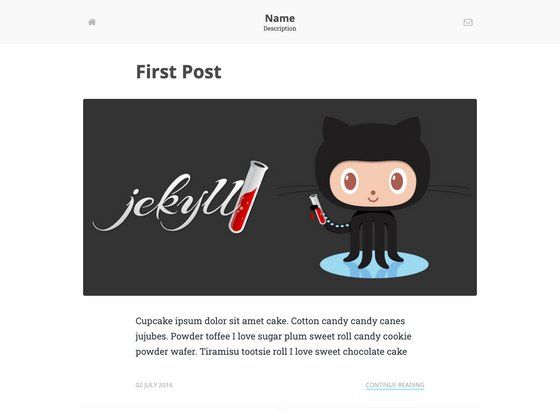
A Jekyll blog template for creating markdown-based posts and pages with customizable taglines and categories.
About this template
Safarnama is a Jekyll blog template that turns Markdown files into a static blog, letting you publish posts and standalone pages with simple front matter. It's hosted on GitHub at github.com/hemangsk/safarnama, released under the MIT license, and described by its author as "Blogging for the free flying spirits."
What is Safarnama?
Safarnama is a Jekyll-based blog theme that generates a static website from Markdown files. You provide .markdown or .md files containing YAML front matter, and Jekyll converts them into HTML pages. The theme supports two content types: blog posts stored in the _posts folder and standalone pages placed in the root directory. The project is maintained by GitHub user hemangsk and distributed with an MIT license, so it can be freely modified and reused.
Key Features
- Markdown-based publishing — Write posts as .markdown files using the standard Jekyll naming convention
2016-03-30-i-love-design.markdownand add front matter for layout, title, date, and categories. - Front matter categories — Each post can carry a single category string or an array of strings, as shown with
categories: ["life", "friends"]in the example. - Standalone pages — Create pages like
about.mdordesign.mdin the root directory with front matter that includes apermalinkand an optionaltaglinefor custom page subtitles. - Optional page taglines — Add a
taglinefield to page front matter to display a subtitle, e.g. "Humanity is overrated." for a Science page. - Open-source contribution — The repository explicitly invites pull requests for new features, encourages opening issues for bugs, and provides a direct support channel through GitHub issues.
- Simple setup — The theme avoids complex configuration; the only requirement is dropping properly named files into specific folders.
Who is it for?
Safarnama suits bloggers who want a minimal, file-based workflow without a content management system. Developers comfortable with Git and Jekyll can use it to spin up a personal blog quickly. Writers who prefer Markdown for drafting can maintain their content as plain text files. Teams or individuals wanting an easily forkable, MIT-licensed theme can customize it through pull requests.
What can you do with Safarnama?
- Personal bloggers: Publish life-and-interest posts by creating dated markdown files in the _posts folder and tagging them with categories such as "life" or "friends".
- Portfolio or about pages: Add static pages like an about page or a design showcase by dropping .md files in the root and setting a clean permalink.
- Open-source experimenters: Fork the repository, contribute new features via pull requests, or adapt the MIT-licensed code for your own Jekyll site.
- Support-seeking users: If setup fails, file an issue on the GitHub repository and the maintainer promises to respond as soon as possible.
How does Safarnama work?
To create a post, add a .markdown file to the _posts folder with a filename like 2016-03-30-i-love-design.markdown, then write front matter containing layout: post, title, date, and categories followed by the content. To create a page, add a .md file to the root directory with front matter that includes layout: page, title, permalink, and an optional tagline. Jekyll then builds the static site from these files.
FAQ
How do I create a new post in Safarnama?
Create a .markdown file inside the _posts folder using the Jekyll date-based naming format, for example 2016-03-30-i-love-design.markdown. Inside the file, add front matter with layout: post, a title, a date timestamp, and a categories field that can be a string or an array.
Does Safarnama support multiple categories per post?
Yes. The categories field in the front matter accepts both a single string and an array of strings. The documentation shows categories: ["life", "friends"] as a valid example, so posts can belong to several categories at once.
Is Safarnama free to use?
Yes, the theme is released under the MIT license, meaning it is free to use, modify, and distribute. The repository explicitly mentions the MIT license and also invites community contributions through pull requests.
How do I create a custom page like an About page?
Create a .md file in the root directory of the site, for example about.md. In its front matter, set layout: page, give it a title, define a permalink like /about/, and optionally add a tagline for a subtitle. Jekyll will generate the page at that permalink.
What should I do if I find a bug in Safarnama?
Open an issue on the GitHub repository at github.com/hemangsk/safarnama. The maintainer states that they are there for users who face setup problems and promises to get back as soon as possible. Pull requests for new features are also invited.