
Template details
scrollcraft
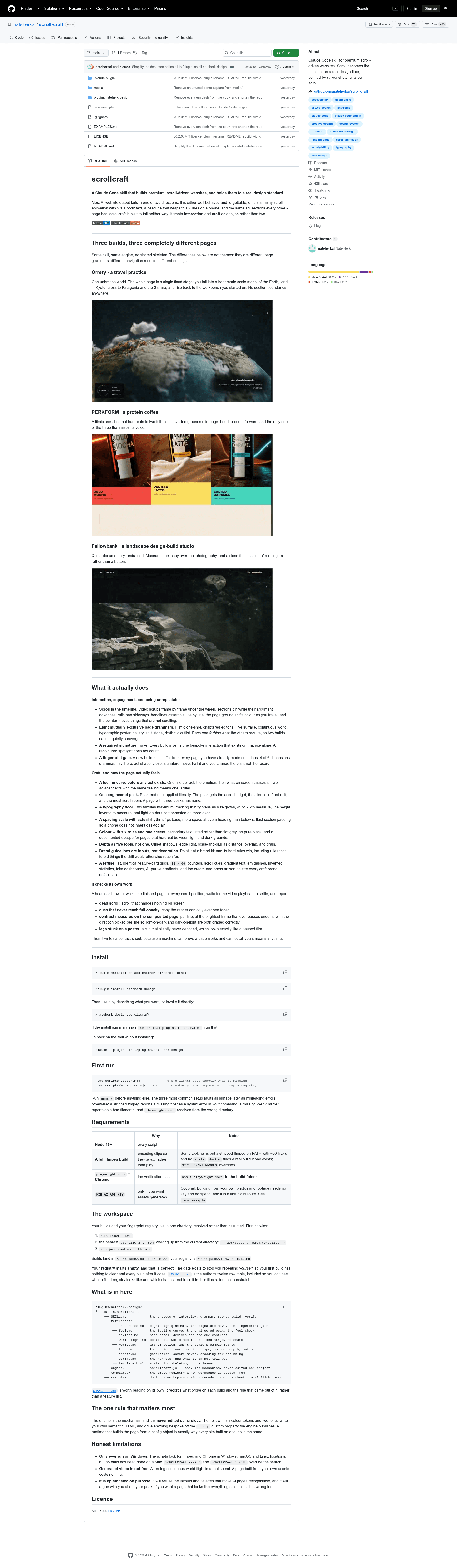
Claude Code skill for premium scroll-driven websites. Scroll becomes the timeline, on a real design floor, verified by screenshotting its own scroll.
About this template
scrollcraft is a Claude Code skill that generates premium, scroll-driven websites by treating scroll as the timeline, enforcing a strict design floor, and verifying the finished page with a headless browser. It was created for the Claude Code plugin marketplace and is installed as nateherk-design.
What is scrollcraft?
scrollcraft is a skill/plugin for Claude Code (Anthropic's agentic coding tool) that builds bespoke, scroll-driven websites. It takes a plain-language description of the site you want — or a direct invocation like /nateherk-design:scrollcraft — and produces a complete HTML/CSS/JS website, plus a verification contact sheet. It runs on Node 18+ and requires a full ffmpeg build and playwright-core with Chrome for the verification pass.
Key Features
- Scroll as the timeline — video scrubs frame by frame under the wheel, sections pin while arguments advance, rails pan sideways, and headlines assemble line by line.
- Eight mutually exclusive page grammars — filmic one-shot, chaptered editorial, live surface, continuous world, typographic poster, gallery, split stage, and rhythmic cutlist; each grammar forbids what the others require.
- Required signature move — every build must invent one bespoke interaction that exists on that site alone, so two builds cannot converge.
- Fingerprint gate — a new build must differ from every prior build on at least 4 of 6 dimensions: grammar, nav, hero, act shape, close, and signature move.
- Feeling curve and engineered peak — one line per act records the emotion and its on-screen cause; exactly one peak receives the asset budget and scroll room.
- Design floor — two font families maximum, 45 to 75 character measure, inverse line height, a 4px spacing scale, six colour roles with one accent, no pure black, and depth built from five tools including edge light and grain.
- Verification harness — a headless browser walks the finished page at every scroll position and reports dead scroll, cues that never reach full opacity, per-line contrast on the composited page, and clips that silently failed to decode.
- Brand guidelines as inputs — point it at a brand kit and its hard rules win, including rules that forbid what the skill would otherwise reach for.
Who is scrollcraft for?
- Claude Code users building landing pages — you describe the site, and scrollcraft generates a scroll-driven page that does not look like default AI output.
- Creative developers and interaction designers — you can build one-shot product pages, continuous-world flights, or chaptered editorial experiences, with the engine as a fixed mechanism you never edit per project.
- Agencies producing multiple sites — the fingerprint registry tracks each build so no two client pages repeat the same grammar, hero, or close.
What can you do with scrollcraft?
- Travel and experience brands: build a continuous-world page like Orrery, a single fixed stage that flies from Kyoto to Patagonia and back without section boundaries.
- Product launches: create a filmic one-shot product page with hard cuts to full-bleed inverted grounds, like the PERKFORM protein coffee example.
- Design studios: craft a restrained documentary page with museum-label copy and a running-text close, like the Fallowbank example.
How does scrollcraft work?
Install it with /plugin marketplace add nateherkai/scroll-craft and /plugin install nateherk-design, then run node scripts/doctor.mjs to check that ffmpeg, Chrome, and dependencies are in place. The skill's procedure is interview, grammar, score, build, verify: it interviews you for the feeling curve, selects one of eight grammars, scores the plan, builds the page, and runs the headless verification pass before writing a contact sheet.
Pros and cons
- Pros: enforces a real design floor so AI-generated pages avoid generic layouts; verifies scroll behaviour and contrast on the actual composited page; the fingerprint gate keeps your output original.
- Cons: only ever tested on Windows — no build has been done on a Mac, though
SCROLLCRAFT_FFMPEGandSCROLLCRAFT_CHROMEoverrides exist; generated video via KIE costs money, while building from your own assets is free; it is intentionally opinionated and will refuse layouts it considers clichés.
FAQ
Is scrollcraft free?
Yes, scrollcraft is released under the MIT License, as shown by the licence badge in its repository. You also need Node 18+, a full ffmpeg build, and playwright-core with Chrome, which are free and open source.
Does scrollcraft work on macOS?
It has not been tested on macOS. The scripts search for ffmpeg and Chrome on Windows, macOS, and Linux, but every build to date has been done on Windows. If you try it on a Mac, you can set SCROLLCRAFT_FFMPEG and SCROLLCRAFT_CHROME to point to your installations.
Can I use my own photos and footage?
Yes. Building from your own photos and footage is a first-class route and requires no API key and no spend. The KIE_AI_API_KEY is optional and only needed if you want the skill to generate assets for you.
What is the fingerprint gate?
The fingerprint gate checks each new build against every page you have already made on six dimensions: grammar, navigation, hero, act shape, close, and signature move. A build must differ on at least four of those dimensions, or you change the plan rather than the record.
What happens during verification?
A headless browser scrolls through the entire page and waits for video playheads to settle. It reports dead scroll, cues that never reach full opacity, per-line contrast measured on the composited page, and clips that never decoded. It then writes a contact sheet image of the page.