Template details
Simple Technical Resume
A simple technical resume designed to fit within a page and work well with ATS.
About this template
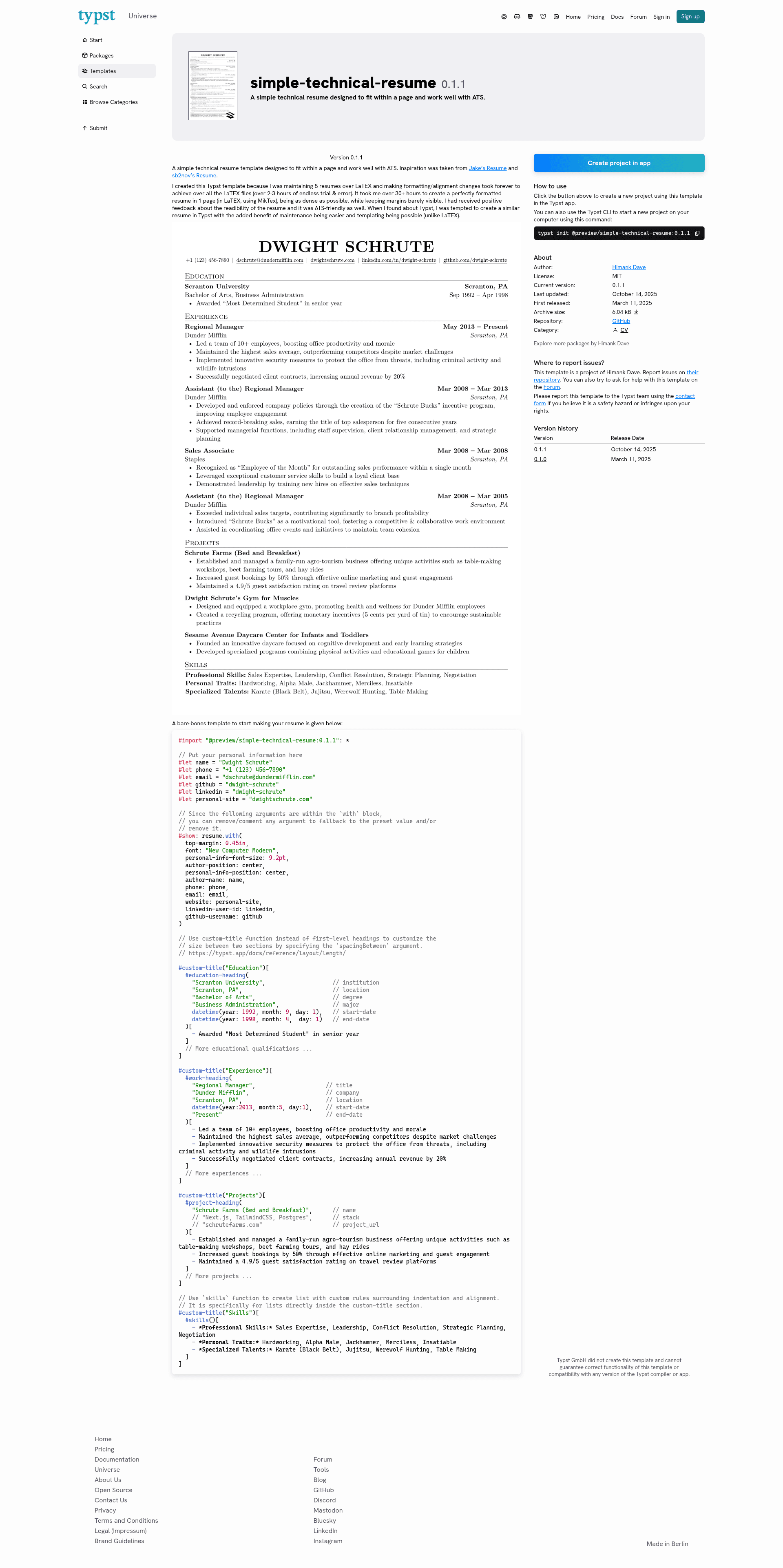
Simple Technical Resume is a Typst template that compiles structured resume content — name, contact information, education, experience, projects, and skills — into a compact one-page PDF designed to pass ATS parsers.
What is Simple Technical Resume?
Simple Technical Resume is a free Typst template (version 0.1.1) created by steadyfall, taking inspiration from Jake's Resume and sb2nov's Resume. It accepts plain-text content via Typst variables and helper functions, then typesets a single-page resume with dense margins and standardized sections. The template is distributed through the Typst preview package repository, so it can be imported with a single line: #import "@preview/simple-technical-resume:0.1.1": *.
What makes it stand out?
- ATS-friendly output — The layout avoids tables and graphics that break automated parsers, using plain heading and bullet structures.
- One-page density — Margins are tightened to keep content within a single page; the author spent 30+ hours perfecting a comparable LaTEX resume.
- Configurable personal information — Set name, phone, email, website, LinkedIn ID, and GitHub username as variables, with options to center them or adjust font size (e.g.
personal-info-font-size: 9.2pt). - Customizable typography — Choose the font, top margin, and alignment via the
resume.withrule; examples use "New Computer Modern". - Helper functions for each section —
education-heading,work-heading,project-heading, andskillsprovide consistent formatting for dates, locations, and bullet lists. - Maintenance efficiency — The author reports that updating eight LaTEX resumes took 2–3 hours per change; in Typst, a single source file compiles quickly to PDF.
Who should use Simple Technical Resume?
- Software engineers and IT professionals — produce a technical resume that highlights projects, skills, and employment history in a machine-readable format.
- People who manage multiple resume versions — keep one Typst source file per job target and compile to PDF instantly, instead of hand-editing LaTEX.
- Job applicants to ATS-heavy companies — the template's straightforward headings and bullet lists are far less likely to be mangled by resume parsers.
What can you do with it?
- Customize section spacing — Use the
custom-titlefunction with aspacingBetweenargument to adjust vertical gaps between sections. - Add structured experience entries —
work-headingtakes job title, company, location, start/end dates, then a body of bullet accomplishments. - Format project portfolios —
project-headingsupports optional stack and URL fields, letting you show technologies and links alongside project descriptions. - List skills compactly — The
skillsfunction creates a bullet list with custom indentation and alignment, ideal for grouping by category.
How does it work?
First, import the template and define personal information variables. Second, pass a set of layout options to show: resume.with(...). Third, call custom-title for each major section, using the provided heading functions to add entries. Compile the .typ file with Typst to produce a PDF resume.
FAQ
Is Simple Technical Resume free?
Yes. The template is available through the Typst preview registry as @preview/simple-technical-resume:0.1.1, and its source is public on GitHub. No payment or license key is mentioned on the repository page.
What does the resume look like?
The generated output is a single-page PDF with a centered author name and contact line, followed by sections for Education, Experience, Projects, and Skills. Margins are intentionally narrow to maximize content density.
Does it work with ATS?
The template is explicitly designed to work well with ATS. It relies on standard headings, bullet lists, and plain text rather than multi-column tables or embedded graphics, making it easier for automated resume screeners to extract information.
Can I change the font?
Yes. The resume.with rule accepts a font argument; the quickstart example uses "New Computer Modern". You can use any font available to your Typst installation.
How is it different from a LaTEX resume?
The main difference is maintainability. The author created this template after spending 30+ hours building a one-page LaTEX resume, and found that updating multiple LaTEX files took hours. With Typst, the resume source is shorter, the syntax compiles faster, and reuse between documents is simpler.