Template details
Singhkunal2050v2
Portfolio Website / Blog Portal with eleventy and netlify-cms based on the Jamstack Architecture
About this template
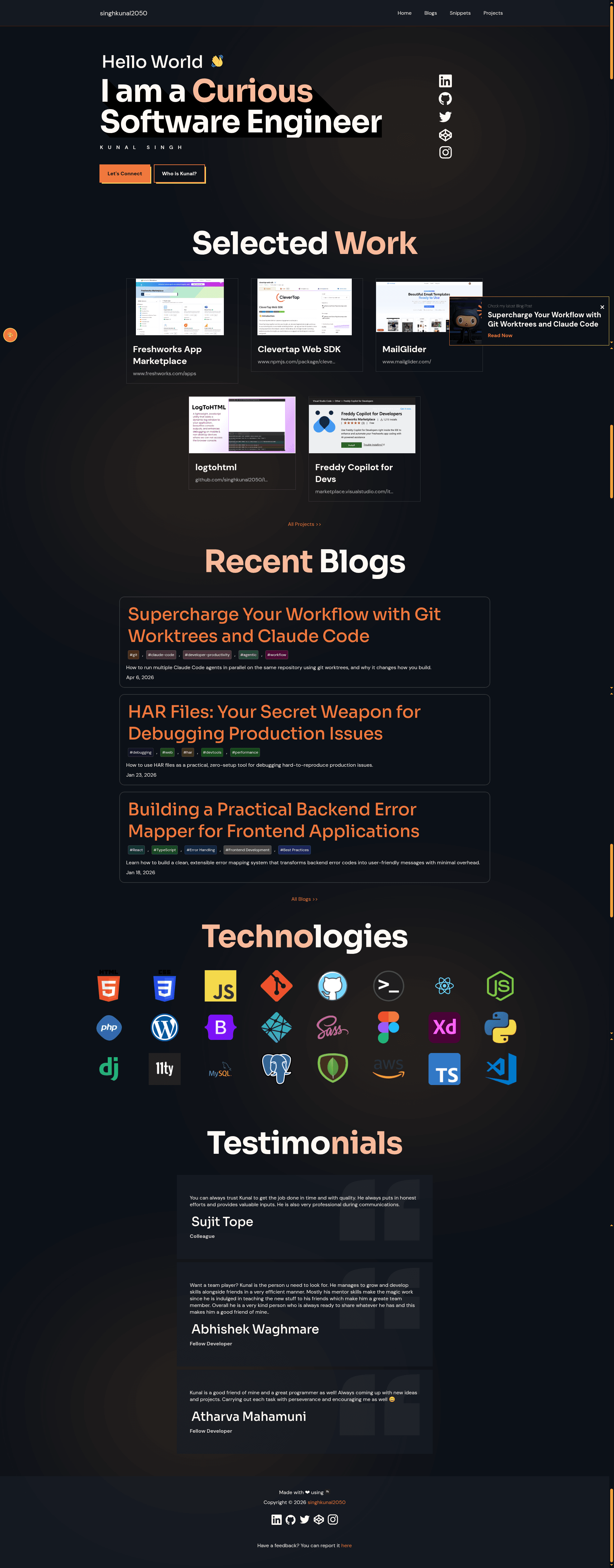
Singhkunal2050v2 is a personal portfolio and blog template built with the Eleventy static site generator and Netlify CMS, following the Jamstack architecture. It produces a deployable static website with a blog, portfolio, contact form, dark mode, and a 404 page, with content stored in Markdown on GitHub.
What is Singhkunal2050v2?
Singhkunal2050v2 is a static site template that turns Markdown blog posts and site configuration into a complete personal website. It runs on Eleventy (also known as 11ty), a JavaScript-based static site generator; content is authored in Markdown and stored under the /posts directory of a GitHub repository, and edited through the Netlify CMS web interface. The template deploys to Netlify via a connected repository and includes a contact form. It was created by Kunal Singh, the GitHub user behind the singhkunal2050 repository.
Key Features
- Jamstack architecture — Built on Eleventy for static generation and Netlify CMS for content management, with the backend data hosted on GitHub.
- Custom cursor and semantic HTML — The template includes a custom cursor effect and uses semantic HTML for accessibility and SEO.
- Open Graph meta tags — og meta tags are included so shared links display properly on social platforms.
- Contact form — A functional contact form is built into the site for visitor messages.
- Surprise modal popup — After a time delay on the first visit, a modal greets the user.
- Color mode switcher — Visitors can switch between light and dark color modes.
- Blog features — Posts support highlighted code blocks, embedded videos, tags, and social share buttons.
- 404 page — A custom 404 page is included.
- Lighthouse optimizations — The project reports a maximum Lighthouse score, covering performance, accessibility, best practices, and SEO.
Who is it for?
Singhkunal2050v2 suits developers who want a personal portfolio and blog with a modern Jamstack workflow. Bloggers who prefer editing content through a CMS rather than editing code directly can use the Netlify CMS integration. Design-conscious individuals who want a site with dark mode, custom cursor, and high Lighthouse scores will find the template meets those requirements out of the box.
What can you do with it?
- Publish blog posts: Write Markdown posts, store them in the
/postsGitHub directory, and they appear on the site with syntax-highlighted code and embedded video support. - Manage content visually: Use the Netlify CMS admin interface to create and edit posts without touching Git commands.
- Showcase a portfolio: Update project listings to display work, with plans for dedicated project pages mentioned by the author.
- Collect visitor messages: The built-in contact form lets visitors send messages directly from the site.
How does it work?
Content is stored as Markdown in the GitHub repository. Netlify CMS provides an editing interface that commits changes back to the repository. Eleventy builds the site from templates and content, and the static output is deployed to Netlify on each push. This workflow produces a fast, serverless site with no databases to manage.
Alternatives
- Eleventy Base Blog — The official Eleventy blog starter, which is more minimal and does not include Netlify CMS, a portfolio, or a contact form by default.
FAQ
Is Singhkunal2050v2 free?
Yes, the template is open source and publicly available on GitHub, so it is free to use and modify.
Does it require a CMS to run?
No, Netlify CMS is optional. The site is fully static, but Netlify CMS provides a convenient interface for content editing. You can also edit Markdown files directly.
What static site generator does it use?
It uses Eleventy, a JavaScript-based static site generator that compiles Nunjucks templates and Markdown content into HTML.
Does the template include a contact form?
Yes, a contact form is included as one of the key features, so visitors can send messages without external services.
Can I customize the colors?
Yes, the site includes a color mode switcher, allowing visitors to toggle between light and dark themes. The author also lists plans to add more color schemes using CSS variables.