Template details
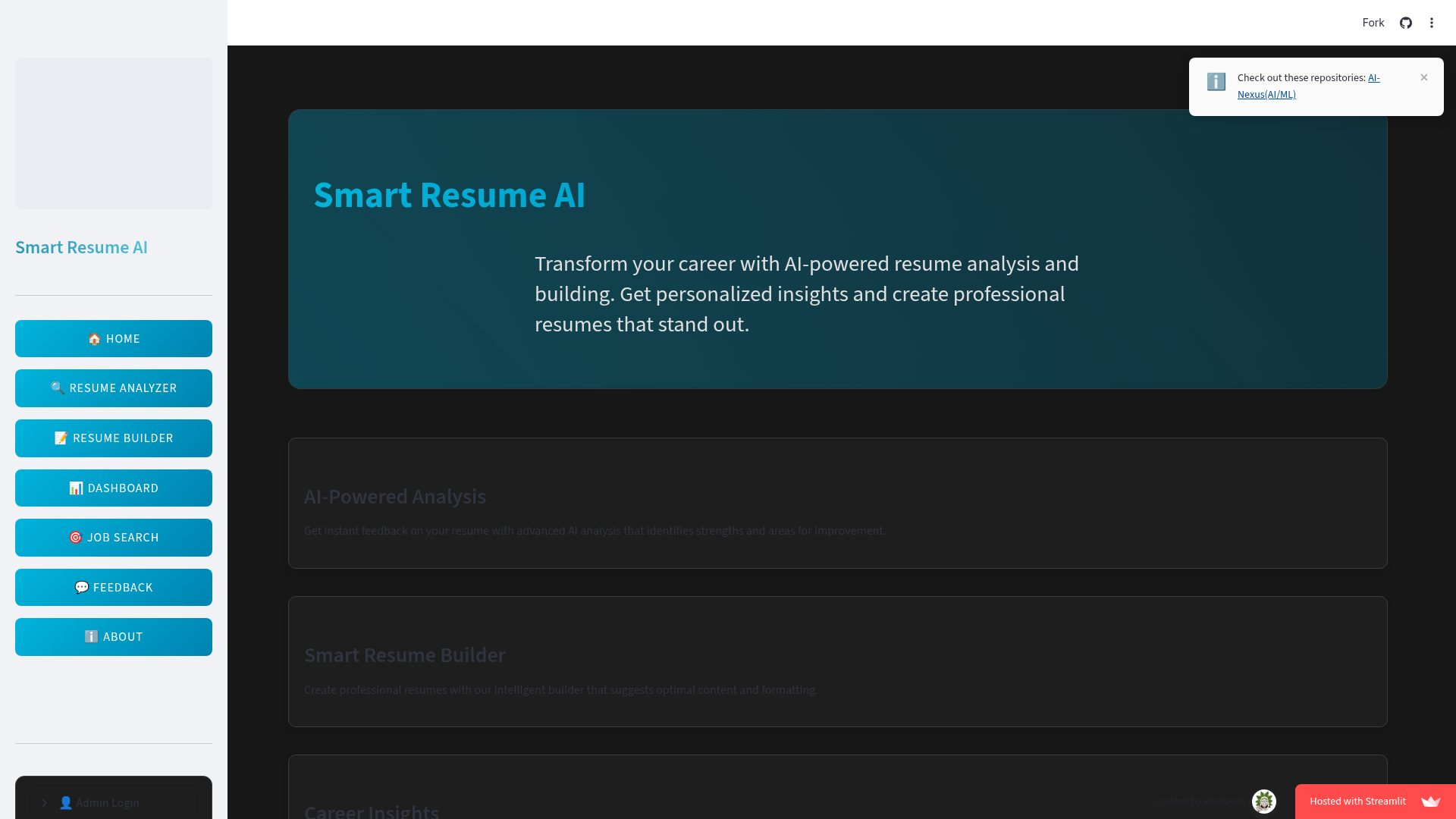
Smart AI Resume Analyzer
AI-powered resume analyzer with ATS scoring, keyword gap analysis, resume builder, and job search — built with Streamlit.
About this template
Smart AI Resume Analyzer is an open-source, Streamlit-based web application that scores resumes for ATS compatibility, identifies keyword and skills gaps, builds tailored resumes from four templates, and searches live jobs — developed by Het Patel as a BCA final-year project at Parul University (2024-25).
What is Smart AI Resume Analyzer?
Smart AI Resume Analyzer is a Python web application built with Streamlit that turns a resume in PDF or Word format into an actionable career report: an ATS compatibility score, keyword gap analysis, skills gap breakdown, role-specific feedback, and course/video recommendations. It also includes an AI-powered resume builder with four templates (Modern, Minimal, Professional, Creative) and exports the finished resume as a PDF. The AI analysis layer uses the Google Gemini API, while spaCy, NLTK, and scikit-learn handle NLP and machine-learning tasks; the database is SQLite3. The project is open source under the MIT License, and a live demo is hosted at resumind.streamlit.app.
What makes Smart AI Resume Analyzer stand out?
- Deep Resume Analysis — Generates an ATS compatibility score, keyword gap analysis, role-specific feedback, and a skills gap breakdown from an uploaded PDF or Word resume.
- AI-Powered Resume Builder — Offers four polished themes (Modern, Minimal, Professional, Creative) with customizable sections, smart content suggestions, and ATS-optimized formatting.
- AI Optimization Engine — Connects to the Google Gemini API to highlight missing keywords, suggest content enhancements, and deliver industry-specific insights.
- Role-Based Course & Video Recommendations — Recommends courses and videos based on the target role selected during analysis.
- Dashboard with Plotly Visualizations — Displays skills gap and keyword analysis as interactive Plotly charts, alongside a feedback system and admin panel.
- Job Search with LinkedIn Scraper — Includes job search functionality plus a LinkedIn job scraper that returns listings and market insights (scraping is slow, as the README notes).
- Multiple File Formats — Uses PyPDF2 and python-docx for PDF and Word extraction/editing, and openpyxl for Excel-based data export.
Who should use Smart AI Resume Analyzer?
- Job seekers can upload their resume, select a target role, and get a concrete ATS score plus a list of missing keywords to fix before applying.
- Career changers can paste a custom job description and let the AI analyzer highlight exactly which skills and phrases their current resume lacks.
- Students and educators can use the four-template resume builder to create clean, downloadable PDF resumes for internships and academic projects.
- Developers can self-host the app by cloning the repository, installing the requirements, and supplying their own Google Gemini API key.
Use cases
- Preparing for a job application: Run your PDF resume through the analyzer, review the role-specific feedback, and address the top keyword gaps before submitting.
- Tailoring a resume to a job description: Use the custom job-description mode in the AI analyzer to see how well your resume matches a specific posting and what to add.
- Building a first resume: Use the resume builder's Modern, Minimal, Professional, or Creative template, fill in sections, and export a formatted PDF in minutes.
- Exploring job opportunities: Use the built-in job search and LinkedIn scraper to find roles, then compare them against your resume in the same application.
How does Smart AI Resume Analyzer work?
The workflow is a four-step loop: upload a resume in PDF or Word (or build one from scratch), run the analysis to get ATS score, keyword insights, and skills gap, then use the AI suggestions or builder templates to refine content, and finally download the updated resume as a PDF. To run locally, clone the repository, create a virtual environment, install requirements.txt, download the spaCy model en_core_web_sm, add a Google Gemini API key to a .env file in the utils/ directory, and launch with streamlit run app.py.
FAQ
Does Smart AI Resume Analyzer require a paid API key?
The app itself is open source, but the AI analysis features require a Google Gemini API key. You can generate a free key from Google AI Studio (aistudio.google.com/app/apikey) and place it in the utils/.env file as GOOGLE_API_KEY.
What file formats can I upload?
The analyzer accepts PDF and Word documents. It uses PyPDF2 and python-docx to extract text, and the resume builder exports the final result as a PDF.
Why does the resume builder say "Please enter your email address" when the field is filled?
This is a known bug with browser autofill in the resume builder. The README recommends manually removing and retyping the email (or any autofilled field) so the input validation recognizes it.
Is there an admin panel?
Yes, an admin section appears below the Dashboard after login. The demo credentials provided in the README are username admin@example.com and password admin123.
How long does LinkedIn job scraping take?
The README warns that the LinkedIn job scraper is time-consuming and asks users to have patience while results load.