Template details
Soft UI Dashboard
Soft UI Dashboard - Free and Open Source Bootstrap 5 Dashboard
About this template
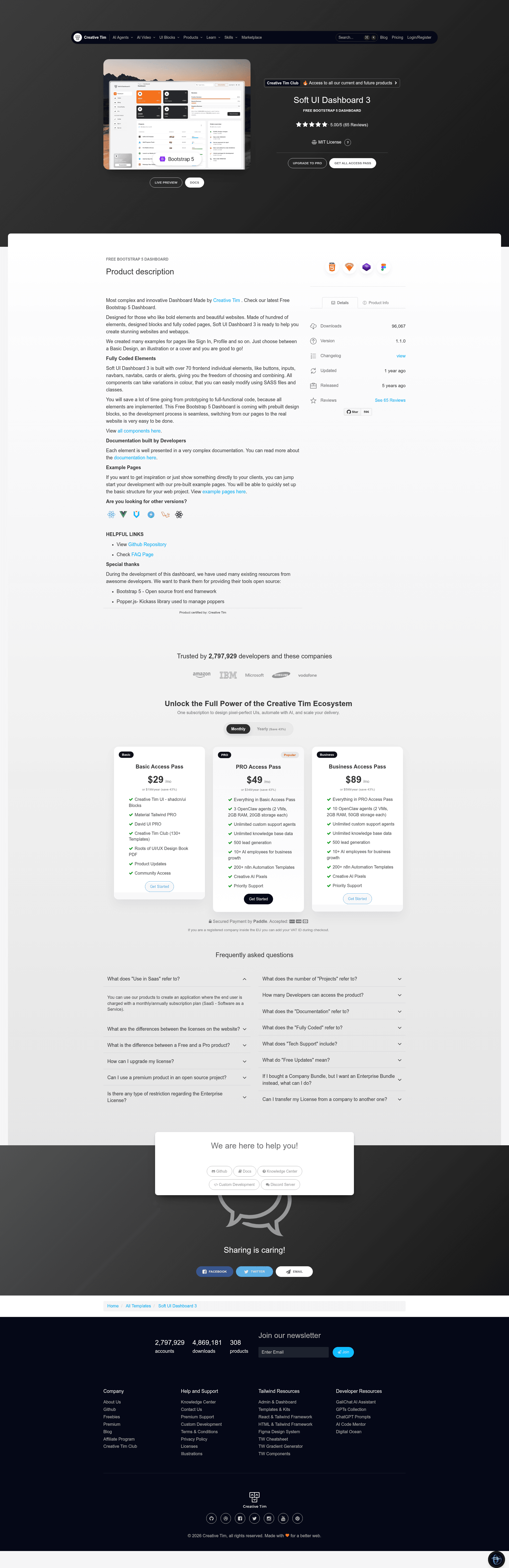
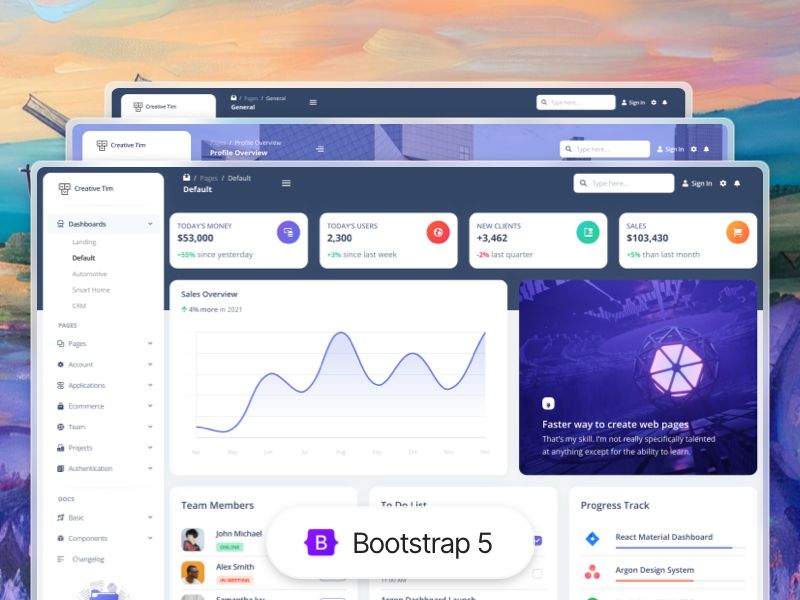
Soft UI Dashboard is a free, open-source Bootstrap 5 admin dashboard template by Creative Tim, built to give web developers a ready-made foundation of UI components and example pages for building admin panels and web applications.
What is Soft UI Dashboard?
Soft UI Dashboard is a front-end dashboard template created by Creative Tim, distributed as a free download and open source on GitHub. It is built on Bootstrap 5 and ships with over 70 individual components — buttons, inputs, navbars, nav tabs, cards, and alerts — each customizable through Sass variables and classes. The template includes fully coded pages for a dashboard, profile, sign-in, and sign-up, so you can use it as the structural starting point for an app's admin area. The current release version is 1.1.0, and a live preview is available at the Creative Tim demo server.
Key Features
- Over 70 frontend components — Buttons, inputs, navbars, nav tabs, cards, alerts, and more are included, and their colors can be changed through Sass files and utility classes.
- Pre-built example pages — Dashboard, profile, sign-in, and sign-up pages come ready to use, with choices between basic design, illustration, and cover layouts.
- Bootstrap 5 foundation — The template uses the Bootstrap 5 open-source CSS framework, with Popper.js included for managing poppers, tooltips, and popovers.
- Sass customization — The assets/scss folder contains the full source stylesheets, letting you edit variables and compile a custom theme.
- Nepcha Analytics integration — Nepcha analytics tool is already integrated, allowing you to track traffic sources without additional setup.
- Gulp build tooling — A gulpfile.js and package.json are provided, so you can install dependencies with
npm installand process the assets. - Browser support — Creative Tim officially supports the last two versions of Chrome, Firefox, Edge, Safari, and Opera.
- Documentation included — A local documentation.html file is part of the download, and the full component documentation is hosted on Creative Tim's learning lab website.
Who is it for?
- Web developers — Get a clean, responsive Bootstrap 5 admin panel that can be customized and extended instead of starting from an empty HTML file.
- UI/UX designers — Use the pre-built pages and component library as a reference or starting point for designing dashboard interfaces with a soft, modern look.
- Startups and product teams — Launch internal tools, analytics dashboards, or user-facing admin areas quickly using the included authentication and profile pages.
What can you do with Soft UI Dashboard?
- Build an admin panel: Use the dashboard page with charts and cards as a template for displaying metrics, user activity, and key data.
- Implement authentication flows: Start from the sign-in and sign-up pages and adapt their layout styles to match your product while adding your own backend.
- Prototype new pages: Combine the 70+ components into custom layouts and restyle them by editing the Sass variables in the assets/scss directory.
How does Soft UI Dashboard work?
To start, download the dashboard from Creative Tim's website, then run npm install in the root directory to install local dependencies. The project includes a Gulpfile for building and watching assets, and you can deploy the template to Genezio with a one-click button provided on the GitHub repository. The download also contains a documentation.html file that explains every component and page.
Pricing
Soft UI Dashboard is a free download, and its source code is publicly available on the GitHub repository. Creative Tim offers additional paid templates and products on its website, but this dashboard itself has no listed pricing tier.
FAQ
Is Soft UI Dashboard free?
Yes, the dashboard is offered as a free download by Creative Tim, and the code is open source on GitHub. No purchase or subscription is mentioned on the project page.
What is Soft UI Dashboard built with?
It is built with Bootstrap 5, the open-source CSS framework, and uses Popper.js for interactive popper elements. The styling source is written in Sass, and the project includes Gulp for compilation.
How do I set up Soft UI Dashboard locally?
Download the project, navigate to the root folder, and run npm install to install the local dependencies listed in package.json. The included gulpfile.js can then be used to build and process the assets.
Which browsers are officially supported?
Creative Tim states that the dashboard supports the last two versions of Chrome, Firefox, Edge, Safari, and Opera.
Does Soft UI Dashboard include documentation?
Yes, a documentation.html file is bundled in the download, and the full component documentation is available on Creative Tim's learning lab website.