Template details
Soft UI Dashboard Tailwind
Free open-source Tailwind CSS admin dashboard by Creative Tim with 70+ components, example pages, and full documentation.
About this template
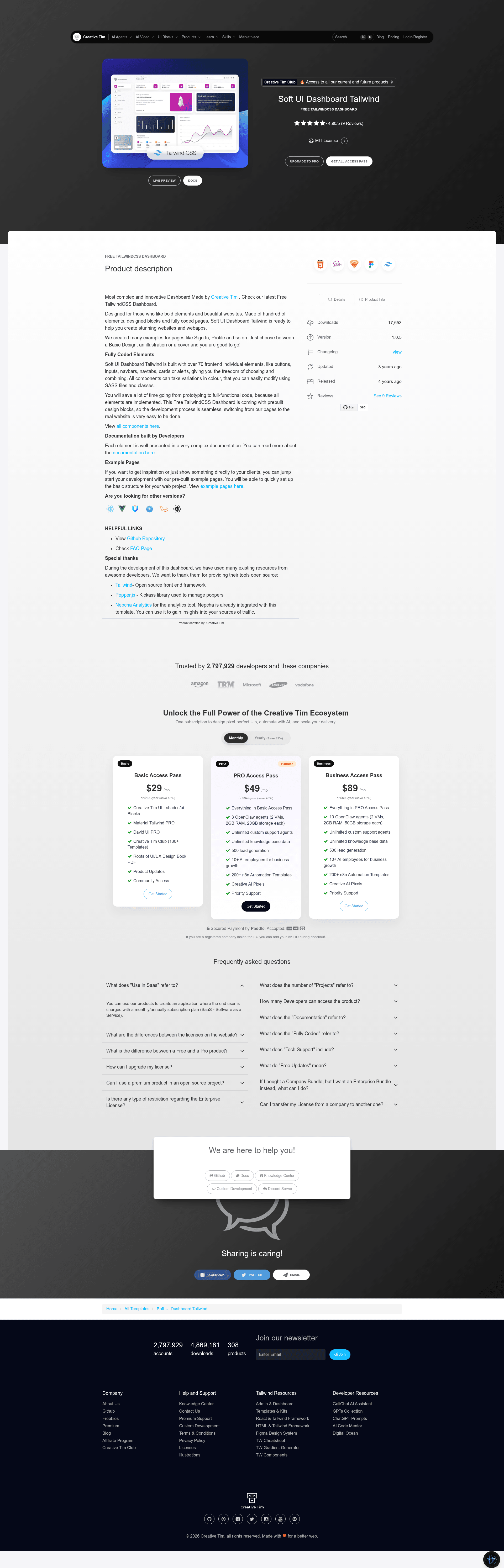
Soft UI Dashboard Tailwind is a free, open-source admin dashboard template built by Creative Tim on the Tailwind CSS framework, offering 70+ frontend components and prebuilt pages for building web app interfaces.
What is Soft UI Dashboard Tailwind?
Soft UI Dashboard Tailwind is an HTML dashboard template styled with Tailwind CSS, produced by Creative Tim as version 1.0.5. It takes the repo's source files — HTML pages, a Tailwind config, and JavaScript plugins — and compiles them into a responsive admin interface you can drop into any web project. The template includes example pages for dashboards, profile screens, and authentication flows, and it ships with precompiled CSS and JS in the build directory.
Key Features
- 70+ UI components — Buttons, inputs, navbars, navtabs, cards, and alerts that you can combine and recolor through SASS classes.
- Tailwind CSS styling — Built on Tailwind CSS with a tailwind.config.js file, plus a src/styles.css source for custom styles.
- Prebuilt example pages — Dashboard, profile, sign-in, and sign-up pages, each available with basic, illustration, or cover design variations.
- Full developer documentation — Hosted at Creative Tim's learning lab, covering quick start, components, and customization.
- Nepcha Analytics integration — The template includes Nepcha Analytics so you can track traffic sources without extra setup.
- One-click Genezio deployment — A deploy button in the README lets you publish the template to Genezio instantly.
- Broad browser support — Officially supports the last two versions of Chrome, Firefox, Edge, Safari, and Opera.
- Clean file structure — Src for source code, build with minified CSS/JS assets, and a package.json for local dependencies.
Who is it for?
- Frontend developers — Need a ready-made admin panel that they can extend with Tailwind utilities instead of writing CSS from scratch.
- SaaS and startup teams — Can use the dashboard layout and sign-in/sign-up pages as the foundation for their product's back-office area.
- Agencies and freelancers — Can rebrand the prebuilt components to deliver client dashboards quickly without building UI elements from zero.
What can you do with Soft UI Dashboard Tailwind?
- Launch a dashboard quickly — Replace the demo content with your own data and deploy the HTML files to any static host.
- Learn Tailwind CSS — Explore 70+ component implementations in the source to see how Tailwind classes and SASS are combined.
- Prototype admin interfaces — Use the example pages to show clients a profile or sign-in flow before the real backend is ready.
How does it work?
The README's quick start says to download the archive from Creative Tim, install Node.js, navigate to the project root, and run npm install to pull local dependencies. Because the build folder already contains compiled CSS and JavaScript, you can also open the HTML pages directly in a browser without a build step. A one-click Genezio deploy option is available for publishing your own version.
Pricing
Soft UI Dashboard Tailwind is free to download from Creative Tim's product page and is published as a public GitHub repository. The license is Creative Tim's own license agreement, linked from the README, not an MIT or GPL license.
FAQ
Is Soft UI Dashboard Tailwind really free?
Yes, Creative Tim describes it as "Free and OpenSource TailwindCSS Dashboard." You can download it directly from the Creative Tim website or clone the public GitHub repository, and the README shows no paid tier for this product.
How do I run the template locally?
Download the zip, install Node.js from the official website, navigate to the project root directory, and run npm install to install local dependencies. After that you can open the HTML files in the build folder in your browser.
What example pages are included?
The demo includes a main dashboard page, a profile page, a sign-in page, and a sign-up page. Each of these can be viewed as a live preview from the repository's demo links.
Which browsers are supported?
The template officially supports the last two versions of Chrome, Firefox, Microsoft Edge, Safari, and Opera, according to the README's browser support list.
Does it include documentation?
Yes, each component is covered in a documentation site hosted at Creative Tim's learning lab, with a quick-start guide and an in-product documentation.html file inside the download.