Template details
TailAdmin Next.js
Free open-source Next.js + Tailwind CSS admin dashboard template with 30+ components and 50+ UI elements for building back-ends and admin panels.
About this template
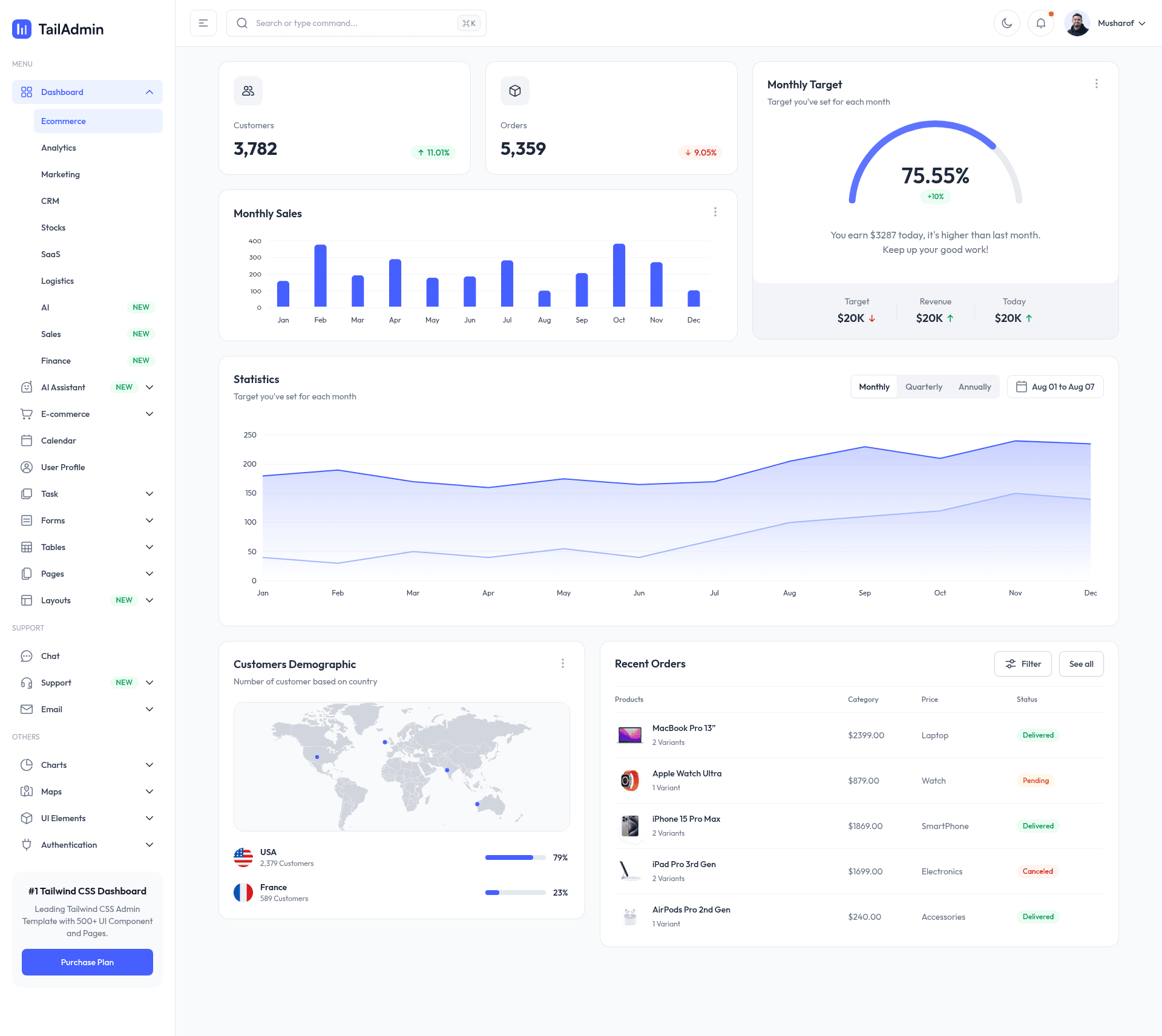
TailAdmin Next.js is a free, MIT-licensed, open-source admin dashboard template built on Next.js 16, React 19, TypeScript, and Tailwind CSS v4 that ships 30+ dashboard components and 50+ UI elements for building back-ends, dashboards, and admin panels.
What is TailAdmin Next.js?
TailAdmin Next.js is an open-source admin dashboard template maintained by TailAdmin and distributed through the GitHub repository TailAdmin/free-nextjs-admin-dashboard. It provides a pre-built Next.js App Router application with a collapsible sidebar, data visualization components, tables, authentication forms, input elements, profile management screens, and a custom 404 page, which developers clone, install, and customize into a production admin panel. The project runs on Next.js 16 with server-side rendering, static site generation, and API route integration, and it uses ApexCharts for React for its line and bar charts. The same design is also published as free React, Vue, Angular, and Laravel templates by the same team.
What makes TailAdmin Next.js stand out?
TailAdmin stands out by pairing an up-to-date Next.js 16 stack with a large pre-built component set and offering the same design across five frameworks.
- Modern stack — Next.js 16.x with the App Router and React Server Components, React 19, TypeScript, and Tailwind CSS v4 styling with no separate CSS framework.
- 30+ dashboard components — collapsible sidebar, tables, alerts, dropdowns, modals, buttons, and a statistics chart with functional date-picker positioning.
- 50+ UI elements — authentication forms, input elements, profile management, and a custom 404 error page.
- Data visualization — line and bar charts via ApexCharts for React, JSvectormap for map rendering, and 7+ chart types recorded in the v2.3.0 changelog.
- Dark mode — a built-in toggle switches the whole Tailwind-styled interface to a dark theme.
- Layout flexibility — v2.3.0 adds 6 new layout variations; v2.0.0 introduced a collapsible sidebar, chat screens, and a calendar.
- Figma file — a Community Edition Figma design file accompanies the free version, and the Pro version includes a complete Figma file.
- Framework family — identical admin dashboards are available as free templates for React, Vue, Angular, and Laravel.
Who is it for?
TailAdmin Next.js suits developers and teams that want a functional admin interface without designing dashboard UI from scratch.
- Full-stack developers who need a ready-made admin panel can clone the repository and immediately customize authentication, forms, tables, and charts instead of building dashboard UI from scratch.
- SaaS teams can use it as the base for customer dashboards; the v2.3.0 changelog records added AI, Sales, and Finance dashboard layouts with token usage, retention, and cashflow analytics.
- Agencies and freelancers delivering client back-ends can reuse one design system across Next.js, React, Vue, Angular, or Laravel projects.
- Front-end developers evaluating Next.js 16 and React 19 can study a production-style App Router structure with server components and ApexCharts integration.
What can you do with TailAdmin Next.js?
With TailAdmin you can scaffold admin and back-office interfaces, visualize data, and prototype screens using the included Figma file.
- SaaS founders: launch an admin panel with authentication pages, a collapsible sidebar, tables, and a dark mode toggle without writing dashboard CSS.
- Internal tool builders: assemble back-office screens from the alerts, dropdowns, modals, forms, and chart components included in the template.
- Data-driven products: display metrics with ApexCharts line and bar charts and JSvectormap-based map visualizations.
- Prototyping: use the Community Figma design file to mock up dashboard screens before implementing them in the Next.js codebase.
How does TailAdmin Next.js work?
The template requires Node.js 18.x or later, with Node.js 20.x or later recommended. After cloning the repository, install dependencies with npm install or yarn install — adding the --legacy-peer-deps flag if peer-dependency errors appear — then start the development server with npm run dev or yarn dev. The README also advises Windows users to place the repository near the root of their drive if they hit cloning issues. Since v2.0.0, authentication flows use Next.js Server Actions and middleware.
Pros and cons
- Pros: free under the MIT License; 30+ components and 50+ UI elements included; releases kept current with Next.js 16 and Tailwind CSS v4 upgrades.
- Cons: the free version includes 1 unique dashboard and community support only, while the Pro version adds 7 dashboards and email support; installation sometimes requires the
--legacy-peer-depsflag to resolve peer-dependency conflicts.
Pricing
TailAdmin Next.js is free and MIT-licensed. TailAdmin also sells a Pro version that adds 7 unique dashboards (Analytics, Ecommerce, Marketing, CRM, SaaS, Stocks, Logistics), 500+ components and UI elements, a complete Figma design file, and email support; its price is listed on the tailadmin.com pricing page.
Alternatives
Other open-source admin dashboard templates occupy the same space as TailAdmin.
- AdminLTE — a long-standing Bootstrap-based admin dashboard without React or Next.js integration.
- Tabler — an open-source Bootstrap 5 admin template known for its large icon set.
- Horizon UI — a free Next.js and Tailwind CSS admin dashboard built on a similar modern stack.
FAQ
Is TailAdmin Next.js free?
Yes. The free version is open source under the MIT License and hosted on GitHub at TailAdmin/free-nextjs-admin-dashboard. TailAdmin separately sells a Pro version with 7 dashboards, 500+ components, a complete Figma file, and email support.
What Next.js version does TailAdmin use?
TailAdmin targets Next.js 16.x with the App Router and React Server Components; the v2.2.3 release runs on Next.js 16.1.6. The template migrated from Next.js 14 in version 2.0.0 and from Tailwind CSS v3 to v4 in version 2.0.1.
Does TailAdmin support dark mode?
Yes, TailAdmin ships with a built-in dark mode toggle. Because all components are styled with Tailwind CSS utility classes, switching themes does not require a separate set of component files.
What are the system requirements to run TailAdmin?
You need Node.js 18.x or later, with Node.js 20.x or later recommended. After cloning, install dependencies with npm install or yarn install and launch the development server with npm run dev.
Are there versions for other frameworks?
Yes. TailAdmin publishes the same admin dashboard design as free templates for React, Vue, Angular, and Laravel, all available under the TailAdmin GitHub organization.