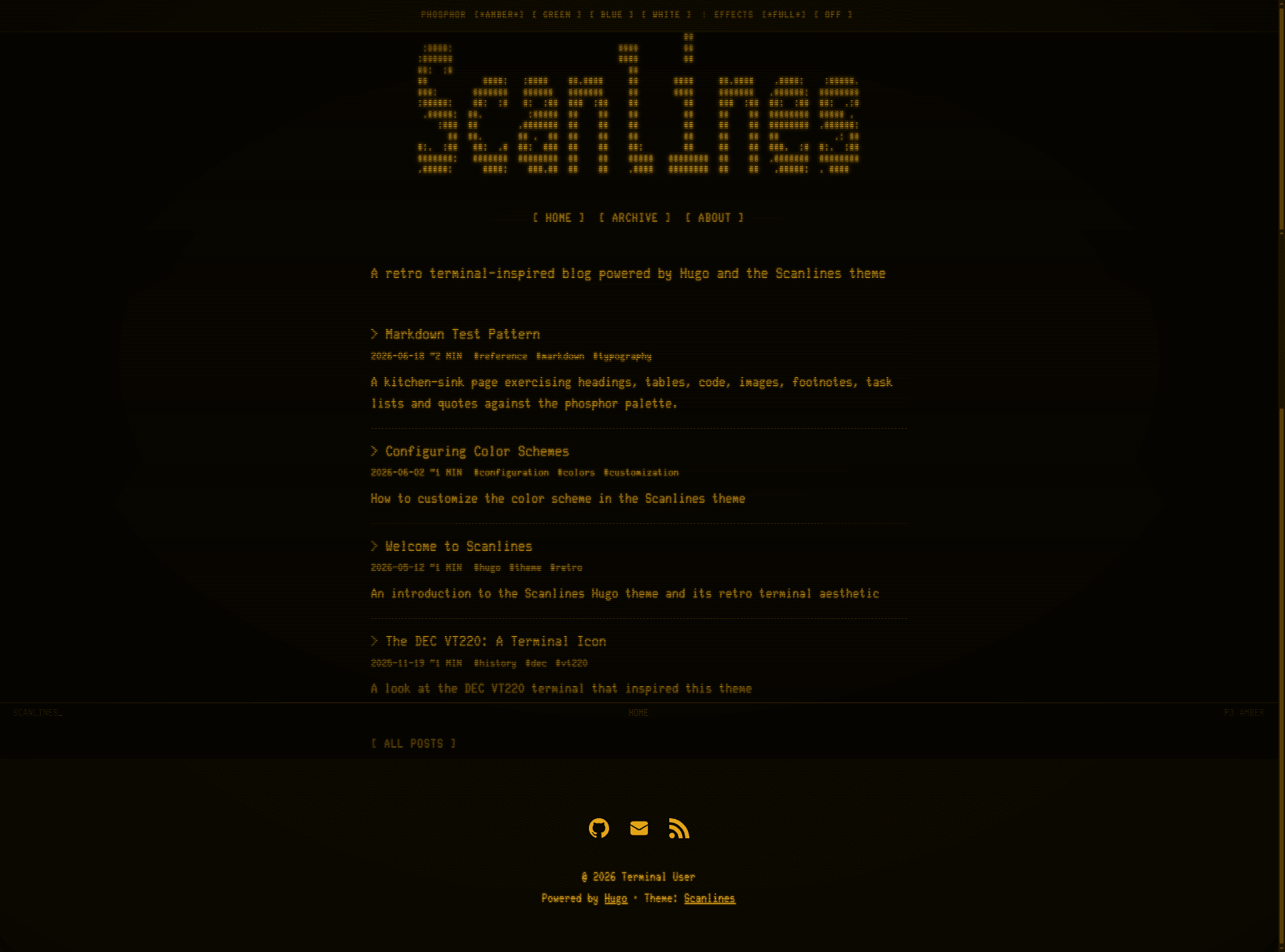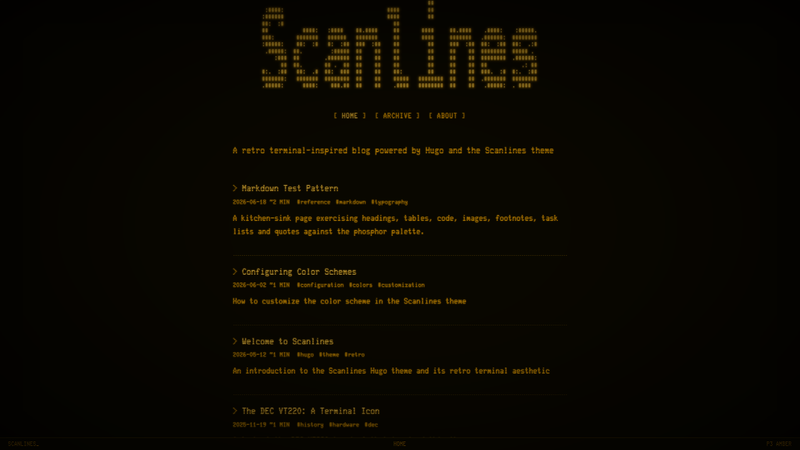
Scanlines is a retro, minimalist Hugo theme that recreates the look of DEC VT220/VT100 CRT terminals, with historically accurate phosphor color schemes, CRT visual effects, and a zero-JavaScript, self-contained design.
What is Scanlines?
Scanlines is a free, open-source theme for Hugo Extended (v0.146.0 or newer) that turns a static site into a faithful CRT terminal display. It takes your Hugo content (posts, pages, images, and configuration in hugo.toml) and produces a fully static website with scanline overlays, phosphor glow, screen flicker, vignette, and screen curvature, all rendered in pure CSS. The theme ships no JavaScript and makes no external network requests, and it is maintained in the GitHub repository wthouse/scanlines, with build credit in the README to Claude Opus 4.6. The homepage can be either a blog listing recent posts or a profile-style landing page with avatar, bio, and button links. Four phosphor color schemes are available — amber (P3), green (P1), blue, and white — selected through params.scanlines.colorScheme, and custom hex colors can override any default.
What makes Scanlines stand out?
- CRT visual effects — The theme applies horizontal scanlines, phosphor glow, screen flicker, vignette, and screen curvature using pure CSS. All effects have intensity controls under params.scanlines.effects, such as scanlineOpacity from 0.0 to 1.0, flickerIntensity around 0.03, and glowIntensity on a 0.0 to 2.0 scale.
- Historical phosphor colors — Amber, green, blue, and white presets emulate P3 (near 602 nm) and P1 (near 525 nm) phosphors. With effects disabled, the scheme foreground/background pairs reach WCAG AAA contrast levels: amber about 10.8:1, green about 13.6:1, blue about 8.7:1, white about 13.9:1.
- Terminal status line and ASCII header — A fixed status bar occupies the bottom of the screen, presenting site title, section, reading time, post count, or phosphor type, and it hides on mobile. Instead of a text title, the header can load a custom ASCII art file from a static/ folder, with asciiScale to control its size.
- Hugo-native technology — The theme is built on Hugo Extended for SCSS processing, uses Chroma class-based syntax highlighting with a colored or monochrome toggle, and uses render hooks for lazy-loaded images, heading permalinks, and external links that open in a new tab. All UI strings flow through Hugo i18n, starting from i18n/en.toml.
- No external dependencies or JavaScript — Two monospace fonts are bundled as self-hosted WOFF2 assets: Glass TTY VT220 (the default authentic terminal font) and Fira Code (optional). There is no CDN, no script file, and no external request made by the theme.
- Two homepage modes and multiple page types — Choose blog mode for recent posts or profile mode for a landing page with buttons; built-in layouts cover blog posts, static pages, an archive grouped by year, 404 page, and tag/category taxonomy pages.
- Responsive mobile-first layout — Navigation and a table of contents collapse on narrower screens, and the status line is disabled on mobile to keep content readable.
- Accessibility built in — The theme honors prefers-reduced-motion to stop animations, exposes disableEffects, highContrast, and reduceMotion settings, uses reverse-video on focus, and automatically suppresses overlays under forced-colors or prefers-contrast: more.
Who should use Scanlines?
- Retro computing enthusiasts and hobbyists — Set up a personal blog or journal that looks like an authentic VT220 session, with an amber or green phosphor color, CRT effects, and the bundled Glass TTY VT220 font.
- Hugo site owners who value no-JS performance — Run a static site with zero client-side requests and no third-party assets by default, keeping pages lean and privacy-friendly.
- Developers writing technical content — Publish docs or code-heavy posts where Chroma syntax highlighting works in monochrome or colored modes, and source code appears on a terminal-style background.
- People building a terminal-style landing page — Activate profile mode to show a name, bio, avatar, and configurable buttons, with social links for GitHub, Twitter, Mastodon, YouTube, Discord, Steam, and more.
Use cases
- Personal retro blog: Write posts under content/posts (or a custom contentSection), add tags and categories, and publish with a collapsible table of contents, reading time, and automatic SEO metadata.
- Profile-style homepage: Switch to homepage = profile to create a landing page with your name, subtitle, bio, avatar, and buttons linking to posts, an about page, or external profiles.
- Archive-oriented content collection: Point a page at the archive layout to list every post grouped by year, while the post taxonomy pages automatically create tag and category indexes.
- Accessibility-first terminal design: Keep the CRT aesthetic for readers with reduced-motion preferences by letting the theme stop animations automatically or by setting disableEffects in configuration.
How does Scanlines work?
Scanlines is installed as a Hugo module by adding github.com/wthouse/scanlines to the module imports in hugo.toml and running hugo mod get -u; submodule, clone, and ZIP installation are also documented in the repository. Content is read from the configured contentSection (default posts), and every setting lives under the params.scanlines namespace, with sub-blocks for effects, colors, accessibility, header, TOC, status line, layout, typography, syntax, social, and profile. When you use the default Glass TTY VT220 font, the theme asks that you disable Hugo goldmark typographer so quotes and dashes remain ASCII and don't fall back to a different font.
Pricing
Scanlines is free and open source under the MIT License. The bundled fonts are separately licensed: Glass TTY VT220 is under The Unlicense and Fira Code under the SIL Open Font License, both reproduced in LICENSE-FONTS.md.
Alternatives
- hugo-theme-terminal — A Hugo theme with a terminal aesthetic that Scanlines credits as an inspiration for monospace-first typography.
- PaperMod — A widely used clean Hugo theme that contributed layout patterns for Scanlines profile mode and archive page design.
- BOOTSTRA.386 — A retro-computing-inspired website theme that demonstrated the retro aesthetic for Scanlines author.
FAQ
Does Scanlines require JavaScript?
No. Scanlines deliberately ships zero JavaScript; scanlines, glow, flicker, vignette, collapsible navigation, and TOC toggle are all pure CSS. Adding third-party JavaScript for comments, analytics, or search is possible, but the theme itself loads none.
What version of Hugo do I need?
Scanlines needs Hugo Extended v0.146.0 or later because it uses SCSS processing and render hooks from the 0.146 template system. Go 1.18+ is only required for the Hugo Modules install path; submodule, clone, and ZIP installs need only Git.
Can I change the phosphor color?
Yes. Set colorScheme to amber, green, blue, or white, or provide custom CSS hex values under params.scanlines.colors. Invalid hex values are silently dropped and fall back to the scheme default. The published contrast ratios are measured with CRT effects off; scanline and vignette overlays lower delivered contrast.
Does Scanlines have built-in comments, analytics, or search?
No. Comments can be added by overriding the article-footer partial, analytics via custom_head.html, and search by linking to an external engine or adding Pagefind as a post-build step. The no-JS design leaves those integrations to the site owner.
Does it support multiple languages?
Yes. Every UI string in Scanlines runs through Hugo i18n. To translate, copy i18n/en.toml to your site as a language file, translate its values, and set defaultContentLanguage; templates fall back to English for missing keys.