Template details
Spectral
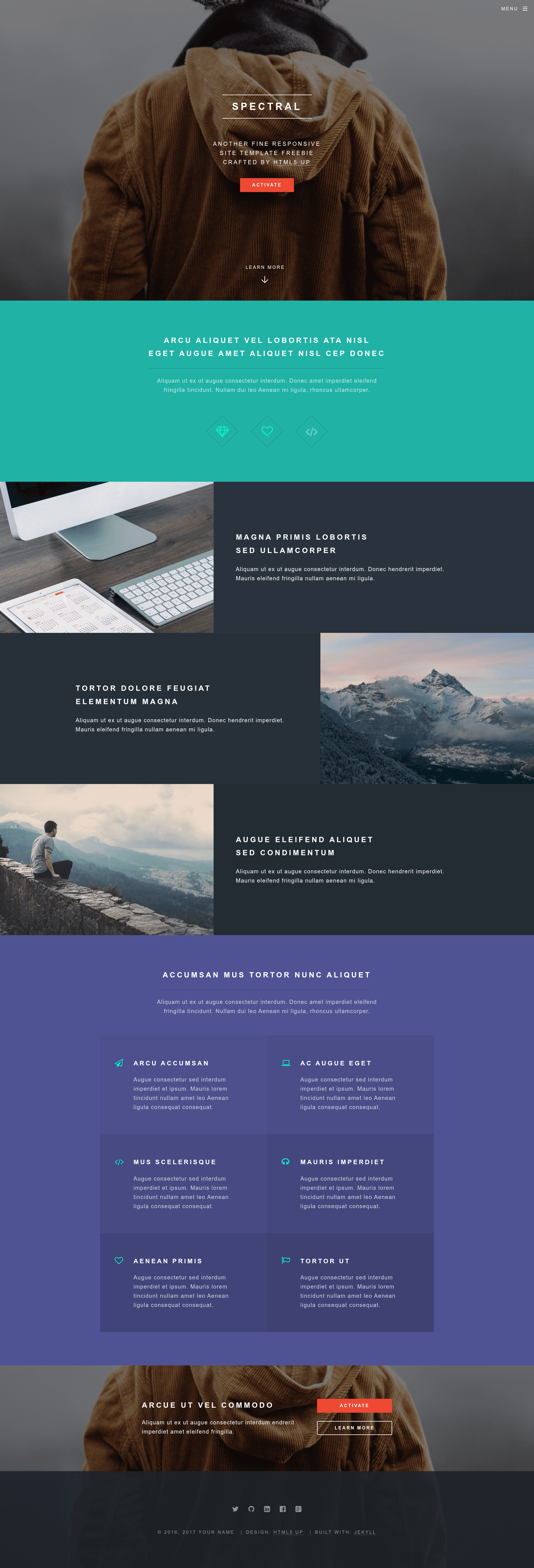
A Jekyll port of the Spectral theme by HTML5 UP, featuring responsive flexbox layout, mobile menu, and free CCA license.
About this template
Spectral is a Jekyll theme that ports HTML5 UP's Spectral template into a static-site-ready design, retaining its responsive flexbox layout, mobile menu, and freely licensed styling.
What is Spectral?
Spectral is a Jekyll port of the Spectral theme by HTML5 UP, created by arkadianriver. It takes the original HTML/CSS design—which was built by @ajlkn using Skel 3, flexbox, and Sass—and packages it as a Jekyll theme so you can generate a static site from Markdown content. The output is a fully responsive, blocky single-page layout with a mobile-style menu and pre-styled elements.
Key Features
- Responsive flexbox layout — The theme relies on CSS flexbox for its grid and alignment, with non-flexbox fallbacks included for IE8/9 compatibility.
- Mobile-style menu — Navigation collapses into a mobile-friendly menu on smaller screens, matching the original Spectral behavior.
- Sass-based styling — Styling uses Sass mixins and functions (including contributions from @HugoGiraudel), though vanilla CSS is still supported if you prefer not to compile Sass.
- Pre-styled elements — Includes an assortment of ready-made UI components like buttons, forms, and feature sections that you can drop into your pages.
- Font Awesome icons — Icon set is integrated for adding visual icons to headings, buttons, and features.
- Free CCA 3.0 license — Released under the Creative Commons Attribution 3.0 license, free for personal and commercial use with attribution.
- Jekyll integration — Works with Jekyll’s standard directory structure; a fork at arkadianriver.com extends it for multi-page blogs.
Who should use Spectral?
Jekyll users who want a modern, responsive design without hand-coding HTML and CSS. Developers setting up a project showcase or landing page for an open-source tool. Designers looking for a quick portfolio template with a distinctive blocky aesthetic. Bloggers who need more than a few pages can use the maintained fork.
Use cases
- Open-source developers: Create a polished project landing page with hero, features, and call-to-action sections from the pre-styled elements.
- Freelance designers: Build a personal portfolio that scales from mobile to desktop, with Font Awesome icons for visual interest.
- Jekyll bloggers: Adapt the theme (or use the fork) to run a blog with Spectral’s styling, keeping the responsive navigation.
How does Spectral work?
Spectral is a Jekyll theme, so you clone the repository, add your content as Markdown or HTML, and run the Jekyll build command to generate a static site. The demo site at arkadianriver.github.io/spectral shows the output.
Pricing
Spectral is free. It’s distributed under the CCA 3.0 license, which permits personal and commercial use. No paid plans or premium tiers are advertised.
FAQ
Is Spectral free to use?
Yes, the theme is free for both personal and commercial projects under the Creative Commons Attribution 3.0 license.
Does Spectral require Sass?
No. The theme uses Sass for its source files, but you can also use plain CSS. The build process is optional depending on how you integrate it with Jekyll.
What browsers are supported?
The layout uses flexbox, but non-flexbox fallbacks are included for IE8 and IE9. Modern browsers get the intended flexbox experience.
Are demo images included?
No. The demo images are from Unsplash and are not part of the theme. You’ll need to supply your own images.
How does this relate to HTML5 UP?
The original Spectral theme was created by @ajlkn (n33co) at HTML5 UP. This Jekyll port is by arkadianriver, who is not officially associated with HTML5 UP.