Template details
StarGarden
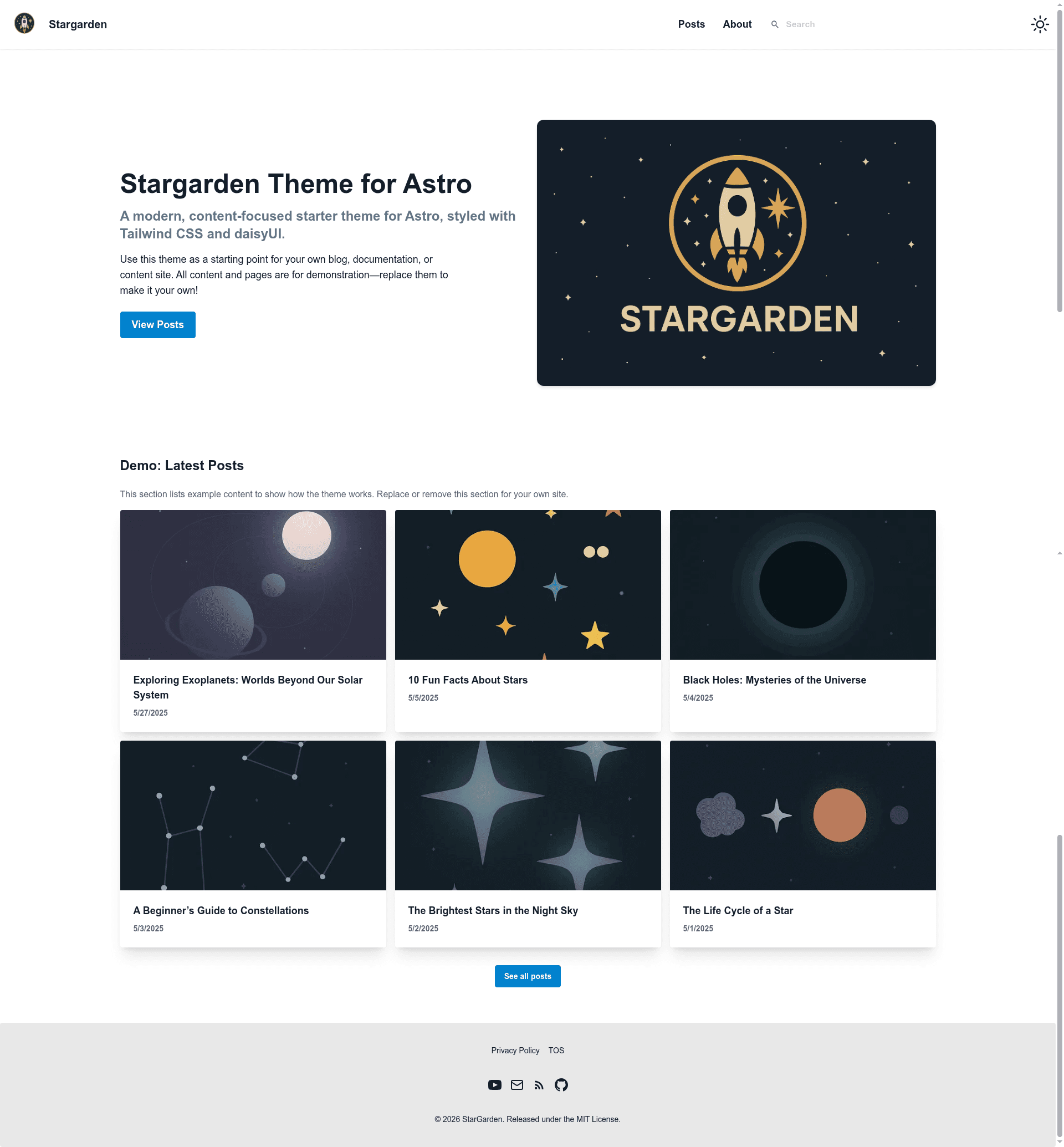
An open-source Astro 6 starter theme for markdown content sites, styled with Tailwind CSS v4 and DaisyUI v5, with built-in search, RSS, and SEO.
About this template
StarGarden is an MIT-licensed Astro 6 starter theme for building markdown-powered content sites, styled with Tailwind CSS v4 and DaisyUI v5. It's maintained by GitHub user sustanza, installable through Astro's official starter command, and has a live demo at stargarden.pages.dev.
What is StarGarden?
StarGarden is a boilerplate theme that takes Markdown files from src/content/posts and src/content/pages and compiles them into a static Astro site. It ships with a landing page, a blog index and post pages, legal pages (about, privacy, TOS, FAQ), a 404 page, an RSS feed, a sitemap, and a dynamic robots.txt. The template uses Astro 6 content collections with schemas defined in src/content.config.ts and image optimization through astro:assets.
Key Features
- Astro 6 + content collections — post and page schemas are defined in
src/content.config.ts, with Markdown and cover images co-located insrc/content/posts/. - Tailwind CSS v4 + DaisyUI v5 theming — light "corporate" and dark "business" themes, honoring
prefers-color-schemeon first visit and persisting the user's toggle in localStorage. - View Transitions and link prefetch — uses
<ClientRouter />for SPA-style navigation and hover-strategy prefetching to speed up clicks. - Pagefind search — indexed at build time, with integrated mobile and desktop UI; search returns no results in dev mode until a production build is run.
- SEO head — hand-rolled
BaseHead.astroemits OpenGraph, Twitter Card, canonical, and JSON-LD Organization markup on every page. - Sitemap, robots.txt, RSS —
sitemap.xmland dynamicrobots.txtfollow thesite:URL inastro.config.mjs; the RSS feed at/rss.xmlincludes full post HTML and cover-image enclosures. - Expressive-code syntax highlighting — paired light/dark themes that follow DaisyUI's
data-theme, plus reading-time estimates and clickable heading anchors on every post. - Testing setup — Vitest unit tests and Playwright end-to-end smoke tests, run via npm scripts.
Who should use StarGarden?
- Developers who want a lean, content-focused Astro starter without a CMS: posts and pages are plain Markdown files with frontmatter, and the customization checklist touches only
src/consts.ts,astro.config.mjs,src/components/Footer.astro,public/favicon.svg, and demo content. - Technical bloggers who need SEO, RSS, and search out of the box: the template emits OpenGraph and Twitter cards, feeds
/rss.xml, and indexes posts with Pagefind at build time. - Small-site creators who want a polished two-theme design and legal pages quickly: about, privacy, TOS, and FAQ pages are pre-built in
src/content/pages/and can be edited or extended using the same<slug>/index.mdpattern.
What can you do with StarGarden?
- Technical bloggers: write Markdown posts with cover images, then automatically get a searchable, RSS-fed blog with per-post reading time and heading anchors.
- Startup landing pages: use the pre-built landing page and the legal-page collection to assemble a company site with privacy, terms, and FAQ in one content folder.
- Documentation sites: structure docs as pages in
src/content/pages/, and readers get Pagefind search plus syntax-highlighted code blocks that follow the active light or dark theme.
How does StarGarden work?
Two install paths are supplied: npm create astro@latest -- --template sustanza/stargarden or git clone https://github.com/sustanza/stargarden.git. After npm install, npm run dev starts the Astro dev server on http://localhost:4321/. Content is authored as Markdown in the src/content/ collections, then npm run build produces dist/ including the Pagefind search index.
Pricing
StarGarden is free and open source under the MIT License.
FAQ
Is StarGarden free?
Yes. The project is released under the MIT License, which permits free use, modification, and redistribution, including for commercial projects.
Why is Pagefind search empty in dev mode?
Pagefind indexes built HTML, not source Markdown. The search input renders under npm run dev, but no results appear until you have run a production build at least once. Use npm run preview:search, which builds and previews in one step, to test search locally.
Does the 404 page work on any hosting platform?
The template builds to dist/404.html. Hosts such as Cloudflare Pages, Netlify, and Vercel serve this file automatically with a 404 status code; self-hosted nginx or other static servers may need explicit configuration to return the right status.
Will images in RSS posts resolve for subscribers?
The cover image enclosure uses absolute URLs and resolves correctly in feed readers. However, inline Markdown images in post bodies use local relative paths and will not resolve in subscribers' readers; host body images in public/ with absolute paths or reference them by full https:// URL if you need them in the feed.