Template details
Story Jekyll Theme
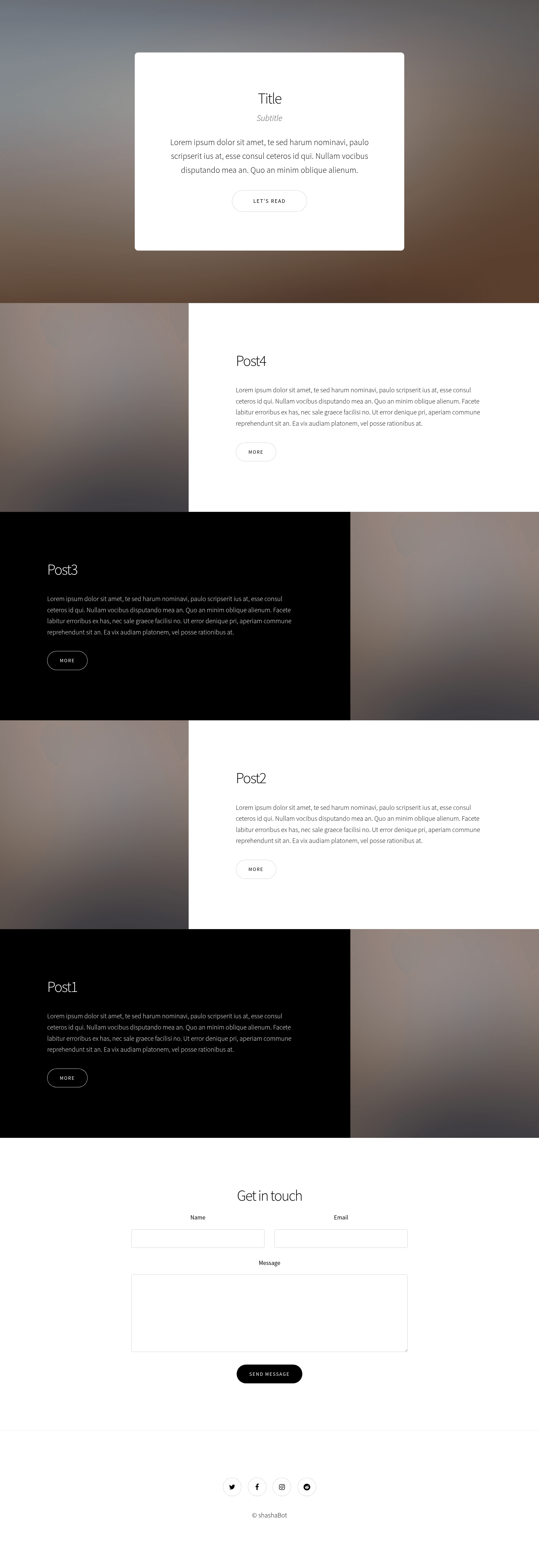
Story theme from html5up.net with jekyll blogging engine
About this template
Story Jekyll Theme is a Jekyll blog theme that ports the responsive one-page Story design from HTML5 UP into the Ruby-based Jekyll static site generator. It takes configuration and content (#_data# files and Markdown posts) and outputs a static one-page website with modular sections. The theme is a work in progress released under the Creative Commons Attribution 3.0 license.
What is Story Jekyll Theme?
Story Jekyll Theme is a free, open-source Jekyll theme that adapts the Story template by HTML5 UP for the Ruby-based blogging engine. It inputs site variables from #_data/# directory files and Markdown blog posts, then produces a static, responsive one-page website via Jekyll's build process. The original Story design was created by AJ (ajlkn) for HTML5 UP, and the Jekyll port is maintained by an independent contributor.
Key Features
- Responsive one-page layout # — Based on Story by HTML5 UP, the theme delivers a mobile-friendly single-page design that scales to any screen.
- Reusable content blocks # — Includes #spotlight# and #gallery# elements that can be infinitely duplicated and restyled to build custom sections.
- Data-driven customization # — Users can edit variables in the #_data/# directory to change content and layout without writing CSS.
- Demo mode # — Ships with an interactive demo (#index-demo.html#) and #assets/js/demo.js#; both are meant to be deleted before production.
- Free for commercial use # — The CCA 3.0 license permits personal and commercial projects at no cost.
- Typical tech stack # — Built with Jekyll (Ruby), jQuery, Font Awesome icons, and Sass; demo images from Unsplash are not included.
Who is it for?
- Jekyll bloggers # — Anyone who wants a visual, one-page theme for a Jekyll-powered blog without building from scratch.
- Portfolio owners # — Creative professionals who can use the gallery and spotlight sections to showcase work.
- Developers # — Those who appreciate the modular HTML5 UP design and want a Jekyll integration that can be fleshed out as the project matures.
What can you do with it?
- Launch a one-page blog # — Set up a Jekyll site where the homepage uses the Story layout and links to individual blog posts.
- Showcase a portfolio # — Use the gallery element to display images and the spotlight sections to describe projects.
- Customize via #_data# # — Change site variables and content from YAML data files rather than editing HTML templates.
How does it work?
The theme integrates with Jekyll's standard build flow: install Jekyll, add your posts in Markdown, edit the #_data# files, and generate a static site. The demo page provides an interactive exhibition of the design; remove #index-demo.html# and #demo.js# for a production-ready setup.
Pros and cons
- Pros: Free, responsive, based on the polished Story design, and flexible via reusable elements.
- Cons: The project is a work in progress, so it may be incomplete or unstable; demo images are not bundled.
Pricing
Story Jekyll Theme is free to use for both personal and commercial purposes under the Creative Commons Attribution 3.0 license.
FAQ
Is Story Jekyll Theme free?
Yes, the theme is released under the CCA 3.0 license, allowing free personal and commercial use, as long as you attribute the original HTML5 UP design.
What do I need to run this theme?
You need Jekyll, a Ruby-based static site generator. The theme is designed to work with Jekyll's standard file structure and Markdown posts.
Do I have to delete the demo files?
Yes, the README instructs you to delete #index-demo.html# and #assets/js/demo.js# when you are done experimenting, since they are not needed in production.
Are demo images included?
No, the demo images shown in screenshots come from Unsplash and are not part of the repository. You need to supply your own images.