Template details
PaperAstro
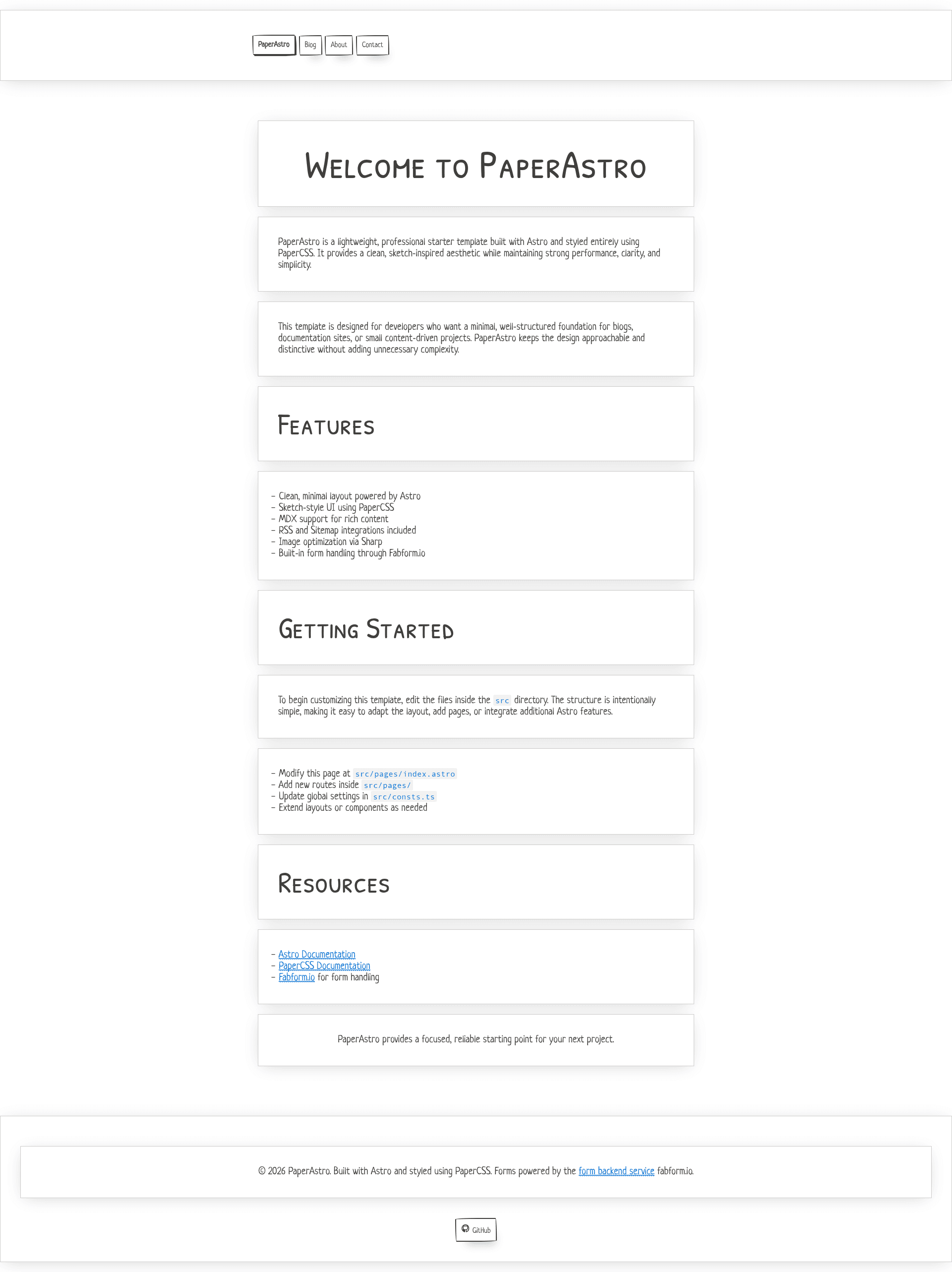
PaperAstro is a lightweight Astro 5 starter template styled with PaperCSS, with built-in Fabform form handling.
About this template
PaperAstro is a lightweight Astro 5 starter template for blogs and content sites, styled entirely with PaperCSS and featuring built-in Fabform form handling.
What is PaperAstro?
PaperAstro is a minimal, content-focused starter template built on Astro 5 that produces static sites with a distinctive hand-drawn, sketch-inspired visual style from PaperCSS. It takes Markdown and MDX files as input and outputs an optimized static site with RSS, sitemap, and image optimization. The template is published as @fabform/paperastro on npm and hosted on GitHub under the fabformhub organization; it is released under the MIT license with copyright to Geoffrey Callaghan.
What Makes PaperAstro Stand Out?
- Astro 5 Framework — The template is built on Astro 5, which ships zero client-side JavaScript by default for fast, static output.
- PaperCSS Styling — Every component and page is styled with PaperCSS, a lightweight CSS framework whose sketch-like lines and notebook borders create a unique, low-fi aesthetic.
- MDX Support — Write posts and pages in Markdown and embed components directly in your content for richer layouts.
- RSS and Sitemap — Built-in integrations generate an RSS feed and a sitemap.xml, ready for subscribers and search engines.
- Sharp Image Optimization — The Sharp integration processes and optimizes images automatically when you build the site.
- Fabform Form Handling — Forms are pre-wired to Fabform; you only need to add your endpoint URL to a form action. No server code or API keys are required, and Fabform offers spam protection, email notifications, webhooks, CSV export, redirects, and analytics.
- Minimal File Structure — The project is organized into small folders:
public,src/components,src/layouts,src/pages,src/styles, and aconsts.tsconfig file. - One-Click Vercel Deploy — A Vercel deploy button is included to clone and launch the site immediately in your Vercel account.
Who Should Use PaperAstro?
- Bloggers — Publish a personal blog with MDX posts, an RSS feed, and a fast, static front end.
- Technical Writers — Build documentation sites with a clean, content-first layout, sitemaps, and an embedded feedback form that posts to Fabform.
- Indie Makers and Small Teams — Create marketing or landing pages with waitlist forms that capture submissions in the Fabform dashboard without spinning up a backend.
- Astro Learners — Use the minimal codebase as a starting point to learn Astro, MDX, and PaperCSS.
Use Cases
- Personal blog: Write articles in MDX, add images that get compressed by Sharp, and generate an RSS feed for subscribers.
- Documentation hub: Create a multi-page documentation site with a side-less, content-first layout and a contact form for user feedback.
- Product waitlist: Put a start page with a simple email form connected to Fabform to collect interest before launch.
- Portfolio site: Showcase projects and include a sketch-styled contact form, all without a JavaScript UI framework.
How Do You Get Started with PaperAstro?
Install the template with npm create astro@latest -- --template @fabform/paperastro, or clone the GitHub repository and run npm install. Start the dev server with npm run dev, build the production site with npm run build, and preview it with npm run preview. To connect forms, simply set your Fabform endpoint URL as the form action.
FAQ
Is PaperAstro free?
Yes. PaperAstro is licensed under the MIT License, so you are free to use, modify, and distribute it for personal or commercial projects without paying a license fee.
What framework is PaperAstro built with?
PaperAstro is built with Astro 5 and styled entirely with PaperCSS. It also includes MDX for content, Sharp for images, and Fabform for form handling.
Does PaperAstro require a backend for forms?
No. Forms are handled by Fabform, a backend-free service. You add your Fabform endpoint URL to the form action, and submissions go to your Fabform dashboard with no server code or API keys.
How do I deploy PaperAstro?
You can deploy to Vercel with the one-click button in the repository, or build the project with npm run build and host the output on any static host.