Template details
Hexo Theme Particle
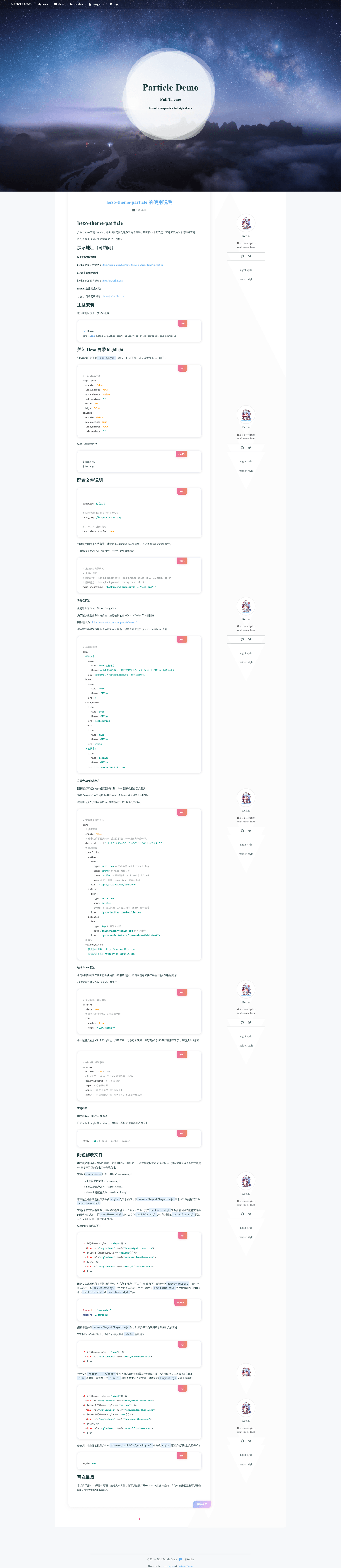
A Hexo blog theme with three built-in color styles (full, night, maiden), Vue.js and Ant Design Vue icons, and Gitalk comments.
About this template
hexo-theme-particle is a Hexo blog theme developed by korilin that provides three built-in color styles — full, night, and maiden — for running a static blog on the Hexo generator.
What is hexo-theme-particle?
hexo-theme-particle is a theme for the Hexo static site generator. It was created by the developer korilin after setting up multiple blogs, and it is distributed as a GitHub repository. The theme accepts Hexo site configuration and markdown posts, then renders a static blog with a configurable style: full, night, or maiden, with full as the default when the style field is missing or invalid. The author has stopped maintaining the project but states it should still be usable.
Key Features
- Three color styles — Choose full, night, or maiden via the
stylesetting in the theme config; incorrect values fall back to full. - Vue.js and Ant Design Vue icons — Navigation menu entries use Ant Design Vue icons, supporting the outlined and filled themes; icons without a
themeproperty leave it blank. - Built-in Gitalk comments — The theme includes Gitalk by default, configurable with GitHub clientID, clientSecret, repo, owner, and admin values.
- Customizable home header — Toggle the top info block with
head_block_enable, and set a background using a CSS string such asbackground-image:url('../home.jpg')(with quotes) orbackground:black. - Post sidebar info card — Show a description list, icon links (Ant Design icons or custom 118x18 pixel images), and friend links in a card beside articles.
- Footer with ICP filing — Configure the site start year and optional Chinese ICP filing code for self-hosted domains on servers in China.
- Stylus-based theming — Styles are written in Stylus with separate color files per theme; you can add a new color scheme by creating
new-theme.stylandnew-color.stylfiles and editinglayout.ejs.
Who should use hexo-theme-particle?
- Hexo bloggers who want a ready-made theme with several visual styles, without building a theme from scratch.
- Multilingual or multi-blog owners — the author used it for three separate blogs (Chinese, English, and Japanese technical notes) with different styles per blog.
- Developers comfortable editing Stylus and EJS who want to create a custom color variant by extending the theme's existing style files.
What can you do with hexo-theme-particle?
- Personal bloggers: Install the theme and write markdown posts in Hexo to publish a static blog with navigation, tags, categories, and Gitalk comments.
- Self-hosted blog operators: Configure the footer ICP code to comply with Chinese regulatory requirements when using a custom domain.
- Theme customizers: Build a new color style by adding two Stylus files and a matching branch in
layout.ejs.
How does hexo-theme-particle work?
Clone the repository into the themes/particle directory, disable Hexo's built-in highlight in _config.yml, then set the active theme to particle in the root Hexo config. After that, configure options such as style, menu, card, footer, and gitalk in the theme's _config.yml. Generate the site with hexo g after clearing the cache with hexo cl to see the changes.