Template details
Storyblok's Gridsome Boilerplate (Moon-Theme)
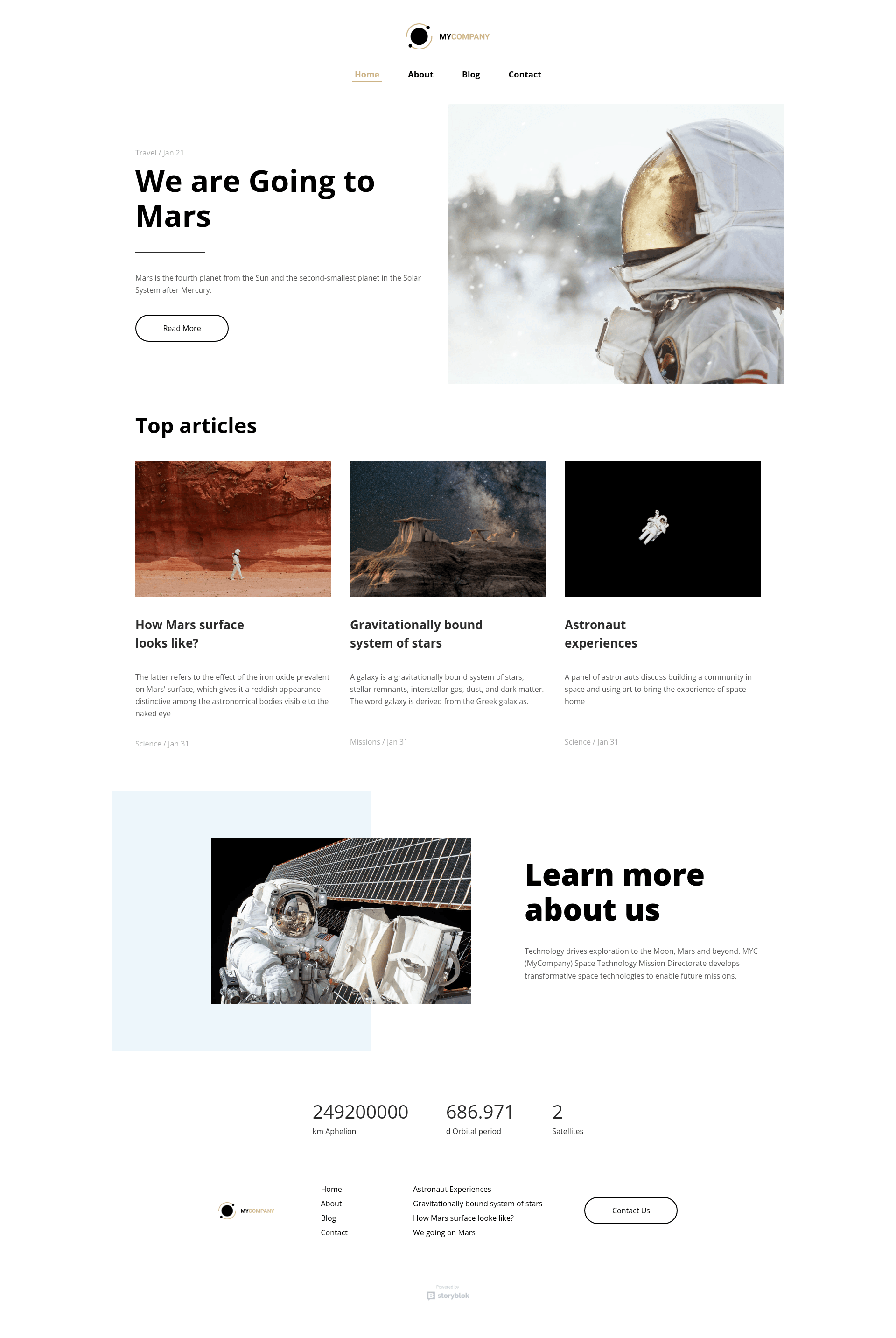
Storyblok's Gridsome boilerplate (Moon-Theme) — a multilanguage static website starter pairing Gridsome with the Storyblok headless CMS.
About this template
The Gridsome Website by Storyblok is a boilerplate for a multilanguage static website, built on Gridsome (the Vue.js-powered static site generator) and connected to the Storyblok headless CMS as its content source.
What is the Gridsome Website by Storyblok?
The Gridsome Website by Storyblok, also known as Storyblok's Gridsome Boilerplate (Moon-Theme), is a starter project that pairs the Gridsome static site framework with the Storyblok headless CMS through the gridsome-source-storyblok plugin. Its core function is to give you a pre-configured, multilanguage website where pages, stories, and blog posts are authored in Storyblok and rendered as a static Gridsome site. The repository is published by Storyblok, runs on Node.js with Yarn or npm, and has a live demo at https://demo.storyblok.com/.
Key Features
- Multilanguage structure — The project is configured as a multilanguage website (siteName: "Gridsome Multilanguage Website"), giving you a starting point for localized content.
- Storyblok source plugin — Content is pulled from Storyblok through
gridsome-source-storyblok, configured withversion: 'published'so only published content is fetched. - Automatic image downloads — The plugin option
downloadImages: truedownloads Storyblok assets locally into theassets/imagesdirectory. - Blog relation resolution — The config sets
resolve_relations: 'blog-post.next_post', so blog posts can link to a "next post" within the CMS. - One-click Storyblok space duplication — You can create a pre-filled Storyblok space with all stories and some settings by calling https://app.storyblok.com/#!/build/73623.
- Yarn and npm support — Install, develop, and build with either package manager (
yarn installornpm install,yarn develop,yarn build). - Editor preview configuration — The README links to a tutorial for setting up the Storyblok preview location so editors can view the Gridsome site before publishing.
Who is it for?
- Frontend developers — Get a working Gridsome project structure with a headless CMS backend already wired up, so you can skip boilerplate setup and focus on building pages.
- Storyblok users — Use the boilerplate as a reference for configuring the Gridsome source plugin, including access tokens, image downloads, and relation resolution.
- Multilanguage site owners — Start from a site already structured for multiple languages and manage all content through the Storyblok visual editor.
What can you do with it?
- Build a blog with next-post navigation: configure stories in Storyblok with the
blog-post.next_postrelation and the site resolves them automatically. - Run a localized corporate site: use the multilanguage structure to serve content in several languages from one Gridsome codebase.
- Prototype Storyblok content models: duplicate the ready-made Storyblok space via the build URL to explore the content schema and page components.
How does it work?
- Clone the repository and install dependencies with
yarnornpm install. - Put your Storyblok access token into the
gridsome.config.jsfile under thegridsome-source-storyblokplugin options, inclient.accessToken. - Run
yarn developfor local development, oryarn buildto generate a static build. - Set up the preview URL in your Storyblok space, using the tutorial linked from the repository, so the editor displays your Gridsome site.
- Optionally duplicate the project into your own Storyblok account by visiting the build URL and following the four setup steps.
FAQ
Is the Gridsome Website by Storyblok open source?
The source code lives in a public GitHub repository, so you can clone, fork, and modify it freely. The Storyblok CMS itself requires a separate account, and the free tier's limits apply when you connect your own space.
What content does the boilerplate include?
The project includes a multilanguage page structure and blog stories. When you duplicate the project through the Storyblok build URL, a space is created in your account containing all stories and some settings used by the site.
How do I connect my own Storyblok space?
Generate an access token in Storyblok, open gridsome.config.js at the project root, and replace the token in the client.accessToken option under gridsome-source-storyblok. Then restart the development server.
Does the boilerplate download images?
Yes. The configuration sets downloadImages: true and imageDirectory: 'assets/images', so images from Storyblok are downloaded into the local project during the build instead of being hot-linked.