Template details
Strata Jekyll Theme
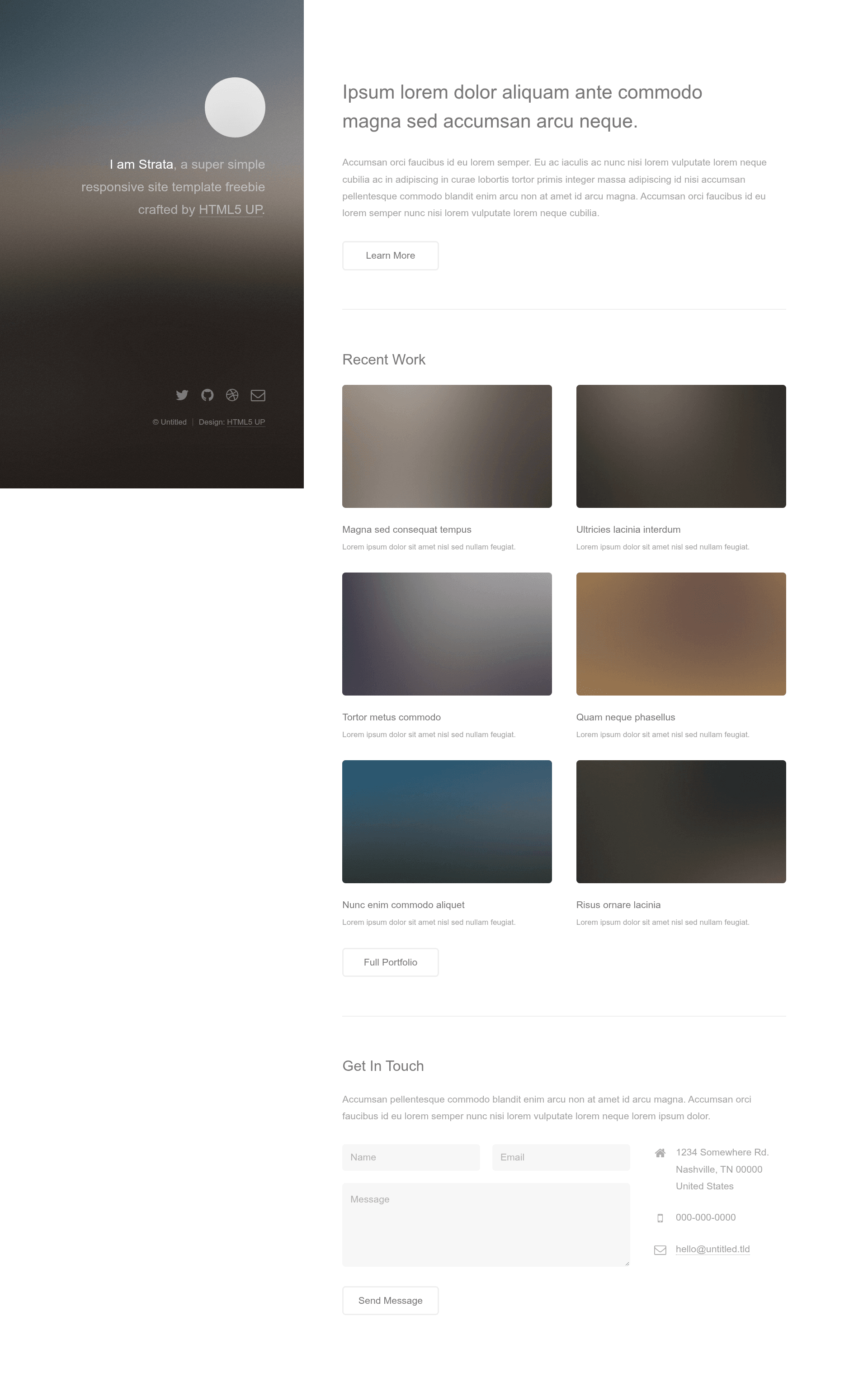
A Jekyll version of the minimalist 'Strata' portfolio theme by HTML5 UP, with parallax background and lightbox gallery.
About this template
Strata Jekyll Theme is a portfolio-oriented Jekyll theme that ports the minimalist Strata design from HTML5 UP into a static-site builder workflow. It compiles Markdown pages and posts into a clean, single-page portfolio site with a configurable parallax background and a Poptrox-powered lightbox gallery.
What is the Strata Jekyll Theme?
The Strata Jekyll Theme is a port of the Strata theme by HTML5 UP, created by Andrew Banchich. It takes a standard Jekyll site — front matter, posts, and pages — and renders it as a simple, minimalist portfolio layout. The theme runs on Jekyll, so it outputs static HTML that can be hosted on GitHub Pages or GitLab Pages, and the repository includes a full README explaining the setup.
Key Features
- Jekyll port — A faithful conversion of the HTML5 UP Strata theme, giving you Jekyll's blogging and page structure within the original design.
- Configurable parallax background — The theme includes a parallax background effect that can be adjusted to fit your content, a feature preserved from the original theme.
- Lightbox gallery — Uses Poptrox to power an image gallery with a lightbox viewer, ideal for showcasing photography or design work.
- Sass sources — Styling is authored in Sass, letting you customize variables and compile your own CSS without hunting through minified files.
- Pre-styled elements — The original theme ships with a set of ready-styled HTML elements like buttons, forms, and tables, which carry over to the Jekyll version.
- Font Awesome icons — Includes Font Awesome for social links, UI icons, and contact section accents.
- Easy deployment — Fork the repository and edit
_config.yml; for GitHub Pages, create agh-pagesbranch, and for GitLab Pages, simply fork.
Who is it for?
- Designers and photographers – Present a one-page portfolio with a lightbox gallery and parallax background that draws attention to visual work.
- Developers – Use it as a minimal starting point for a personal Jekyll site that includes a blog, with all the standard Jekyll conventions.
- Freelancers – Build a lightweight online presence with a bio, skills, and social links in a layout that loads quickly.
What can you do with the Strata Jekyll Theme?
- Photographers: Display a portfolio of shots in the lightbox gallery, using the parallax background to add a subtle depth effect.
- Job seekers: Create a personal landing page with a professional bio, resume-like skills list, and links to social profiles.
- Bloggers: Pair the portfolio layout with Jekyll's post system to run a minimal, visually focused blog.
How does the Strata Jekyll Theme work?
Fork the repository, then edit the _config.yml file to set your site title, description, and social media links. Write your content in Markdown pages and posts, then push to a gh-pages branch on GitHub or simply fork on GitLab to publish. For local development, follow the Jekyll documentation linked in the README.
FAQ
Is the Strata Jekyll Theme free?
The original Strata theme by HTML5 UP is free for personal and commercial use under the CCA 3.0 license, as stated in the README credits. This Jekyll port is open source and hosted on GitLab, with the GitHub repository operating as a mirror.
Where can I report issues or request features?
You can report bugs, ask questions, or request features on the GitLab repository at gitlab.com/andrewbanchich/strata-jekyll-theme, or email the maintainer via the address listed in the README.
What do I need to run this theme?
You need Jekyll installed locally, or you can use GitHub Pages or GitLab Pages as hosts without a local setup. The README points to official Jekyll documentation for installation, front matter, writing posts, and creating pages.
Does the theme include demo images?
The original theme's credits mention demo images courtesy of Unsplash, but the README explicitly notes that the demo images are not included in this repository. You'll need to provide your own images for the gallery and background.