Template details
Stringify.me
Quick and easy profile pages for GitHub users, no login required.
About this template
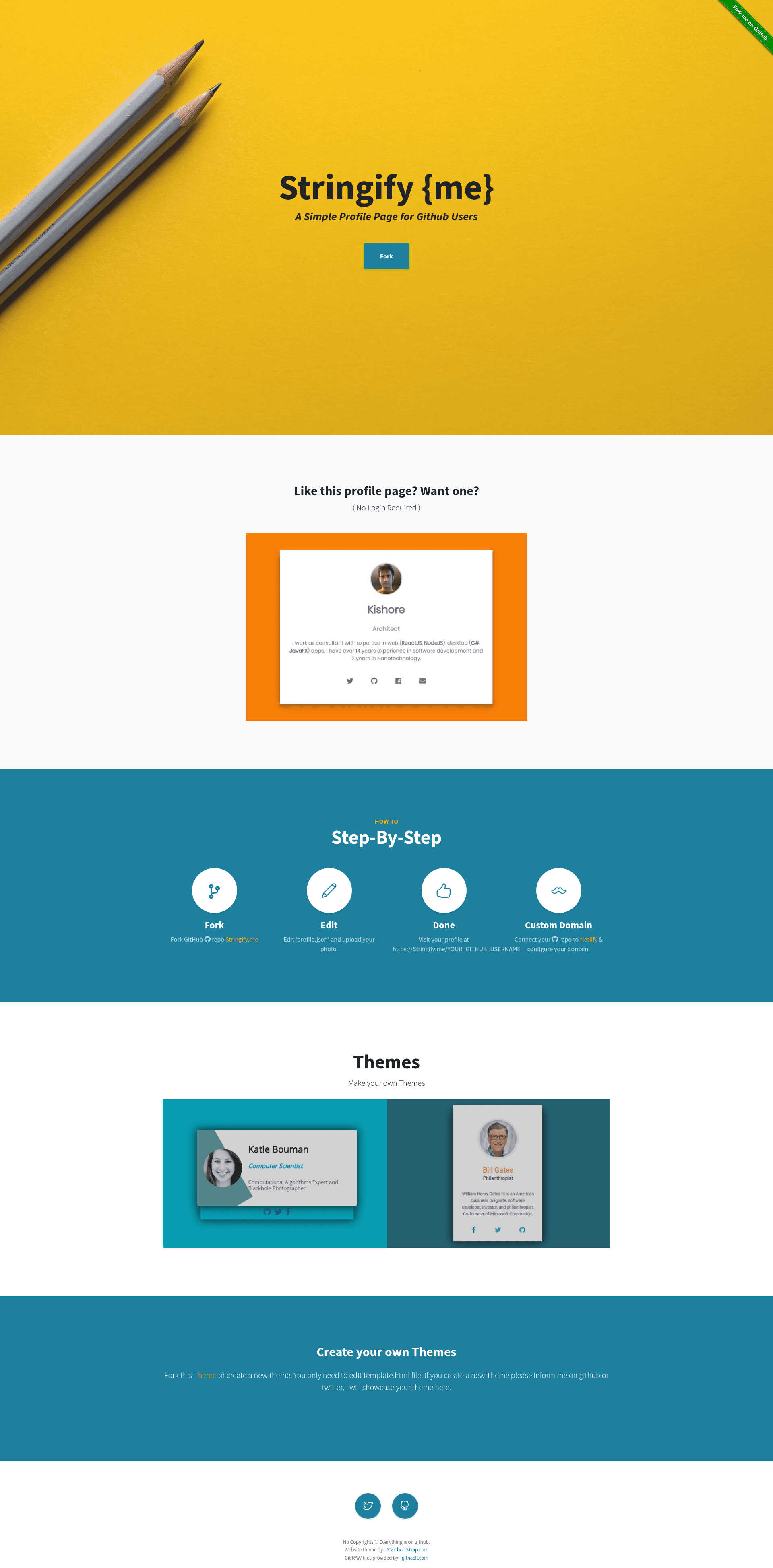
Stringify.me is a free, open-source template for creating quick profile pages for GitHub users, with no login required.
What is Stringify.me?
Stringify.me is a free, open-source template that creates personal profile pages for GitHub users. It takes a profile.json file as input and generates a static page hosted at stringify.me/YOUR-GITHUB-USERNAME. The project is maintained by Prakis on GitHub and requires no authentication for setup or visitors.
Key Features
- No login required — You don't need to create an account; just fork the repository and edit profile.json.
- Two-step setup — Fork the repo, edit profile.json to add your photo, and access your page at stringify.me/YOUR-GITHUB-USERNAME.
- Custom domain support — Host your profile on Netlify to use a free custom domain; login with GitHub and connect your forked repository.
- Theme system — Two themes are available (stringify.me-theme-card1 and stringify.me-theme-card2), selected via the theme.url field in profile.json.
- Forkable themes — You can fork the theme repositories and set your own theme path in profile.json to customize the design.
- Static hosting ready — The repository includes an index.html page, which is required for deploying to Netlify hosting.
Who is it for?
Stringify.me is for GitHub users who want a simple, fast personal profile page without building a website from scratch. Developers can use it to create a professional-looking page for their GitHub presence, job seekers can share a clean profile link with recruiters, and open-source contributors can set up a personal page with a custom domain via Netlify.
What can you do with Stringify.me?
- Developers: Create a personal profile page in minutes by forking the repo, adding your photo, and visiting your stringify.me URL.
- Personal branding: Connect your own domain name to the profile by hosting the forked repo on Netlify for free.
- Theme experimenters: Fork the existing themes or create your own, then point profile.json to your custom theme.
How does Stringify.me work?
The workflow is: fork the GitHub repository, edit the profile.json file to add your photo, and then access your live page at stringify.me/YOUR-GITHUB-USERNAME. For a custom domain, connect the forked repository to Netlify, which builds the static site and provides free custom domain hosting.
FAQ
Does Stringify.me require login to create a profile?
No, Stringify.me requires no login. You only need a GitHub account to fork the repository and edit the profile.json file; visitors see your public page without any authentication.
How can I use a custom domain with Stringify.me?
Host your profile on Netlify by logging in with your GitHub account, connecting your forked repository, and linking your own domain. Netlify provides free custom domains, and the repository's index.html makes it deployment-ready.
How many themes are available?
Currently there are two themes: stringify.me-theme-card1 and stringify.me-theme-card2. You select which one to use by setting the theme.url field in profile.json.
Can I create a custom theme?
Yes, you can fork any existing theme, modify it, and then set the repository path of your theme in profile.json. The maintainer also accepts new theme submissions via GitHub or Twitter.
Is Stringify.me free?
Yes, Stringify.me is free and open source. The code is available on GitHub, and Netlify's free tier supports hosting the profile with a custom domain at no cost.