Template details
TanStack Chat Template
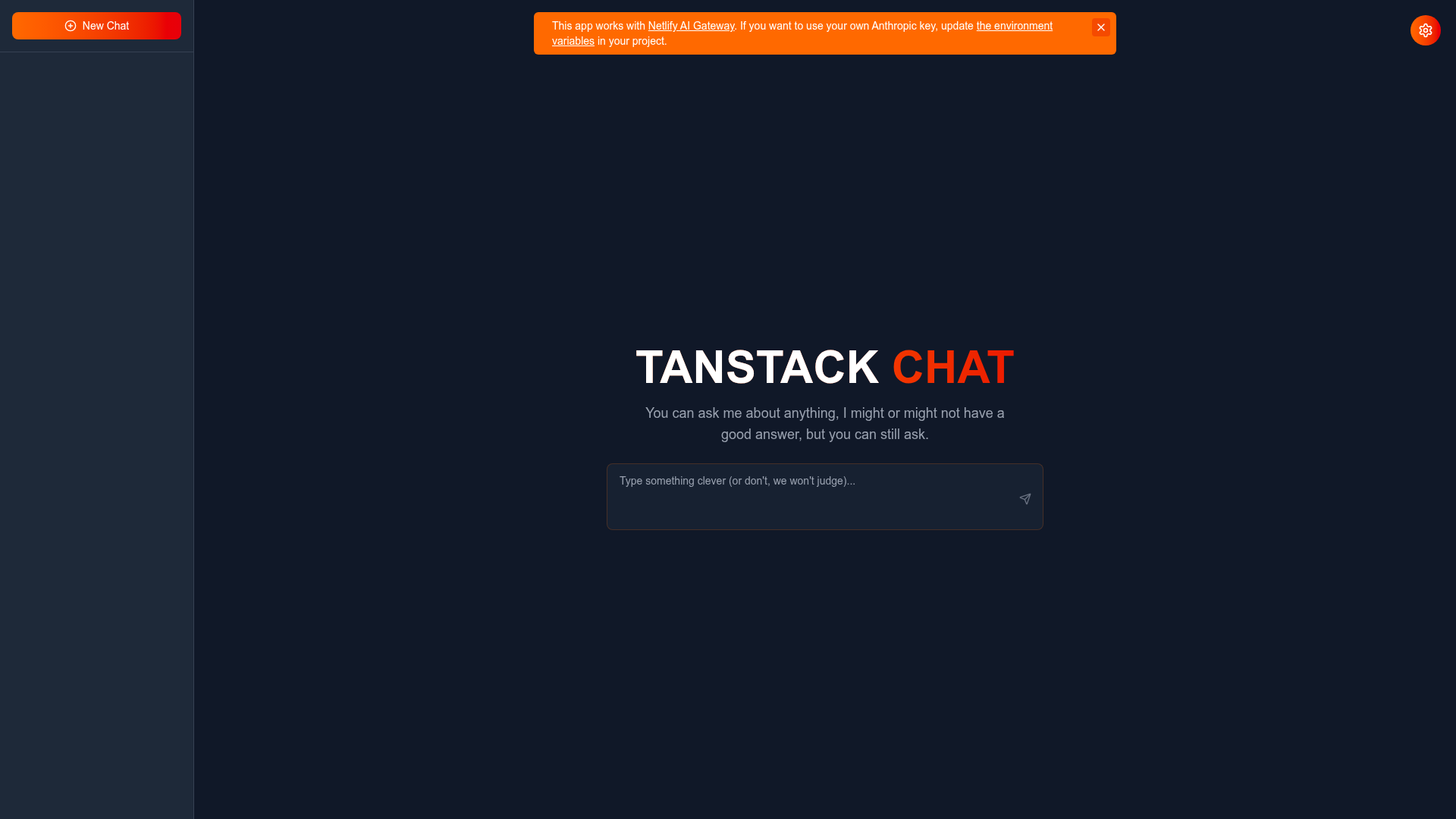
A deploy-ready AI chat template pairing TanStack Router, React 19, Claude API, and Tailwind CSS 4 on Netlify.
About this template
The TanStack Chat Template is a deploy-ready AI chat starter from the netlify-templates team that wires React 19, TanStack Router, and Anthropic's Claude API into a single chat application with streaming responses and markdown rendering.
What is the TanStack Chat Template?
The TanStack Chat Template is an AI chat application starter built on React 19, TanStack Start, and TanStack Router v1.157+, with chat completions generated by Anthropic's Claude API. It takes a user chat message and an optional custom system prompt as input, and outputs Claude's reply streamed into a markdown-rendered conversation with syntax-highlighted code blocks. The project runs on Vite 7, targets Netlify as its primary deployment platform via a one-click Deploy to Netlify button, and is maintained at github.com/netlify-templates/tanstack-template with a live demo at tanstack-starter.netlify.app.
Key Features
- Claude-powered chat — Conversations are answered by Anthropic's Claude API; the feature list names Claude 3.5 Sonnet while the tech-stack table lists Claude Sonnet 4.5.
- Streaming responses — Messages update in real time as Claude streams tokens back instead of appearing all at once.
- Markdown output — Chat messages render as rich markdown with syntax highlighting for code blocks.
- Customizable system prompts — Users can set the system prompt to steer Claude's behavior for an entire conversation.
- Conversation and API key management — The UI includes conversation history management and an interface for managing Anthropic API keys.
- TanStack Router file-based routing — Routes are defined as files in src/routes; adding a page means adding a file, and loaders handle per-route data fetching.
- TanStack Store state management — Local UI state uses TanStack Store v0.8+, including derived state that recomputes when its dependencies update.
- Tailwind CSS 4 with Lucide icons — The responsive interface is styled with Tailwind CSS 4 and Lucide icons.
- Optional Convex persistence — A convex/ directory holds schema and functions so conversations can be stored in Convex by setting VITE_CONVEX_URL.
- Optional Sentry monitoring — Error reporting wires up through VITE_SENTRY_DSN and SENTRY_AUTH_TOKEN and is skipped entirely when those variables are absent.
Who is it for?
- React developers starting a TanStack project — get a working TanStack Start and Router setup (SSR entry, router config exporting getRouter, Vite 7 build) instead of assembling it from scratch.
- Developers building AI chat products — start from a functioning Claude integration with streaming, markdown rendering, and system-prompt controls, then extend the routes and UI.
- Netlify users — deploy with one click, run locally with netlify dev at localhost:8888, and use Netlify AI Gateway, which proxies api.anthropic.com requests with analytics and rate limiting.
- Hackathon and prototype builders — the hosted demo at tanstack-starter.netlify.app shows a working chat app that can be cloned and reskinned quickly.
What can you do with the TanStack Chat Template?
- Deploy a chat app in one click: use the Deploy to Netlify button, which creates a copy of the repository and configures it for immediate deployment on Netlify.
- Prototype Claude features: experiment with Sonnet models, custom system prompts, and streaming output without building the frontend plumbing.
- Learn TanStack concepts: study file-based routing, route loaders, server functions using the inputValidator API, and store-derived state in a working example.
- Extend into a product: add Convex for persistent conversation history, Sentry for error tracking, and your own Anthropic API key for production use outside AI Gateway.
How does the template work?
Setup follows a standard flow: clone the repository, run npm install, copy .env.example to .env, add ANTHROPIC_API_KEY, then start the dev server with npm run dev at localhost:3000. The recommended local path is netlify dev, which loads Netlify environment variables and serves the app at localhost:8888 with simulated production behavior. Production output is produced with npm run build and previewed with npm run serve.
FAQ
What version of Node.js does the template require?
TanStack Start v1.157+ recommends Node.js v22.12.0+ and supports v20.9+ as a minimum. The README suggests switching with nvm by running nvm install 22 and then nvm use 22.
Do I need an Anthropic API key to run it locally?
Yes. Set ANTHROPIC_API_KEY in the .env file without the VITE_ prefix so it stays server-side and out of the client bundle. When deployed to Netlify, no key is required because Netlify AI Gateway automatically proxies requests to api.anthropic.com.
Does the template include a database?
No, a database is optional. Convex can be attached by creating a Convex project, running npx convex dev, and adding VITE_CONVEX_URL to the .env file. Without these steps the application runs normally without persistence.
Is Sentry configuration required?
No. Sentry error monitoring is optional; the app runs without it when VITE_SENTRY_DSN and SENTRY_AUTH_TOKEN are not set. Adding those two values to the .env file enables error and performance tracking.
What breaking changes ship with this version?
The README lists four: migration from Vinxi to Vite 7+, the server function API change from .validator() to .inputValidator(), the router export pattern switched from createRouter to getRouter, and the devtools package renamed to @tanstack/react-router-devtools.