Template details
tea-base-template
A minimal TEAstack (TailwindCSS, 11ty, AlpineJS) for testing, tutorials, and basic blog publishing.
About this template
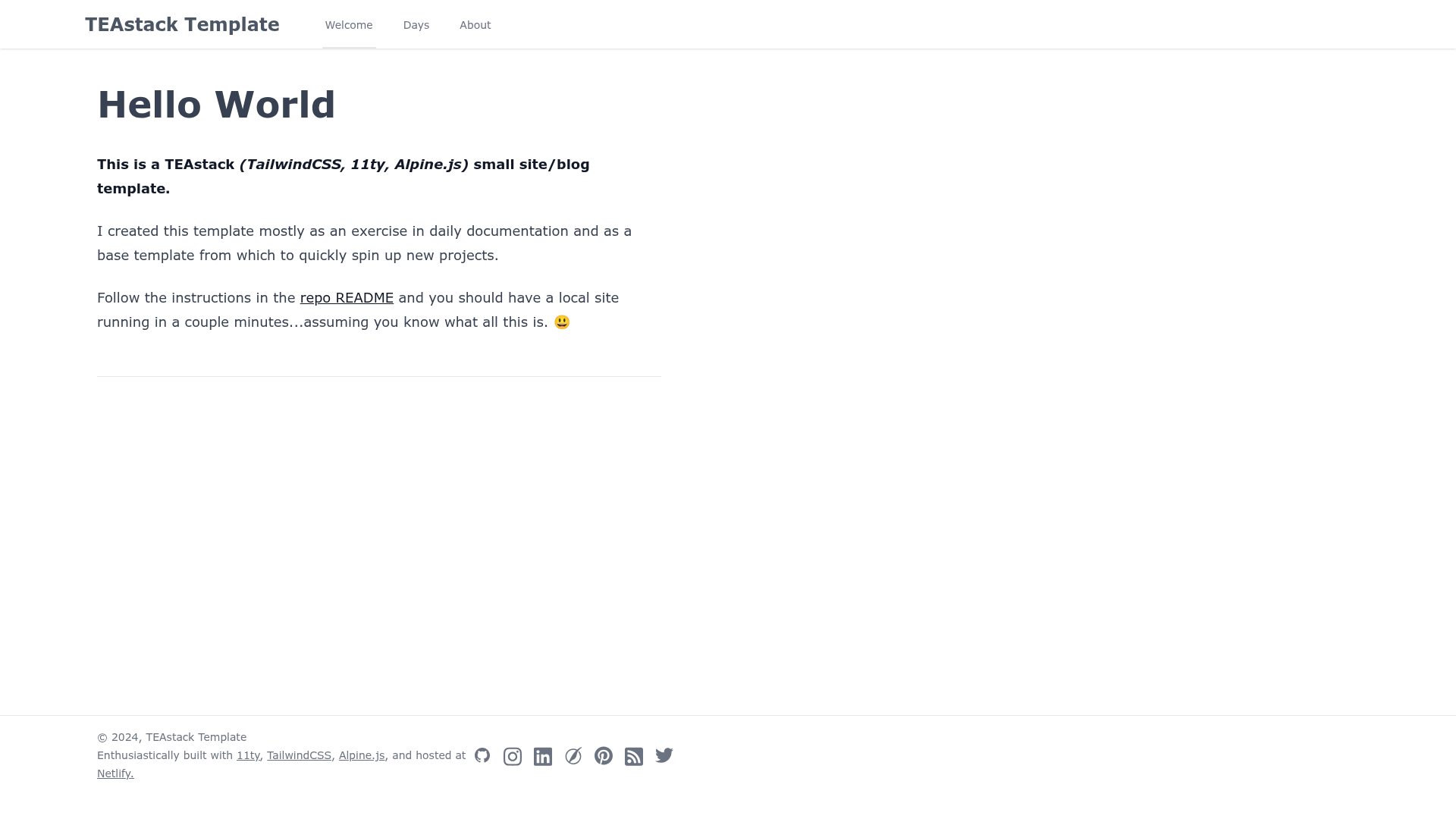
Tea Base Template is a minimal Eleventy (11ty) starter that combines TailwindCSS and AlpineJS into a single TEAstack for building test sites, tutorials, and simple blogs, with a live demo at teastack.netlify.app.
What is tea-base-template?
Tea Base Template is a GitHub repository that provides a base project structure for the TEAstack (TailwindCSS, Eleventy, AlpineJS). It takes Markdown content files as input and outputs a static website using the Eleventy static site generator. The template is maintained as a free open-source starter, currently at version 2 with an updated 11ty and Tailwind setup, and is designed around a #100DaysOfCode blog workflow.
What makes tea-base-template stand out?
- Static site generation with Eleventy — Uses 11ty to convert Markdown content in the /src directory into a static blog, with built-in dev server and hot reloading.
- TailwindCSS integration — Includes TailwindCSS and the TailwindCSS Typography plugin for typography defaults, configured in /tailwind.config.js and /src/assets/css/tailwind.css.
- AlpineJS support — The third part of the TEAstack, enabling lightweight interactivity on the output site.
- Data-driven site content — JSON files in /src/_data (meta.json and social.json) control global site text and footer social icons.
- Blog post structure — Includes sample posts in /src/posts with date-based frontmatter, plus an About page in /src/pages.
- Simple customization workflow — Edit Markdown files in /src and see changes applied immediately via hot reloading when running the dev server.
- Netlify-ready demo — The provided demo site is hosted on Netlify, making it straightforward to deploy your own version to the same service.
Who should use tea-base-template?
- Developers learning Eleventy — A small, readable codebase for experimenting with 11ty, TailwindCSS, and AlpineJS without extra build tooling like PostCSS or CSS Nano.
- #100DaysOfCode participants — The template is explicitly built for deploying and publishing daily blog posts, with a "Days" nav and sample post structure.
- Tutorial writers — The minimal setup makes it a good base for creating step-by-step coding tutorials and test projects.
What can you do with tea-base-template?
- Create a personal blog — Write Markdown posts in /src/posts, set the date in frontmatter, and publish a static blog with a clean Tailwind-styled layout.
- Manage site-wide metadata — Edit /src/_data/meta.json to change the site title and global content without touching templates.
- Control footer social links — Update /src/_data/social.json to add or remove social platform icons in the footer.
- Build a test environment — Use it as a local playground for trying out 11ty plugins and Tailwind utilities; the only dependencies are the ones listed in package.json.
How does tea-base-template work?
Clone the repository with git, run npm install to install dependencies, then npm run dev to start the Eleventy dev server at http://localhost:8080. Edit files in the /src directory; changes appear in the browser automatically through hot reloading. To build the production output, you'd run the corresponding npm build script (the README focuses on the dev workflow).
Pros and cons
- Pros: Simple, focused stack; no PostCSS or CSS Nano processing in v2; data files separate content from layout; designed for Netlify deployment.
- Cons: The TailwindCSS Typography plugin affects image margins and padding, which the author notes is problematic for image galleries; the template is explicitly minimal, so you'll need to add your own additional features for complex sites.
FAQ
Is tea-base-template free?
Yes, the template is open source and available on GitHub, and you can clone and modify it without cost.
What does tea-base-template do?
It generates a static blog site using Eleventy with TailwindCSS for styling and AlpineJS for interactivity. You write content in Markdown and manage site data in JSON files.
Does this template include a specific CMS?
No, it doesn't include a CMS. Content is managed through Markdown files and JSON data files, which is typical for Eleventy projects.
Does it work with Netlify?
Yes, the demo site is hosted at teastack.netlify.app, and the README describes pointing a Netlify site to your own clone for deployment.
Why do my images look weird?
The TailwindCSS Typography plugin applies default margins and padding to images. The README suggests removing the plugin from /tailwind.config.js and resetting typography in /src/assets/css/tailwind.css if you need more image control.