Template details
Timer Hugo
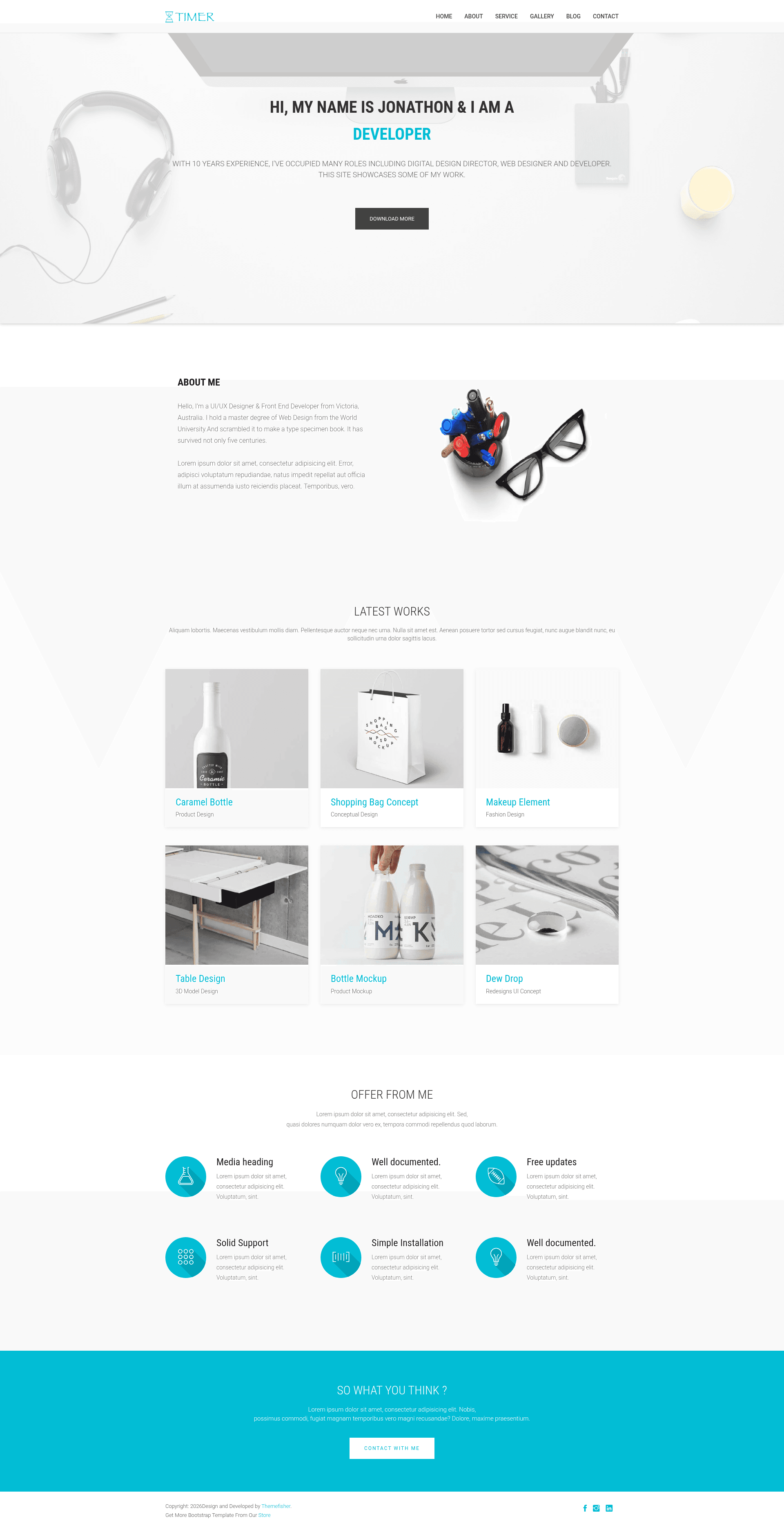
Timer is a free portfolio and landing page theme for Hugo, built for creative companies, agencies, and freelancers to showcase projects and services.
About this template
Timer Hugo is a free portfolio and landing page theme built on the Hugo static site generator, designed for creative companies, agencies, and freelancers to showcase their projects, services, and products.
What is Timer Hugo?
Timer Hugo is a Hugo-based portfolio and landing page theme created by Themefisher and Gethugothemes. It takes standard Hugo site content (markdown files for pages and posts) and renders a multi-page website with 8+ pre-designed page layouts. The theme supports Hugo version 0.60.0 and above, and the code is released under the MIT license, while images in the demo are for display only and retain their own licenses.
Key Features
- 8+ pre-designed pages — The theme includes Home, About, Contact, Blog, Blog Single, Service, and Gallery pages, giving a complete site structure out of the box.
- Google Analytics support — Configure Google Analytics directly in the theme settings to track site traffic.
- Contact form support — A built-in contact page layout that lets visitors send messages.
- Google Maps integration — Embed a Google Map on the contact or other pages using theme parameters.
- Page speed optimized — The demo scores 87% on Google PageSpeed Insights for desktop.
- Open Graph and Twitter card meta tags — Automatic social sharing metadata for better link previews on Facebook, Twitter, and similar platforms.
- Sitepins CMS integration — Pre-configured with Sitepins, a Git-based headless CMS, so you can edit site text, images, and configuration visually without touching code.
- Bootstrap-based styling — Built on Bootstrap, with jQuery, Slick Slider, Animate, Wow, Ionicons, Fancybox, Hover, Modernizr, and Google Fonts included.
Who is it for?
Timer Hugo is aimed at creative professionals who need a polished web presence with minimal setup. Freelancers can use it to present a portfolio and a service list; agencies can showcase team projects and provide a contact route for leads; small studios can sell their products through integrated calls to action. Because it is a static site generator theme, it suits people who want fast, low-maintenance sites without a backend.
What can you do with Timer Hugo?
- Agencies: display case-study pages, service offerings, and a contact form to capture client inquiries.
- Freelancers: publish a personal portfolio with a gallery and blog to share updates and attract work.
- Small product sellers: use the landing page layout to present a product and direct visitors to purchasing or inquiry actions.
How does Timer Hugo work?
To run the theme locally, clone the repository from GitHub, run npm run project-setup to configure the project, then npm run dev to start a local development server. Full documentation is available at docs.gethugothemes.com/timer. For content edits, the Sitepins integration lets you clone the repository into Sitepins and edit in a visual interface.
Pricing
Timer Hugo is free to use under the MIT license. You can download the source, modify it, and use it for personal or commercial projects without a license fee. The demo images are not included in the license, so you must replace them with your own assets.
FAQ
Does Timer Hugo require Hugo knowledge?
Basic familiarity with Hugo is helpful for customizing the theme, since it is a Hugo template. However, the theme includes pre-built page layouts and configuration options, so you can get a site running by editing standard content files.
Can I edit Timer Hugo without writing code?
Yes. The theme comes with a Sitepins integration, a Git-based headless CMS that lets you visually edit pages, images, and settings. You can clone the repository into Sitepins and follow the on-screen instructions.
Is Timer Hugo free for commercial projects?
Yes, the theme code is released under the MIT license, which allows commercial use. The images used in the demo are for demonstration only and are not covered by that license, so you should replace them with your own images.
Which Hugo version is required?
Timer Hugo requires Hugo version 0.60.0 or later.