Template details
Treehole Jekyll
A self-hosted blog system built with Spring Boot and Jekyll themes, offering an admin backend, visitor statistics, and Docker deployment.
About this template
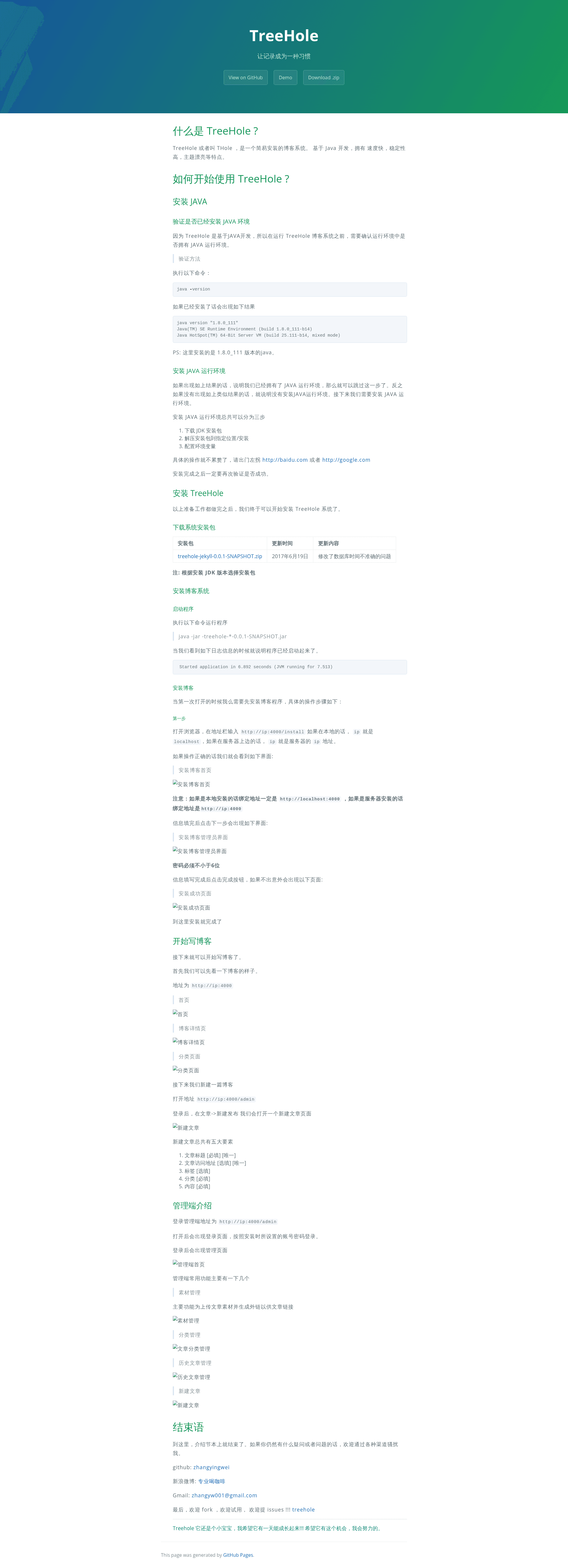
Treehole Jekyll is a self-hosted, non-static blog system built on Spring Boot and MyBatis with SQLite storage, designed to accept Jekyll themes and ship with its own admin backend and visitor statistics.
What is Treehole Jekyll?
Treehole Jekyll (also called THole) is a Java-based blog platform that combines a Spring Boot application with a Jekyll-themed front end. Instead of being a static site, it runs a backend admin panel where you can write posts from any computer with a browser, and the system renders those posts through the theme you choose. It uses SQLite for data storage, follows a MyBatis persistence layer, and is versioned for JDK 8. The official distribution is a downloadable ZIP, and there is also a Docker image named zhangyw/treehole-jekyll. A live demo is available at http://blog.zhangyingwei.com.
Key Features
- Non-static blog with admin panel — Write and manage posts from a web interface rather than editing Markdown files and running a static site build process.
- Jekyll theme compatibility — The official build adapts Jekyll themes, so you can apply any Jekyll theme you like to change the look of the blog.
- Built-in visitor statistics — Detailed visit tracking is included, avoiding the need for third-party analytics platforms.
- Simple ZIP installation for JDK 8 — Download the official package and run the provided script; no complex configuration is documented beyond the script.
- Docker support — Pull
zhangyw/treehole-jekylland run the container with port 5000 exposed to launch the blog quickly without installing Java. - Live demo — You can preview the system’s behavior at the demo blog hosted by the developer.
Who is it for?
- Independent bloggers who want to run their own blog server with a management backend and built-in visitor counting, without signing up for hosted platforms.
- Jekyll enthusiasts who prefer Jekyll themes but want the convenience of a non-static backend to publish from anywhere.
- Java/Spring Boot learners who want a working example combining Spring Boot, MyBatis, SQLite, and Jekyll themes in a small project.
What can you do with it?
- Publish posts from any device — Log into the admin backend and write entries, which are then displayed through the Jekyll theme automatically.
- Monitor blog traffic — Use the detailed statistics screen to see visitor counts and activity directly in the admin panel.
- Deploy on a server quickly — Run two Docker commands to get a blog listening on port 5000, or use the ZIP installer on a Linux machine.
How does Treehole work?
The installation is either a ZIP package or a Docker image. For the ZIP route, download the JDK 8 build, run the install script, and if you hit a carriage-return error on Linux, install dos2unix and run dos2unix treehole.sh. For Docker, execute docker pull zhangyw/treehole-jekyll and then docker run -p 5000:5000 -d --name treehole zhangyw/treehole-jekyll:0.0.1. Once running, the blog is served on port 5000 and the admin panel is part of that process.
FAQ
Does Treehole Jekyll need a static site generator?
No. Treehole is a non-static blog with its own backend; it generates pages from the admin content using adopted Jekyll themes, but you don’t manually compile posts.
What Java version is required?
The official ZIP download is built for JDK 8 (Java 8). The Docker image avoids needing a local Java installation entirely.
How do I fix the script error on Linux?
If the treehole.sh script reports a carriage-return error, install dos2unix and run dos2unix treehole.sh before executing it.
What port does the Docker container use?
The container maps to port 5000, as shown by the docker run -p 5000:5000 command.
Is there a demo I can try?
Yes, the developer hosts a demo at http://blog.zhangyingwei.com.