Template details
Twenty Ninety
A production-ready Eleventy starter kit, optimized for performance.
About this template
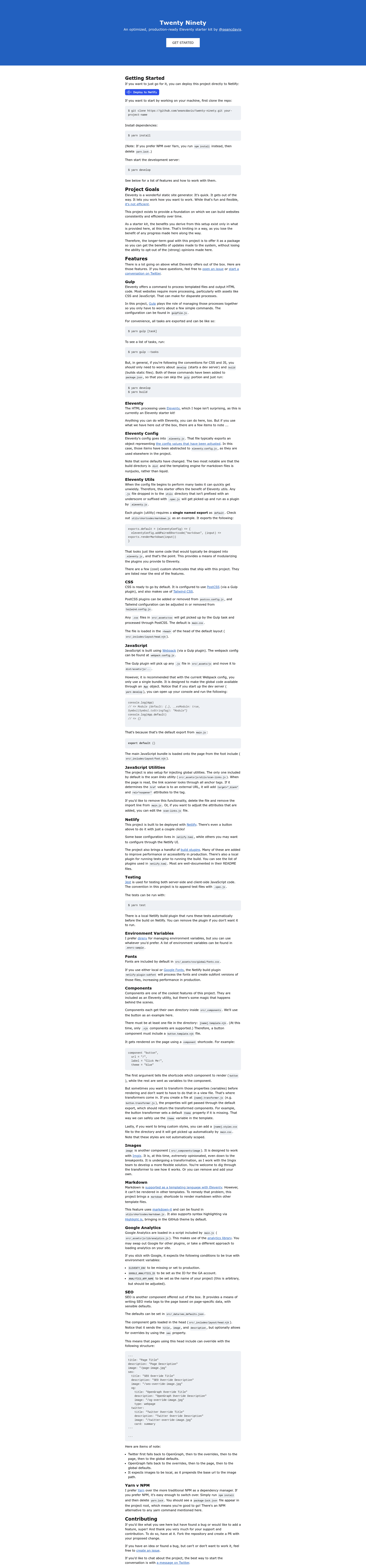
Twenty Ninety is a component-based Eleventy starter kit that uses Gulp to orchestrate Eleventy, PostCSS, Tailwind CSS, Webpack, Jest, and Netlify build plugins into a single develop and build workflow. It is maintained by Sean C. Davis and is designed to let you build static websites faster by establishing strong conventions.
What is Twenty Ninety?
Twenty Ninety is a production-ready Eleventy starter kit, optimized for performance, that provides a preconfigured foundation for static site development. It takes nunjucks templates, CSS, and JavaScript as inputs and outputs static HTML to a dist directory. Eleventy's default output directory is changed to dist, and the markdown templating engine is switched from liquid to nunjucks. The project aims to eventually be installable as a package so you receive updates while keeping the ability to opt out of its opinions.
Key Features
- Gulp orchestration — All Eleventy, PostCSS, and Webpack tasks are managed through Gulp; use
yarn developto start a dev server andyarn buildto produce static files. - PostCSS and Tailwind CSS — CSS files placed in
src/_assets/cssare processed through PostCSS and Tailwind CSS; plugins are configured inpostcss.config.jsandtailwind.config.js. - Webpack bundling — JavaScript files in
src/_assets/jsare bundled todist/assets/js; the main bundle exposes anAppmodule and a tool automatically addstarget="_blank"andrel="noopener"to external links. - Component system — Components live in
src/_componentsas.template.njkfiles with optional.transformer.jsand.styles.css; render them with acomponentshortcode and pass variables. - Markdown shortcode — Use the
markdownshortcode to render markdown inside any nunjucks template; it is powered by markdown-it and Highlight.js with the GitHub theme by default. - Image component with Imgix — The built-in image component is tailored to Imgix, with opinionated breakpoints and transformation settings.
- Netlify build plugins — Configuration in
netlify.tomladds performance and accessibility plugins,netlify-plugin-subfontfor font subsetting, and a local plugin that runs Jest tests before builds. - SEO and metadata — The SEO component writes title, description, OpenGraph, and Twitter meta tags from page data with defaults in
src/_data/seo_defaults.jsonand a fallback chain: Twitter → OpenGraph → page → global. - Google Analytics integration — Analytics load through the
analyticslibrary inmain.js; they activate only whenELEVENTY_ENVis missing or set to production and bothGOOGLE_ANALYTICS_IDandANALYTICS_APP_NAMEare configured.
Who is it for?
- Eleventy developers who want a preconfigured foundation with established conventions instead of wiring up the toolchain themselves.
- Agencies and freelancers who build multiple static sites and want a consistent, opinionated setup that deploys to Netlify in one click.
- Performance-conscious teams who benefit from Netlify build plugins for subfonts, accessibility checks, and automated tests in production builds.
- Developers building component-driven sites who need a reusable component shortcode system with transformers for custom logic.
What can you do with Twenty Ninety?
- Build a marketing site: publish a static site on Netlify with the included layouts, SEO component, and Google Analytics integration ready to configure.
- Create a component library: add components under
src/_componentsand reuse them across pages using thecomponentshortcode with per-page variables. - Combine content formats: use Eleventy's markdown support along with nunjucks pages, and embed markdown inside templates with the markdown shortcode.
- Automate quality checks: run Jest specs locally with
yarn testor have Netlify run them automatically before each build thanks to the included local build plugin.
How does Twenty Ninety work?
Clone the repository, install dependencies with either Yarn or NPM, and run yarn develop to start the local dev server. The Gulp pipeline processes Eleventy templates, runs PostCSS and Tailwind, and bundles JavaScript through Webpack. For production, yarn build outputs static files to dist; you can deploy directly to Netlify using the provided one-click deploy button, which also runs build plugins.
FAQ
Is Twenty Ninety free?
Yes, Twenty Ninety is an open-source project hosted on GitHub. You can clone the repository, use it for commercial projects, and contribute via pull requests.
Can I use NPM instead of Yarn?
Yes. Run npm install and delete yarn.lock; a package-lock.json file will appear. Every Yarn command mentioned in the documentation has an NPM alternative.
Does Twenty Ninety require Netlify?
No, but it is optimized for Netlify. The project ships with netlify.toml configuration and Netlify build plugins, and there is a one-click deploy button. You can also build and host the static files elsewhere.
How do I add a new component?
Create a directory under src/_components with a .template.njk file. Optionally add a .transformer.js to modify properties before rendering and a .styles.css to include component styles. Then use the component shortcode in any template.
How does the SEO component work?
The SEO component is included in the head layout and reads page metadata like title, description, and image from front matter. It combines these with defaults from src/_data/seo_defaults.json and supports OpenGraph and Twitter overrides on a per-page basis.