Template details
Type Theme
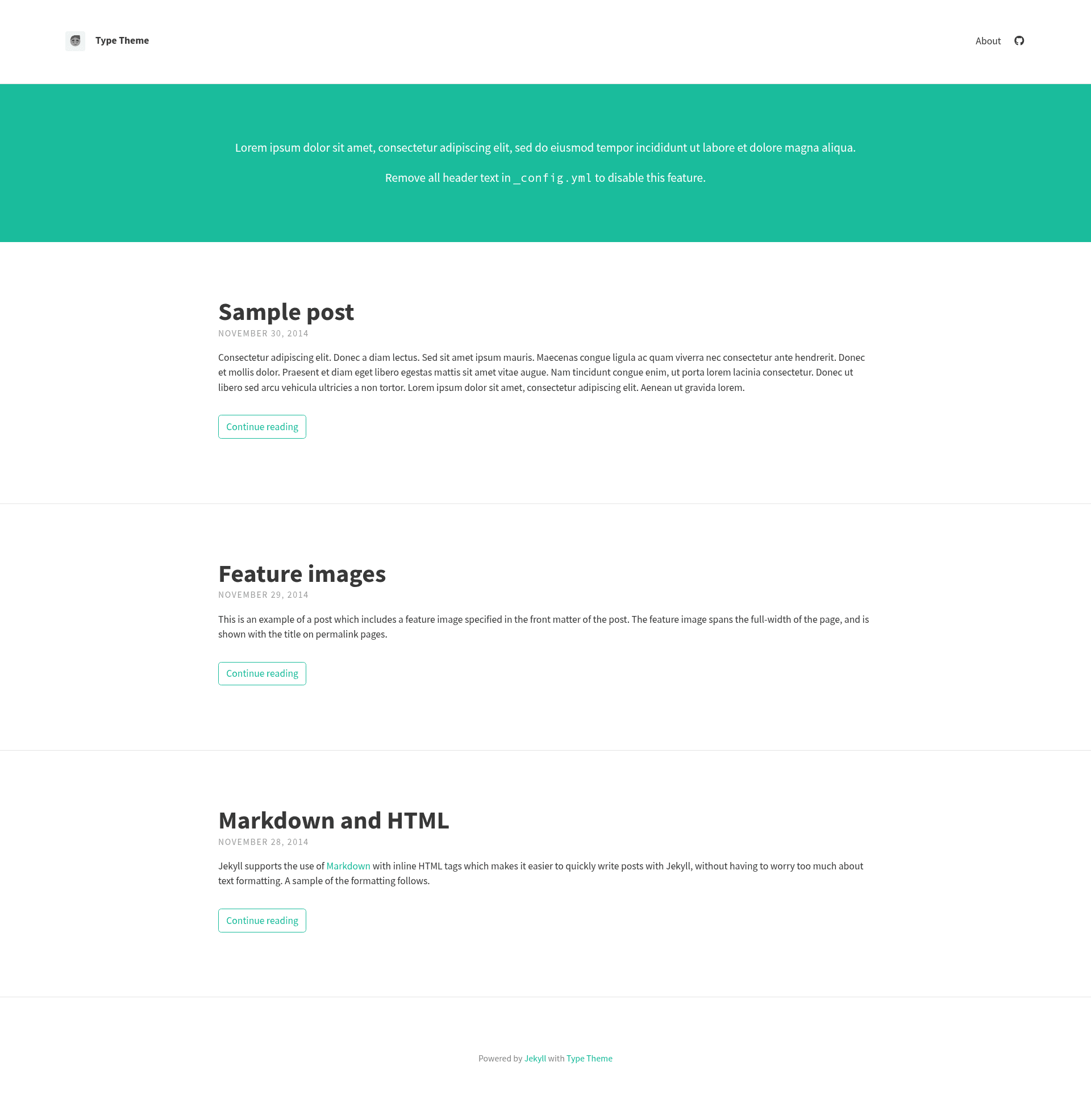
A free, open-source Jekyll theme for responsive blogs with config-driven customization, KaTeX math, and optional search.
About this template
Type Theme is a free, open-source Jekyll blog theme that turns Markdown posts into a fast, responsive static site through simple _config.yml settings.
What is Type Theme?
Type Theme is a free and open-source Jekyll theme created by Rohan Chandra, published on GitHub and available for a live demo. It runs on Jekyll, the Ruby-based static site generator, and is built for blogs that need a responsive layout. The theme takes Markdown posts with YAML front matter as input and outputs a static website with a header, navigation, tag pages, and optional search. It is licensed under the MIT License and has 711 stars on GitHub.
Key Features
- Single-file configuration — Most settings are managed in
_config.yml, including site title, description, avatar, Gravatar hash, header text, footer text, and feature image paths; optional variables are disabled by emptying them. - KaTeX math typesetting — By setting
katex: truein_config.yml, posts can render math written inside double-dollar delimiters, both inline and on separate lines, using the KaTeX library. - Feature images and titles — Posts can declare a
feature-imgpath in front matter to show a banner image; the default title above the image can be changed withfeature-title. - Lunr-based search — Enabling
search: truein the config adds a header search bar that indexes post titles, tags, and content using Lunr.js. - Navigation control — Pages can be hidden from the header with
hide: true, and ordered by giving each page anordernumber oncesite_navigation_sortis set. - Tagged post listings — Post tags in front matter generate an automatic tags page; deleting
tags.htmlfrom the theme disables the feature. - Customizable typography and colors — Google Fonts can be loaded via
google_fontsin the config, and colors, fonts, and padding are edited in the Sass file_sass/base/_variables.scss. - Remote theme support — Works as a GitHub Pages
remote_theme, and users can override styles by creating a customassets/css/main.scssthat imports their own Sass files.
Who should use Type Theme?
- Personal bloggers who want a clean, responsive Jekyll blog without building their own theme, and who want to manage everything from one config file.
- Technical writers who publish math-heavy content need KaTeX typesetting and can enable it with a single boolean value.
- GitHub Pages project owners who need a subpath-compatible blog for a username or project site, supported by the theme's
baseurlconfiguration. - Jekyll learners looking for a well-documented, minimal codebase to fork and study, with clear comments and configuration tables.
Use cases
- Jekyll bloggers — write posts in Markdown with front matter for title, subtitle, tags, and feature images; the theme generates a responsive site with an RSS feed icon and optional Disqus comments.
- Math and science sites — authors can embed inline and display math with KaTeX, loaded only when
katexis enabled. - Portfolio or project pages — users can set
baseurlandurlfor GitHub Pages subpaths and use feature images to make posts visually distinct. - Localized blogs — the theme groups English strings like the "continue reading" label in
_config.ymlso they can be translated or changed without touching templates.
How does Type Theme work?
- Clone the repository from GitHub and install Jekyll and the theme dependencies with
bundle install. - Edit
_config.ymlto set site metadata, choose header and footer text, add icons, and configure optional scripts like Google Analytics, Disqus, KaTeX, or search. - Write posts in the
_postsfolder, add front matter fields for layout, title, and features, then runjekyll serveto preview the site locally and build static files for deployment.
Pros and cons
Pros:
- Free and open-source under the MIT License, so it can be used commercially and modified freely.
- No JavaScript framework or build pipeline beyond Jekyll, which keeps the generated site lightweight.
- Integrations for Google Analytics, Disqus, KaTeX, and Lunr search are optional and only loaded when configured.
Cons:
- Requires local Jekyll installation or GitHub Pages to build and preview the site; no web-based visual editor is provided.
- The default styling is minimal, so most users will want to edit
_variables.scssto match their brand.
Pricing
Type Theme is free and open-source, released under the MIT License. There are no paid tiers or premium features.
FAQ
Is Type Theme free?
Yes, Type Theme is completely free and open-source. It is released under the MIT License, which allows you to use, modify, and distribute the theme for personal or commercial projects.
How do I install Type Theme?
Clone the GitHub repository, then run bundle install to install dependencies, and finally jekyll serve to build and preview the site locally. For GitHub Pages, you can use the theme as a remote_theme and configure it in _config.yml.
Can I use Type Theme with GitHub Pages?
Yes, Type Theme works with GitHub Pages as a remote_theme. It also supports baseurl and url settings for sites hosted in a subpath, such as https://username.github.io/project.
How do I enable math typesetting in Type Theme?
Set katex: true in the _config.yml file, then write math expressions in your posts using double-dollar delimiters. Inline math appears on the same line; display math is written on a new line and rendered with KaTeX.
Does Type Theme include search?
Search is an optional feature. Set search: true in _config.yml to activate a Lunr.js-powered search bar in the header that indexes post titles, tags, and content. It is disabled by default.