Template details
uNFT Marketplace
A free digital art marketplace template built with Next.js, Cosmic CMS, and Stripe payments.
About this template
The uNFT Marketplace, a free Next.js template from Cosmic, is a digital art marketplace starter that pairs a headless CMS backend with Stripe payment processing.
What is the uNFT Marketplace?
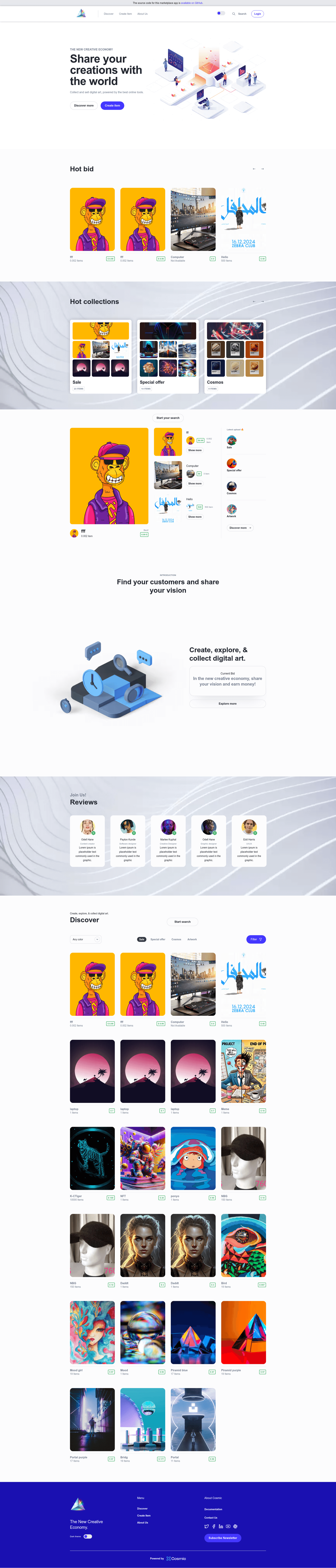
The uNFT Marketplace is a free, open-source template for launching a digital art marketplace. It is built on Next.js, uses Cosmic as a headless CMS to manage content and user-generated content, and integrates Stripe for one-time and subscription payments. The template is developed and maintained by Cosmic and is available on GitHub under the MIT license. The template includes demo content that you install into a Cosmic bucket, so you can see how listings, artist pages, and checkout work before customizing. It runs as a Next.js application and can be deployed to Vercel with a single-click button.
Key Features
- Next.js framework — built on Next.js, giving you hybrid rendering, route prefetching, automatic image optimization, and internationalization out of the box.
- Cosmic headless CMS — manage marketplace content and user-generated content through Cosmic's dashboard, with REST API access for the frontend.
- Stripe payments — integrated with Stripe for accepting one-time and subscription payments; environment variables connect your Stripe account.
- Demo content — installing the template into Cosmic populates a working marketplace with sample digital art, making it easier to understand the data model.
- One-click Vercel deploy — a deploy button imports the GitHub repo into Vercel and prompts you for the required environment variables.
- MIT license — free to use, modify, and redistribute for personal or commercial projects.
- Environment variable setup — a
.env.examplefile is provided; you copy it to.envand add keys for Cosmic and Stripe to run locally. - Live demo — a hosted demo at c-marketplace-cosmicjs.vercel.app lets you explore the user experience without installing anything.
Who is it for?
- Independent digital artists — set up a storefront to sell artwork directly to buyers without building an ecommerce platform from scratch.
- Web developers — use the template as a starting point for a marketplace project; the Next.js and Cosmic stack is modular and well-documented.
- Startup founders — launch a curated digital goods marketplace and manage listings, payments, and user content through Cosmic's CMS.
What can you do with the uNFT Marketplace?
- Launch a digital art storefront: publish artwork listings with Cosmic, let customers purchase via Stripe, and manage orders through the CMS.
- Prototype a marketplace concept: use the demo content and live demo to explore the user flow before committing to custom development.
- Extend the codebase: modify the Next.js app to add auctions, print-on-demand, or new payment methods, since the template is MIT-licensed.
How does the uNFT Marketplace work?
First, install the template into your Cosmic account to get the demo content ready. Then clone the GitHub repository, install dependencies with pnpm, yarn, or npm, and create a .env file from .env.example with your Cosmic and Stripe API keys. Finally, run pnpm dev (or your chosen package manager) to start the development server at http://localhost:3000. For production, deploy the repo to Vercel using the provided button and add the environment variables in the Vercel dashboard. The deployment flow is documented in the Next.js deployment guide.
Pricing
The uNFT Marketplace template is free to download and use under the MIT license. You will need your own Cosmic bucket and Stripe account to obtain the API keys required by the app; those services are external to the template.
FAQ
Is the uNFT Marketplace free?
Yes, the template is free. It is published under the MIT license, so you can use it for commercial projects as well.
What do I need to get started?
You need a Cosmic account to install the template and get API keys, a Stripe account for payment keys, and a local development environment with Node.js and your preferred package manager (pnpm, yarn, or npm).
Can I deploy to Vercel?
Yes, the repository includes a one-click deploy button for Vercel. You will be asked to provide the five environment variables: the Cosmic bucket slug, read key, write key, and the Stripe publishable and secret keys.
Does it support user-generated content?
Yes, Cosmic is positioned as a headless CMS that handles user-generated content, and the template uses Cosmic to manage marketplace listings and related content.
What license is it under?
The project is published under the MIT license, which gives you freedom to use, modify, and distribute the code with minimal restrictions.