Template details
Volcan – Personal Portfolio HTML5 Bootstrap Template
Free, open-source HTML5 Bootstrap 3 template by ThemeWagon for building a personal portfolio site with lightbox gallery and contact form.
About this template
Volcan is a free, open-source personal portfolio website template built with HTML5 and Twitter Bootstrap 3, by ThemeWagon, that gives designers and developers a ready-made multipage site with a lightbox gallery and a footer contact form.
What is Volcan?
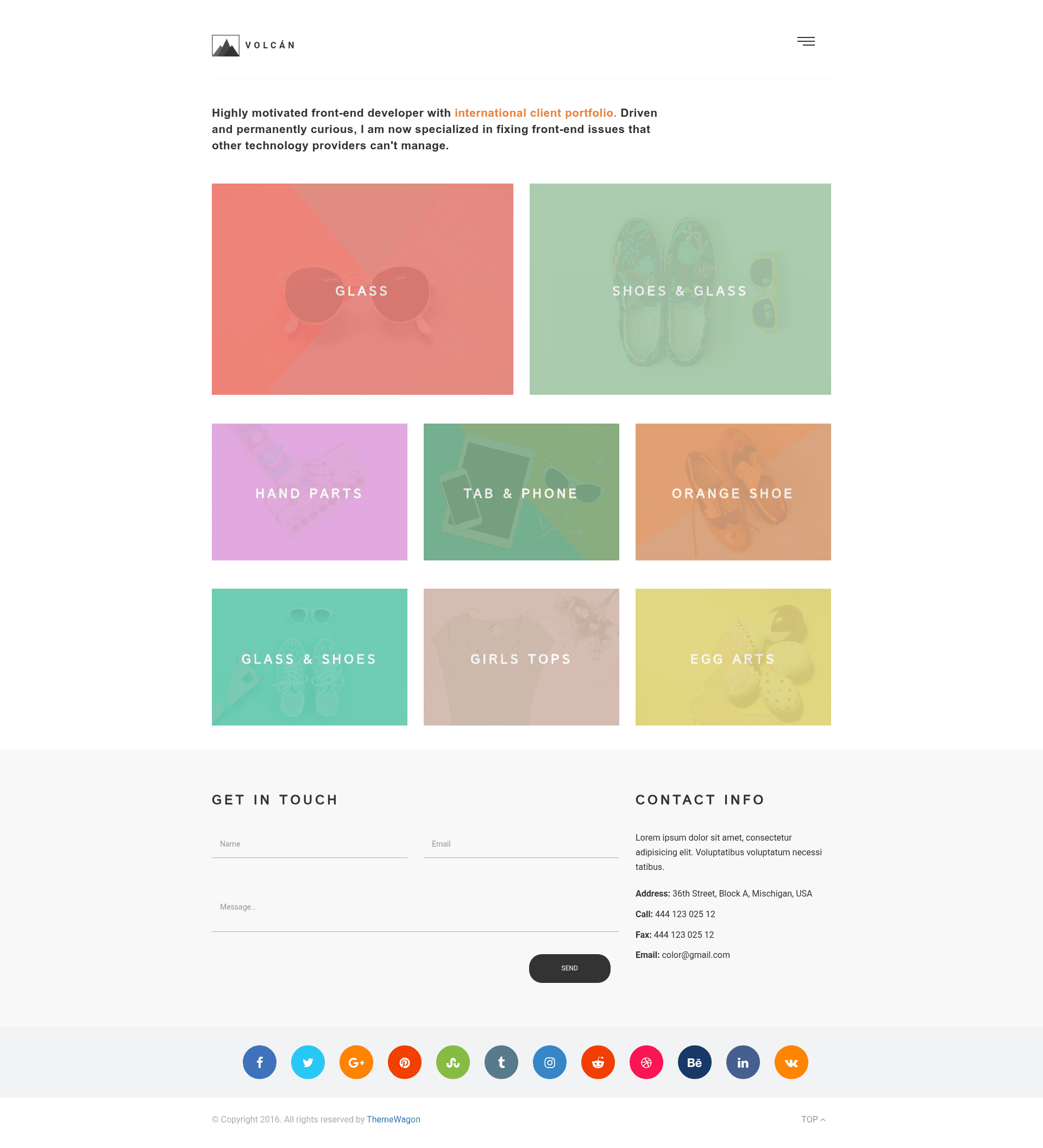
Volcan is a free, open-source HTML5 and Bootstrap 3 portfolio template created and distributed by ThemeWagon. It takes your project images, project titles, and contact information as content, and outputs a multipage portfolio website with a lightbox gallery, a slide-out burger menu, and a contact form in the footer. The template is static HTML, so it runs on any web server without a database or backend, and it is licensed for commercial use with lifetime free updates.
The download package includes the full source code, and the only required editing is swapping in your own text and images. The template is compatible with Chrome, Edge, Firefox, Safari, Opera, and mobile browsers, and is built on Bootstrap 3, FontAwesome icons, Google Fonts, and a Lightbox plugin.
Key Features
- Lightbox portfolio gallery — when a visitor clicks a portfolio item, a lightbox opens an image or screenshot with next/previous navigation, so clients can review multiple pieces without leaving the page.
- Responsive, mobile-friendly layout — the Bootstrap 3 grid makes the layout adapt to small handheld devices, and the template is verified compatible with mobile browsers.
- Footer contact form and social icons — a contact form appears on each page to encourage inquiries; note that it is not connected to any backend, so you need to add your own form handler or service to actually receive submissions.
- Predesigned content elements — includes heading-with-paragraph, blockquote, unordered list, preformatted text, icons, tables, buttons, forms, and multiple image layout variations (fit, grid, left image right text, right image left text).
- Multipage structure with slide-out menu — the template uses a burger/slide-out navigation and supports multiple pages for a fully fleshed-out portfolio site.
- Open source with commercial license — the template is free to download, can be used in commercial projects, and includes lifetime free updates from ThemeWagon.
- Full-width layout and on-hover effects — the design uses a full-width layout and hover effects on portfolio items to draw attention to your work.
Who is it for?
Volcan is aimed at designers and developers who need a personal portfolio website without starting from scratch. Graphic designers can present visual projects with the lightbox gallery, web developers can use the preformatted text and table elements to display code samples and technical skills, and freelance creatives can publish a multipage site with a contact form and social links to win new clients. Artists and photographers also benefit from the image-focused gallery layout, which the listing explicitly mentions as an artist portfolio website template.
What can you do with Volcan?
- Freelance web designers: create a professional portfolio site to showcase recent projects; the lightbox lets potential clients preview project screenshots in a focused view.
- Graphic designers: display artwork using the grid gallery and right/left text-image layouts, with hover effects that make the portfolio feel interactive.
- Developers: structure a skill page with tables and preformatted code sections, plus a dedicated gallery for project screenshots.
- Artists: build a simple, visually clean online portfolio that works on mobile and desktop, with a contact form to receive commission requests.
How does Volcan work?
ThemeWagon's bonus guide describes the exact workflow: buy a domain and hosting, download Volcan, install a code editor, open the template and replace the placeholder content with your text and images, then upload the folder to your server. Because the template is plain static HTML and CSS, no build tools or server-side processing are required.
Pros and cons
- Pros: free and open source; usable in commercial projects; lifetime free updates; responsive and touch-friendly; lightbox gallery built in; no backend required for basic use.
- Cons: according to one customer review, the contact form does not function as-is — since the form has no backend handler, submissions won't be sent until you connect your own form service or script.
FAQ
Is Volcan free?
Yes, Volcan is a free, open-source template. ThemeWagon distributes it at no cost, and the license allows use in commercial projects with lifetime free updates.
Does the contact form work?
The contact form is present in the layout but is not connected to a working backend. One customer review reports that it doesn't work and doesn't respond to editing; you'll need to integrate a third-party form service or write a backend script to receive submissions.
What frameworks does Volcan use?
Volcan is built on Twitter Bootstrap 3, FontAwesome for icons, Google Fonts for typography, and a Lightbox plugin for the gallery. It is written in HTML5 and CSS3 and doesn't require JavaScript frameworks.
What browsers and devices are supported?
The template is compatible with Chrome, Edge, Firefox, Opera, Safari, and mobile browsers. Its responsive layout is specifically tested for small handheld devices.
Can I customize Volcan?
Yes, the source code is open and editable. ThemeWagon says any improvement or modification to the template is welcome, and the included elements (headings, tables, forms, images) can be rearranged or replaced to fit your own content.