Template details
Vue White Dashboard Laravel
Vue SPA admin dashboard template paired with a Laravel JSON:API backend, with auth, profile, and user management out of the box.
About this template
Vue White Dashboard Laravel is a free admin dashboard template that pairs a Vue 2 single-page application with a Laravel backend exposing a JSON:API REST API, built by Creative Tim in partnership with UPDIVISION.
What is Vue White Dashboard Laravel?
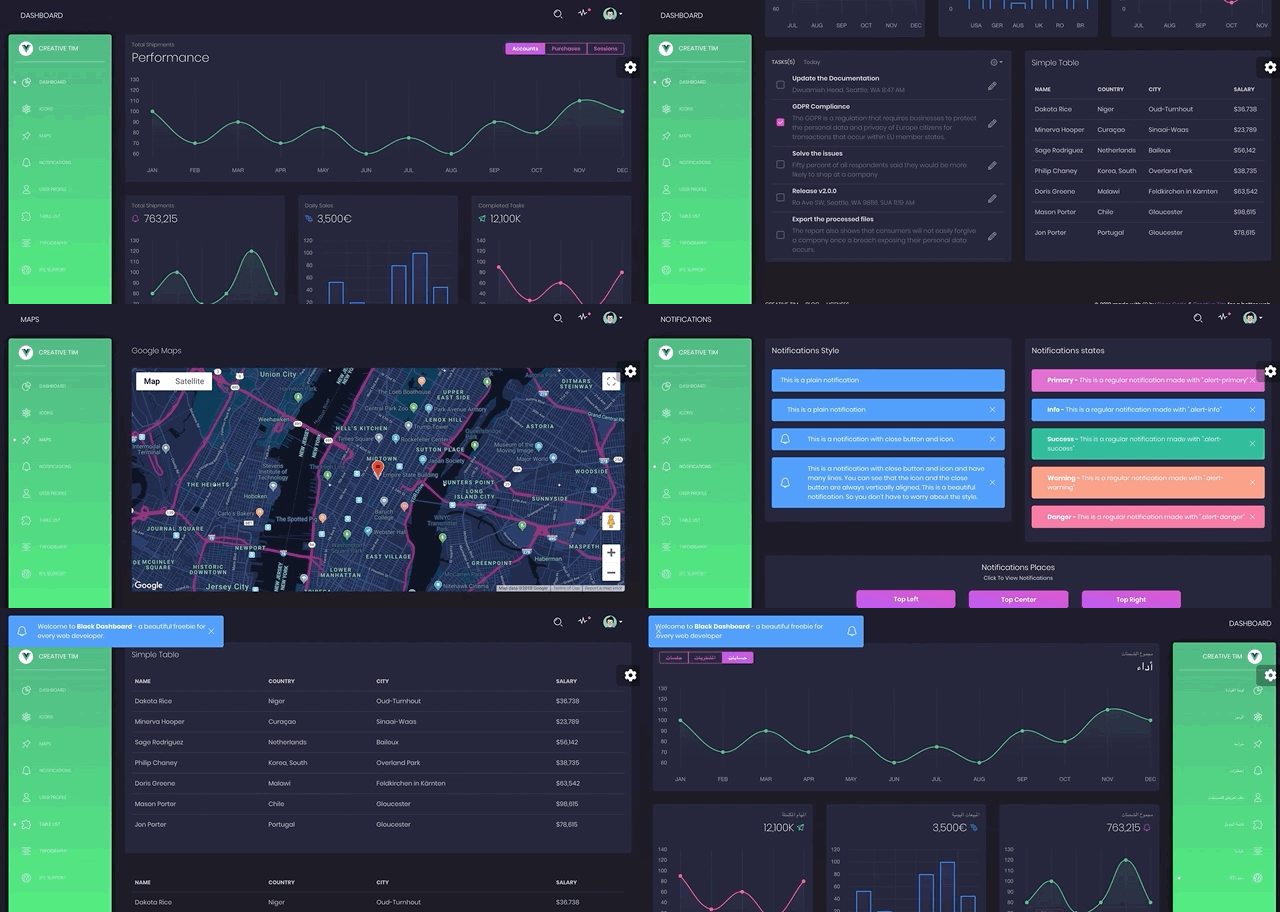
Vue White Dashboard Laravel is a full-stack dashboard template delivered as two separate project folders: one Laravel API project and one Vue frontend. The frontend is based on Vue White Dashboard v1.0.1 and includes the dashboard, login, register, edit profile, password change, and user list pages. The Laravel backend implements the JSON:API specification, uses Laravel Passport for authentication, and expects MySQL as the database. It is licensed under MIT and a live demo runs at vue-white-dashboard-laravel.creative-tim.com.
What makes Vue White Dashboard Laravel stand out?
- Vue and Laravel split — the template ships two folders, a Laravel JSON:API backend and a Vue SPA frontend, so the API and UI can be deployed independently.
- JSON:API backend — the Laravel API follows the JSON:API spec with resources fetched and modified over HTTP, using Composer, PHP, and MySQL.
- Authentication ready — login, registration, and password reset are fully implemented with Laravel Passport; demo credentials admin@jsonapi.com and secret let you test immediately.
- Profile and password editing — pages under Examples/Profile let the logged-in user update name, email, profile picture, and password through Vuex actions.
- Reusable Vue components — the frontend provides BaseInput, BaseButton, BaseCheckbox, Card, Modal, Notification, Sidebar, and chart components (BarChart, LineChart) in src/components.
- Vuex state management — modules for auth, profile, users, alerts, and reset are preconfigured, along with a form mixin for API validation error display.
- Routing and middleware — auth and guest middleware guard routes defined in src/router/index.js, with starter and dashboard layouts.
- Browser and RTL support — supports the last two versions of Chrome, Firefox, Edge, Safari, and Opera, and includes a bootstrap-rtl.scss for right-to-left layouts.
Who is it for?
- Laravel developers who need a ready admin UI connected to a JSON:API backend without building the interface from scratch.
- Vue developers who want a complete SPA dashboard with authentication, profile management, and user management prebuilt.
- Agencies and freelancers building admin panels or internal tools who want to skip boilerplate setup and focus on custom business logic.
- Startups prototyping a product dashboard with an API-driven architecture and secure token-based authentication.
What can you do with Vue White Dashboard Laravel?
- Full-stack developers: scaffold a Vue SPA and Laravel API admin panel in minutes by following the installation steps in the README.
- Product teams: use the theme as the frontend for an existing Laravel REST API and customize pages such as tables, icons, and maps.
- Designers: get a clean, white Bootstrap 4 layout with reusable components that can be reskinned and extended.
How does the setup work?
Two project folders require separate setup. In the Laravel folder, run composer install, copy .env.example to .env, configure DB_DATABASE, DB_USERNAME, and DB_PASSWORD, run php artisan migrate --seed, then php artisan key:generate and php artisan passport:install to get CLIENT_ID and CLIENT_SECRET. In the Vue folder, run npm install, set VUE_APP_BASE_URL and VUE_APP_API_BASE_URL in .env, then run npm run dev for local development or npm run build for production.
Pricing
The free version of Vue White Dashboard Laravel is MIT licensed. A paid PRO version, White Dashboard PRO Laravel, is available from Creative Tim with additional features, but no prices are listed on the README page.
FAQ
Is Vue White Dashboard Laravel free?
Yes, the free version is released under an MIT license, so you can use it for personal and commercial projects. A separate paid PRO version with more features is available from Creative Tim.
What backend does it use?
It uses a Laravel backend implementing the JSON:API specification, Laravel Passport for authentication, and MySQL for storage. The frontend is a Vue SPA built with Vue CLI.
What are the system requirements?
The Laravel backend requires Apache or Nginx, PHP, Composer 2, and MySQL. The Vue frontend requires Node.js 8.9 or above (8.11.0+ recommended), npm, and Vue CLI. The README warns not to use php artisan serve because it is single-threaded.
Can I log in immediately?
Yes, you can log in with admin@jsonapi.com and password secret, or register a new user through the /register page.
Does it support password reset?
Yes, the template includes password reset pages under src/pages/Password with Email and Reset components, backed by the reset Vuex module.