Template details
WEKit
A Jamstack boilerplate for Contentful-backed, multilingual Hugo sites with Netlify deployment.
About this template
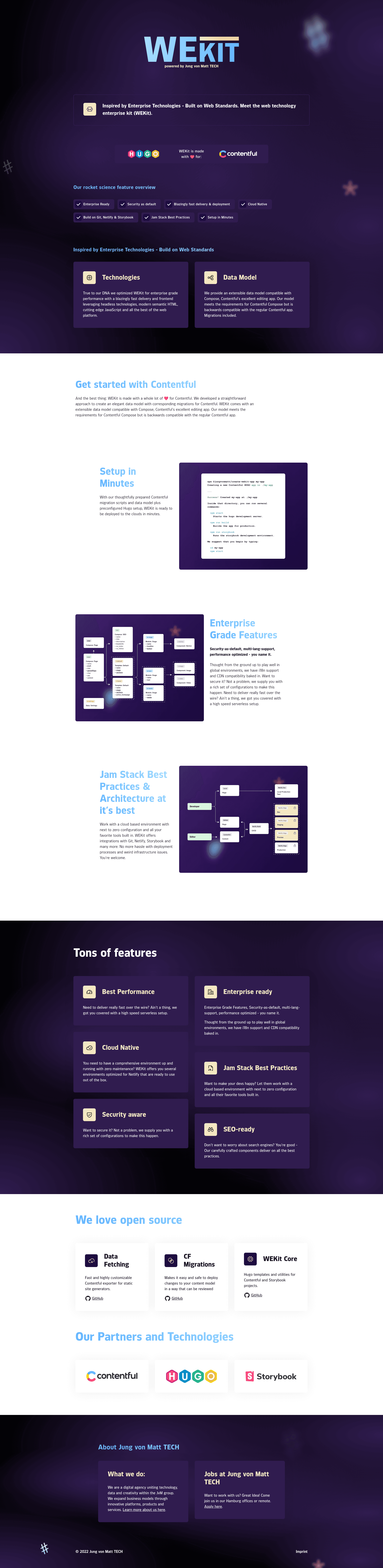
WEKit is a Jamstack boilerplate from Jung von Matt TECH that scaffolds multilingual, Contentful-backed Hugo sites with a production-ready Netlify deployment workflow.
What is WEKit?
WEKit is an open-source Jamstack kit that combines the Hugo static site generator, Contentful headless CMS, and Netlify continuous deployment. It takes a Contentful space (created via migration scripts) as input and produces a static, multilingual website with a reusable component library documented in Storybook. The project is maintained by Jung von Matt TECH GmbH and released under the MIT license, with its repository at github.com/jungvonmatt/wekit.
Key Features
WEKit bundles a command-line scaffolder, Hugo modules, Contentful migration tooling, and a Storybook component library into one project template.
- create-wekit-app CLI — Scaffolds a new project with
npx @jungvonmatt/create-wekit-app@latest, providing a pre-configured Hugo setup, UI components for Storybook, migration scripts, and automatic dependency installation. - Contentful integration — The kit is Compose-ready, includes migration files in
packages/contentful-migrations, and ships Contentful apps and UI extensions inpackages/contentful-apps. - Hugo modules — The
hugo-modules/coremodule provides Hugo templates and utilities that work with both Contentful and Storybook projects. - Multilingual site support — The scaffolded Hugo setup is designed for building sites in multiple languages, using Hugo's i18n capabilities.
- Security and performance baseline — The README reports a Mozilla Observatory A+ score and a Lighthouse 100 score for the demo site.
- Netlify deployment workflow — Includes instructions for connecting a GitHub repository to Netlify, importing environment variables with
npx netlify env:import .env, and creating a Contentful webhook that triggers builds when entries are published or unpublished. - Production-ready example — The
templates/appdirectory combines all parts into a complete example, with reusable components, modules, and templates intemplates/theme-default. - Storybook component development — Run
npm run storybookto develop and test UI components in isolation before integrating them with Contentful data.
Who is it for?
WEKit is aimed at development teams and agencies that want a pre-configured foundation for Contentful-powered Hugo websites with a reliable deployment pipeline.
- Jamstack developers — Get a project scaffolded with Hugo, Contentful, and Netlify, including build hooks and webhooks, so they can skip repetitive setup.
- Agencies building marketing sites — The production-ready example and Storybook component library make it faster to create maintainable, multilingual client sites with structured content.
- Content editors — The webhook setup enables a "Deploy to production" content entry in Contentful, so editors can trigger a Netlify build simply by publishing that entry.
- Teams adopting a headless CMS — The migration scripts and Contentful apps reduce the work of modeling content in the CMS and syncing it with Hugo.
What can you do with WEKit?
- Launch a multilingual marketing site: Scaffold the Hugo project, create content models via migrations, and manage pages in multiple languages through Contentful before deploying to Netlify.
- Build and test UI components: Use Storybook (
npm run storybook) to develop the component library fromtemplates/theme-defaultin isolation. - Automate production deployments: Configure the Contentful webhook with an ID filter for an entry named
deploy-to-production, and publishing that entry triggers a Netlify build. - Version your Contentful schema: Use the migration scripts in
packages/contentful-migrationsto apply and track changes to content models over time.
How does WEKit work?
WEKit's workflow runs from a CLI command to a live site. First, run npx @jungvonmatt/create-wekit-app@latest to scaffold a project with Hugo, Storybook components, and migration scripts. Then set up a Contentful space with delivery and preview API keys, run the migrations, and start Hugo with npm start or Storybook with npm run storybook. For deployment, push the project to GitHub, connect it to Netlify with npx netlify init, import environment variables, add a build hook, and create a Contentful webhook targeting the deploy-to-production entry.
Pros and cons
What are the strengths and tradeoffs of choosing WEKit?
- Pros: The demo site achieves A+ on Mozilla Observatory and 100 on Lighthouse; the kit includes Contentful migration scripts and apps; components can be developed in Storybook; the project is MIT-licensed.
- Cons: It requires Hugo extended, Go, and Node.js, plus a Contentful account and API keys; after scaffolding, the Hugo site is empty until content entries are created in Contentful.
FAQ
What are the system requirements for WEKit?
WEKit requires Hugo extended v0.91.0 or later, Go 1.17 or later, and Node.js 16 or later. You also need a Contentful space with delivery and preview API keys and the Contentful CLI (npx contentful-cli login) for running migrations.
How do I deploy a WEKit site to Netlify?
After scaffolding the project, push it to GitHub, then run npx netlify init to set up continuous deployment. Import your environment variables with npx netlify env:import .env, and create a Netlify build hook. In Contentful, add a webhook that calls that hook when an entry with the ID deploy-to-production is published or unpublished.
Is WEKit free to use?
Yes, the repository is published under the MIT license, so it is free to use and modify. Note that you still need accounts for the third-party services it integrates with: Hugo, Contentful, and Netlify.
Does WEKit include a production-ready example?
Yes. The templates/app directory contains a production-ready example that combines the core module, CLI generators, and migrations. The templates/theme-default directory holds all components, modules, and templates used by the example.