Template details
WooNuxt
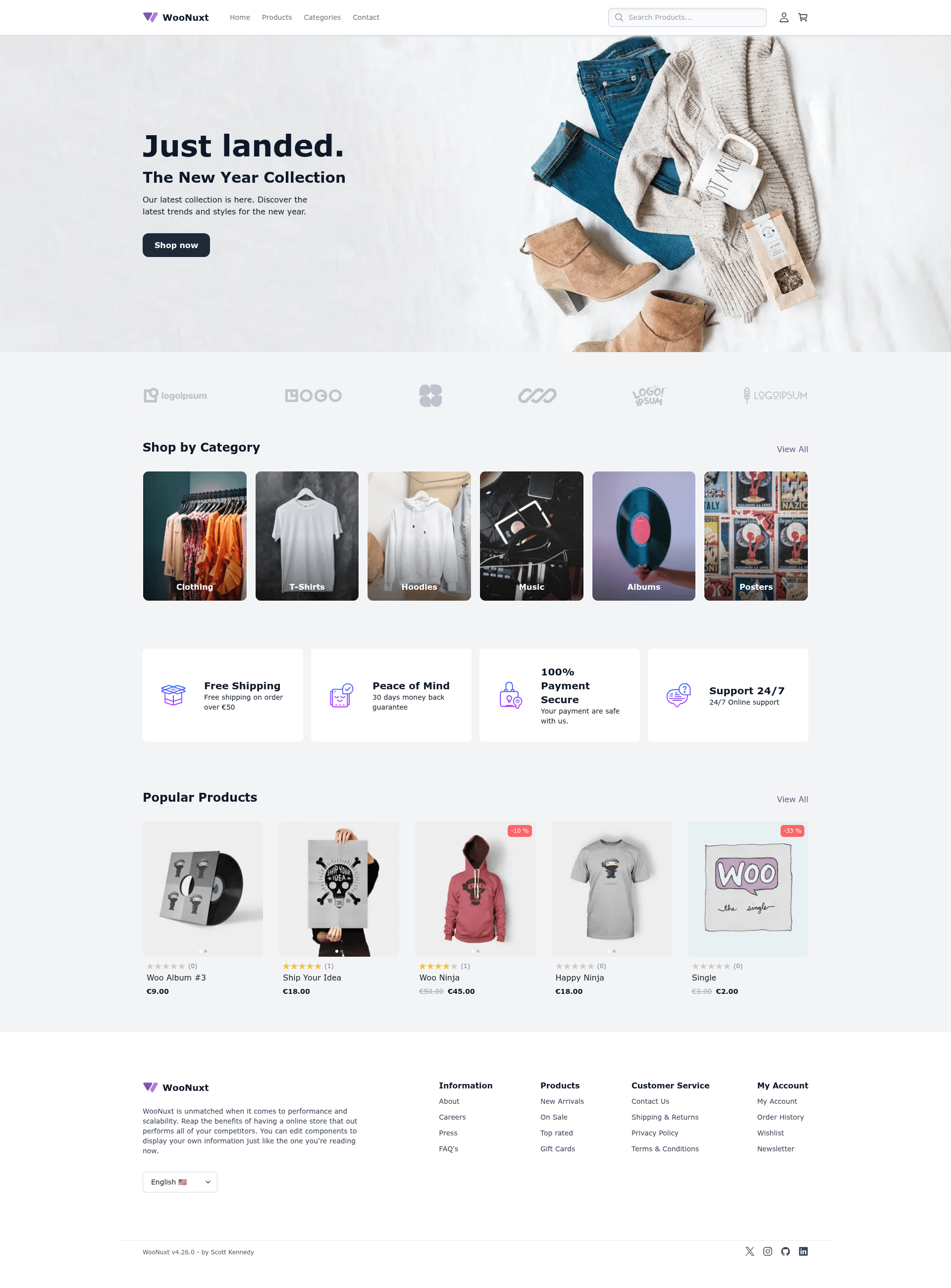
Headless WooCommerce front-end built on Nuxt 3, pulling data via WPGraphQL with static/ISR deployments.
About this template
WooNuxt is a headless e-commerce front-end for WooCommerce built on Nuxt 3 that retrieves all product, cart, and order data through the WPGraphQL API and deploys as a static or ISR-rendered storefront.
What is WooNuxt?
WooNuxt is an open-source, headless WooCommerce storefront template maintained by scottyzen. It uses Nuxt 3 as the Vue front-end and WPGraphQL — together with the WooGraphQL plugin — to pull products, categories, carts, and checkout data from a WordPress/WooCommerce backend. The template's input is a WordPress site with the WooCommerce, WPGraphQL, WooGraphQL, and Headless Login plugins installed; its output is a full storefront with cart, checkout, account, search, filtering, and product pages. It ships with one-click deploy buttons for Netlify, Vercel, and Pandastack, and it is styled with Tailwind CSS.
Key Features
- Nuxt 3 framework — Built on Nuxt 3 with Vue 3 and Tailwind CSS for a modern component-based storefront.
- WPGraphQL data layer — All storefront data comes from WordPress through WPGraphQL using a generated GraphQL SDK based on
graphql-requestand GraphQL Code Generator. - Large catalog ISR — For stores with more than 10,000 products, use
nuxt buildwith NitrorouteRulesISR; the default revalidation TTL is 3600 seconds and can be changed with theCATALOG_ISR_TTLenvironment variable. - Session init performance — WooNuxt skips the WooCommerce session/cart call on first paint for anonymous visitors and only fetches a lightweight
getCartSummaryfor returning users, controlled bystoreSettings.initStoreOnUserActionToReduceServerLoad. - Payment integrations — Checkout supports Stripe, PayPal Standard, and Cash on Delivery, with payment gateway settings auto-retrieved by the WooNuxt Settings plugin.
- Nuxt layers customization — The template uses Nuxt layers: the
woonuxt_basefolder acts as the parent theme and the root folder as the child theme, so you can override any page or component by adding a file with the same name. - Built-in PWA — The
@vite-pwa/nuxtmodule is included; manifest name, description, and theme color are pulled from WordPress general settings with app-config fallbacks. - Translations — Current translations include English, German, Spanish, French, Italian, Portuguese, and Korean.
Who is it for?
- Vue/Nuxt developers — Build a headless WooCommerce storefront without writing a custom GraphQL layer; extend via Nuxt layers.
- WooCommerce store owners — Replace a slow WordPress theme with a fast, cached front-end while keeping the existing WordPress admin and product data.
- Agencies — Ship client storefronts on Netlify or Vercel with one-click deploys and a child-theme workflow for customization.
What can you do with WooNuxt?
- Launch a storefront quickly — Install the WooNuxt Settings plugin on WordPress, set
GQL_HOSTandNUXT_IMAGE_DOMAINS, and deploy with the Netlify or Vercel buttons. - Optimize large catalogs — Enable Nuxt/Nitro ISR via route rules so product pages are generated on first request and cached with revalidation.
- Add an offline-capable store — Get a working baseline PWA without extra setup, with manifest data populated from WordPress settings.
- Support headless login and reviews — Use the Headless Login for WPGraphQL plugin for authentication; product reviews are listed as in progress in the template's roadmap.
How does WooNuxt work?
- Install and activate the WooNuxt Settings plugin on your WordPress site; it installs the required plugins (WooCommerce, WPGraphQL, WooGraphQL, Headless Login) and adds WPGraphQL schema fields.
- Set the
GQL_HOSTenvironment variable to your GraphQL endpoint, for examplehttps://wp.example.com/graphql, andNUXT_IMAGE_DOMAINSto your WordPress/CDN hostnames. - Deploy the repository with
nuxt generatefor static output ornuxt buildfor server-rendered/ISR output, using one of the provided deployment buttons.
FAQ
Which WordPress plugins does WooNuxt need?
WooNuxt requires WooCommerce, WPGraphQL, WooGraphQL, Headless Login for WPGraphQL, and the WooNuxt Settings plugin. The WooNuxt Settings plugin can install and activate all of the others, and it also pulls in the payment gateway settings for Stripe and PayPal.
Does WooNuxt support large catalogs?
Yes. For catalogs with more than 10,000 products, WooNuxt recommends hybrid rendering with ISR instead of full static generation. Build with nuxt build, and product catalog routes use Nitro routeRules with a default revalidation window of 3600 seconds, overridable via CATALOG_ISR_TTL.
What payment methods are supported?
The template supports Stripe, PayPal Standard, and Cash on Delivery. The WooNuxt Settings plugin automatically retrieves the WooCommerce payment gateway settings for Stripe and PayPal once they are configured in WordPress.
Is WooNuxt a PWA?
Yes. WooNuxt includes @vite-pwa/nuxt in the base layer, so you get PWA support out of the box. The manifest name, description, and theme color are resolved first from WordPress generalSettings, then from app-config fallbacks.
Which languages does WooNuxt support?
Current translations are English (en), German (de), Spanish (es), French (fr), Italian (it), Portuguese (pt), and Korean (ko). Language support (i18n) is listed as in progress in the roadmap.