Template details
Yevgeniy Brikman Home Page
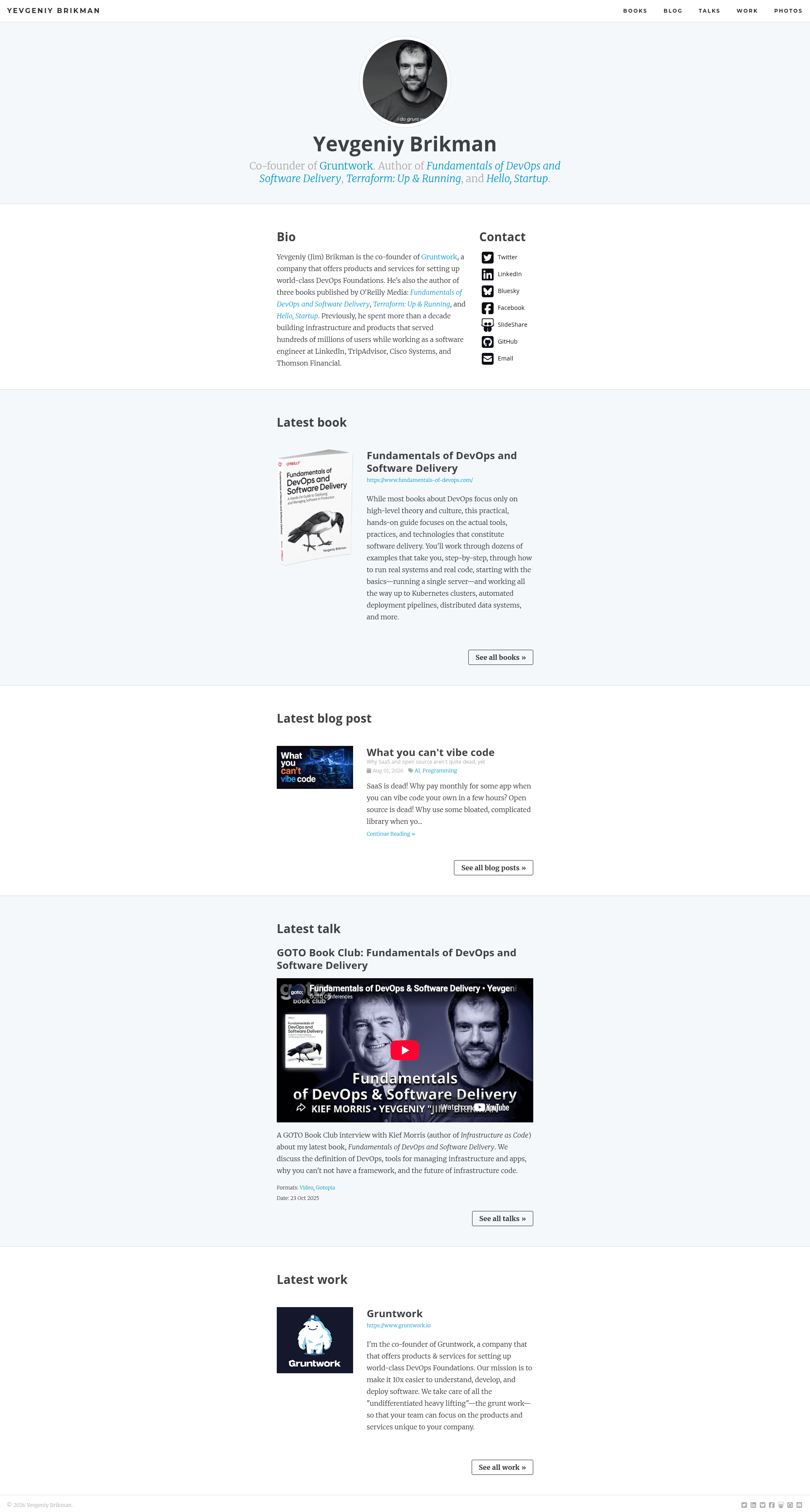
A clean, fast, mobile-friendly home page template built with Jekyll, hosted on GitHub Pages, for publishing writing, talks, projects, and photos.
About this template
The Yevgeniy Brikman Home Page is an open-source Jekyll template for a personal homepage that the author, Yevgeniy Brikman, uses to publish his writing, talks, projects, and photos. It is designed to be fast, mobile-friendly, free to build, and easy to update, and it is released under the MIT License.
What is the Yevgeniy Brikman Home Page?
The Yevgeniy Brikman Home Page is a static website template built with Jekyll. It takes content written in basic HTML or Markdown and generates a complete personal site that is hosted on GitHub Pages. The template includes sections for writing, talks, projects, and photos, and it uses a clean, simple design. The code is available on GitHub with a repository description of 'The Yevgeniy Brikman Home Page.'
What makes the Yevgeniy Brikman Home Page stand out?
- Static and fast — The site is completely static because it is built with Jekyll, so pages load quickly without a database or server-side processing.
- GitHub Pages hosting — It uses the GitHub Pages Gem and only Jekyll plugins that are available on GitHub Pages, meaning deployment is as simple as pushing to a repository.
- Free SSL and CDN — CloudFlare provides free SSL and CDN services, improving both security and global load times.
- Influenced design — The design is loosely based on Kasper, Pixyll, and Medium, giving it a familiar, minimalist look.
- Styling stack — The template uses Basscss, Sass, Font Awesome Icons, Hint.css, and Google Fonts for typography and UI elements.
- Behavioral enhancements — jQuery, lazySizes for lazy loading, and responsive-nav.js for mobile navigation handle interactivity.
- Search integration — Algolia powers the site search, with a localhost API key configured via a separate _config.dev.yml file.
- Comments and analytics — Disqus is integrated for comments, and UptimeRobot plus Google Analytics provide monitoring and metrics.
- Blogger migration scripts — Most blog posts were imported from an old Blogger account using Ruby scripts stored in the _scripts folder.
Who is the Yevgeniy Brikman Home Page for?
- Developers — A developer who wants a personal blog and portfolio site without paying for hosting or a CMS can clone this repo, write in Markdown, and deploy to GitHub Pages.
- Technical writers — Someone who needs a clean, fast site to publish long-form articles and embed code snippets will find the Jekyll workflow straightforward.
- Speakers — A person who gives talks at conferences can use the talks section to list sessions, link to slides, and share videos alongside their bio and contact info.
- Photographers — The photo section offers a simple way to display images, and lazySizes ensures the page stays fast even with many pictures.
What can you do with the Yevgeniy Brikman Home Page?
- Publish a blog — Write posts in Markdown and have Jekyll build them into a static site; a local drafts mode is supported with
serve --drafts. - Showcase projects — Create project pages that link to GitHub repositories, with straightforward file organization.
- List talks and appearances — Maintain a talks archive that separates content from the blog.
- Host a photo gallery — Add photos in a dedicated section, relying on lazySizes for lazy loading to keep initial page loads fast.
- Add comments and search — Plug in Disqus for reader comments and Algolia for instant search, both configured through environment-specific keys.
How does the Yevgeniy Brikman Home Page work?
The template is cloned from GitHub, then Jekyll is installed locally. The developer creates a _config.dev.yml file with an Algolia API key that allows access from localhost, runs bundle install once, and then runs bundle exec jekyll serve --drafts --limit 100 --config _config.yml,_config.dev.yml to build and preview the site at http://localhost:4000. For production, the site is hosted on GitHub Pages, where Jekyll builds are triggered on push.
Pros and cons
- Free and open source — Released under the MIT License, so anyone can use or modify it at no cost.
- Performance-oriented — Static pages, lazySizes, and CloudFlare CDN contribute to fast page loads.
- Requires Jekyll setup — A developer needs Ruby, Jekyll, and Bundler installed locally to preview the site, which is a steeper learning curve than a drag-and-drop website builder.
- Plugin constraints — Because it depends on GitHub Pages, only plugins allowed on that platform can be used; other Jekyll plugins require outsourcing the build.
FAQ
Is the Yevgeniy Brikman Home Page free?
Yes. The code is released under the MIT License, and the recommended hosting platform, GitHub Pages, offers free static site hosting. Additional free tiers are available for CloudFlare CDN and Disqus comments.
What content formats does it support?
Basic HTML and Markdown are used for pages and blog posts. Since it runs on Jekyll, you can also use Liquid templating and the standard Jekyll front matter to structure posts, drafts, and collections.
How do I set up Algolia search on localhost?
You need to create a _config.dev.yml file that contains a dev value for algolia_search_api_key — an API key that allows access from localhost. This file should not be committed to version control. The production configuration in _config.yml uses a different key.
Can I use this template without GitHub Pages?
Yes, any static hosting provider works because Jekyll outputs plain HTML. However, the template is tailored to GitHub Pages, using the GitHub Pages Gem and only plugins available on that platform, so switching hosts may require adjusting the build process.