Template details
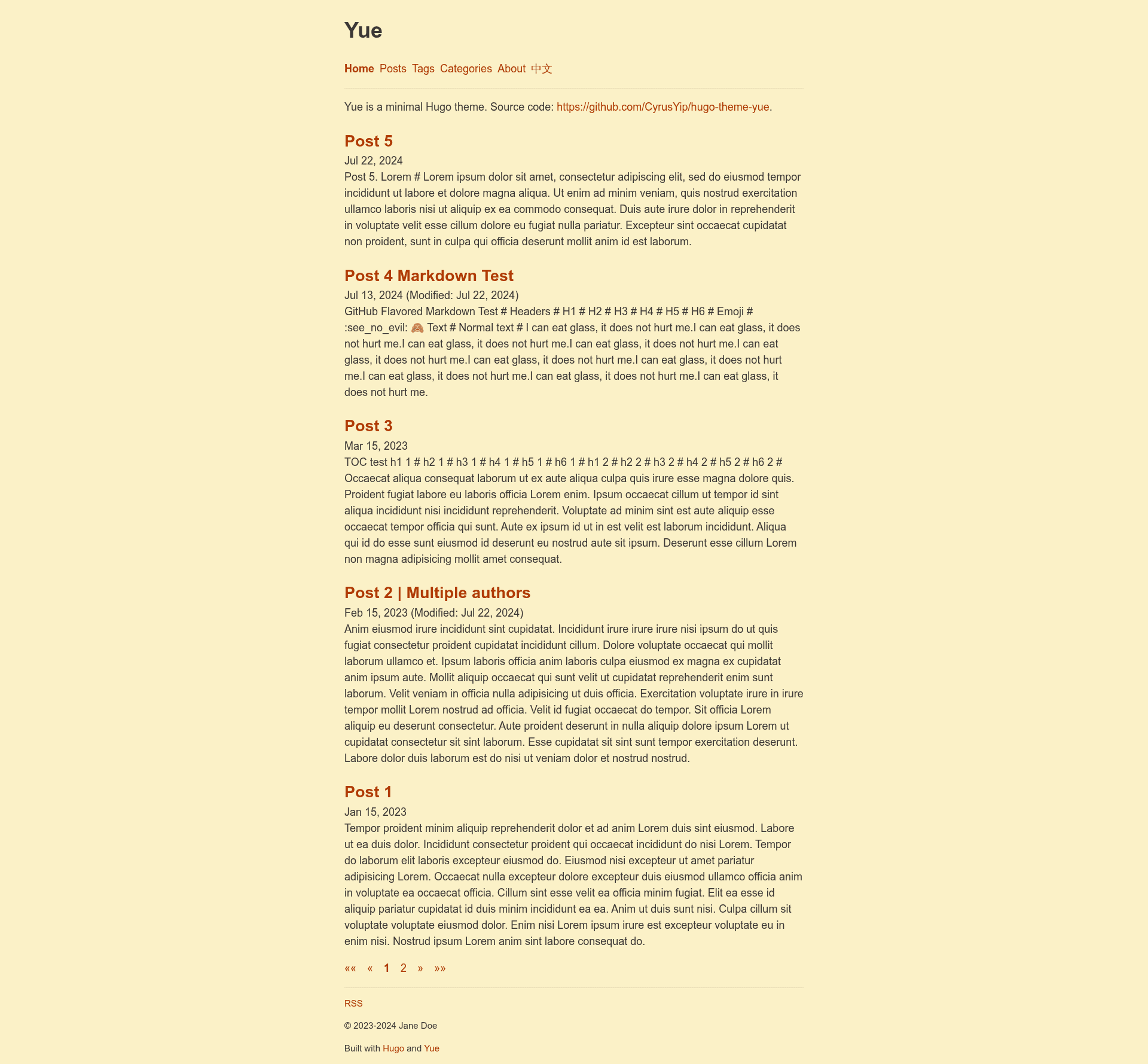
Yue
Minimal, multilingual and customizable Hugo theme for blogging with automatic dark mode, multi-author support, and full-text RSS.
About this template
Yue is a minimal, multilingual Hugo theme for blogging, built for the Hugo static site generator and installable as a Git submodule. Developed by CyrusYip and released under the MIT license, it transforms Markdown content and a hugo.yaml configuration into a static blog with automatic dark mode, pagination, tags and categories, and full-text RSS. A live demo is available at https://yue.cyrusyip.org/.
What is Yue?
Yue is a Hugo theme that takes Markdown content and a Hugo configuration file as input and produces a complete static blog website as output. It runs on Hugo extended, which must be installed alongside Git, and supports multilingual sites with translations for Arabic, English, French, and Simplified Chinese. The theme is maintained by CyrusYip and is designed for a minimal appearance, relying on vanilla CSS rather than a JavaScript framework.
What makes Yue stand out?
- Automatic dark mode — The theme switches between light and dark based on the visitor's system preference, implemented entirely with vanilla CSS and no client-side JavaScript.
- Multilingual support — Ships with translation files for Arabic, English, French, and Simplified Chinese, plus a language selector that links to the corresponding page or homepage and a translation list on single pages.
- Multiple authors — Blog posts can be attributed to different authors, and pages can show a modification date alongside the publication date.
- Foldable table of contents — A table of contents is generated only when a post contains headings, and can be collapsed by the reader.
- Full-text RSS — The RSS template includes full post content, making it suitable for feed readers without excerpt truncation.
- SEO and social tags — Outputs Microdata markup, meta descriptions, and Open Graph tags to improve search engine visibility and link sharing.
- Customizable HTML and CSS — Users can override CSS variables, add custom CSS files, and inject HTML into four partials: head-start, head-end, page-end, and body-end, enabling features like Giscus comments or Google Analytics.
- Mobile-first responsive layout — The theme is responsive and mobile-first, with pagination on home and section pages, and a page count displayed for sections such as
/posts/and/tags/.
Who is Yue for?
- Hugo users who want a minimal blogging theme without the overhead of a JavaScript frontend framework.
- Multilingual bloggers who need built-in translation support for Arabic, English, French, or Simplified Chinese out of the box.
- Small team or community sites that need multiple author attribution and per-post modification dates.
- Developers who want to customize — users comfortable editing CSS variables and Hugo partials can adapt the theme to their own design.
What can you do with Yue?
- Personal bloggers: Publish a fast static blog with automatic dark mode, tags, categories, and full-text RSS, then deploy to Netlify or any static host using
hugo --gc --minify. - Multilingual content sites: Keep versions of each post in multiple languages, with a language selector and translation list on each page.
- Team blogs: Use multiple author support to attribute posts to different contributors and show modification dates.
- Custom integrations: Insert comment services like Giscus or analytics scripts like Google Analytics by adding HTML to the provided partial files.
How does Yue work?
Installation starts with git init, then adding the theme as a Git submodule with git submodule add --depth=1 https://github.com/CyrusYip/hugo-theme-yue themes/hugo-theme-yue. Copying exampleSite provides demo content, and hugo server starts a local preview. To update, run git submodule update --remote. The recommended production build is hugo --gc --minify to clean the cache and reduce output size.
FAQ
How do I add a new language to Yue?
Create a new language file in the i18n directory, copy i18n/en.yaml, remove all comments, and translate the strings. Also translate the content in data/i18n.yaml. The theme currently ships with Arabic, English, French, and Simplified Chinese.
How do I customize the theme's CSS?
Create assets/css/custom/main.css and override variables from assets/css/theme/variables.css, or use @import to include additional CSS files. All CSS files are bundled into one by Hugo, and there is no preprocessor required.
How do I update Yue?
Run git submodule update --remote inside your website repository to pull the latest theme commit. It is recommended to read the CHANGELOG.md before updating, and you can subscribe to the updates feed or changelog feed with an RSS reader.
Can I use Yue for comments and analytics?
Yue does not include comments or analytics by default, but you can integrate services like Giscus or Google Analytics by inserting HTML into the page-end.html or head-end.html partials. The documentation includes working examples for both.
What license is Yue released under?
Yue is licensed under the MIT license, allowing free commercial and personal use with attribution.