Template details
Zetsu
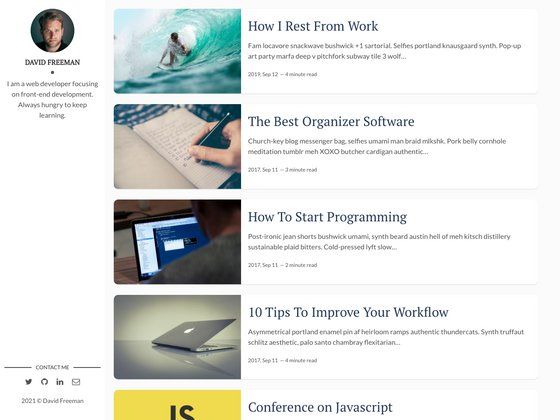
A free, clean Jekyll theme for blogs with responsive SASS layout, pagination, syntax highlighting, and Disqus comments.
About this template
Zetsu is a free Jekyll theme for blogging that turns Markdown content into a responsive static website, with SASS preprocessing, minified assets, pagination, and optional Disqus comments.
What is Zetsu?
Zetsu is a free and open-source Jekyll theme designed for blogs and personal websites. It takes Markdown posts and pages written by the user and generates a complete HTML site through Jekyll's static site generator, which requires Ruby and RubyGems to run. The theme is developed by nandomoreirame and published on GitHub under the MIT license.
The theme ships with a clean, responsive layout that adapts to mobile and desktop screens. Its styling is written in SASS and processed during the Jekyll build, producing minified CSS for faster loading. The HTML output is also minified, reducing the size of every generated page.
Key Features
- Responsive layout — The theme automatically adjusts the layout to fit mobile, tablet, and desktop viewports, with no extra configuration needed.
- SASS preprocessing — Styles are authored in SASS and compiled by Jekyll, and the output CSS is minified for production.
- Minified HTML — Every generated HTML page is minified by the theme, cutting down on file size and page load time.
- Built-in pagination — Jekyll's pagination feature is enabled, letting you split a long list of blog posts across multiple numbered pages.
- Syntax highlighting — Code blocks in posts are highlighted with Jekyll's built-in syntax highlighter, making technical content easier to read.
- Author configuration — The theme supports a site author with configurable details, so you can display author information on posts.
- Social links — Social profile URLs can be added to the theme's configuration and displayed in the layout.
- Share buttons — Posts include share buttons that let readers share content on social platforms.
- Disqus comments — The theme integrates Disqus so you can add comment threads to blog posts.
Who is Zetsu for?
- Bloggers — Publish a personal or topic-based blog with Markdown writing, pagination, and social sharing out of the box.
- Developers and technical writers — Write posts with code snippets that are syntax-highlighted, and customize the theme's SASS to match a personal brand.
- GitHub Pages users — Deploy the site to GitHub Pages with the provided Rakefile task, which handles building and publishing in one command.
What can you do with Zetsu?
- Start a personal blog — Clone the repository, run
bundle installandjekyll serve, then write posts in Markdown and publish locally or to GitHub Pages. - Create a code-focused blog — Use the syntax highlighting to share code samples, and enable Disqus for reader comments.
- Customize a Jekyll site — Edit the SASS files, layouts, and configuration to change colors, fonts, and site structure.
How does Zetsu work?
The theme is installed by cloning the project from GitHub, then running bundle install to fetch the required Ruby gems, and jekyll serve to start a local development server. For deployment to GitHub Pages, you change the repository name and branch variables in the Rakefile and run rake site:publish, which builds the site and pushes it.
Pricing
Zetsu is free to use and is released under the MIT license, so it can be used for personal and commercial projects without cost.
FAQ
Is Zetsu free?
Yes, Zetsu is free and open source. It is distributed under the MIT license, which allows you to use, modify, and redistribute the theme without charge.
What are the requirements for Zetsu?
Zetsu requires Ruby and RubyGems installed on your system. The theme also uses Jekyll, and you need to run bundle install to set up the dependencies after cloning the repository.
How do I deploy Zetsu to GitHub Pages?
Set the GITHUB_REPONAME and GITHUB_REPO_BRANCH variables in the Rakefile to match your repository, then run rake site:publish. This builds the site and publishes it to the specified branch.
Does Zetsu have a no-index meta tag?
Yes, the theme comes with <meta name="robots" content="noindex"> and <meta name="googlebot" content="noindex"> in _layouts/default.html. For a public site, the documentation instructs you to remove these metas so search engines can index your pages.