Template details
zhilu-cv
A Nuxt 4 personal resume template with PDF export, static deployment, and SCSS/UnoCSS styling.
About this template
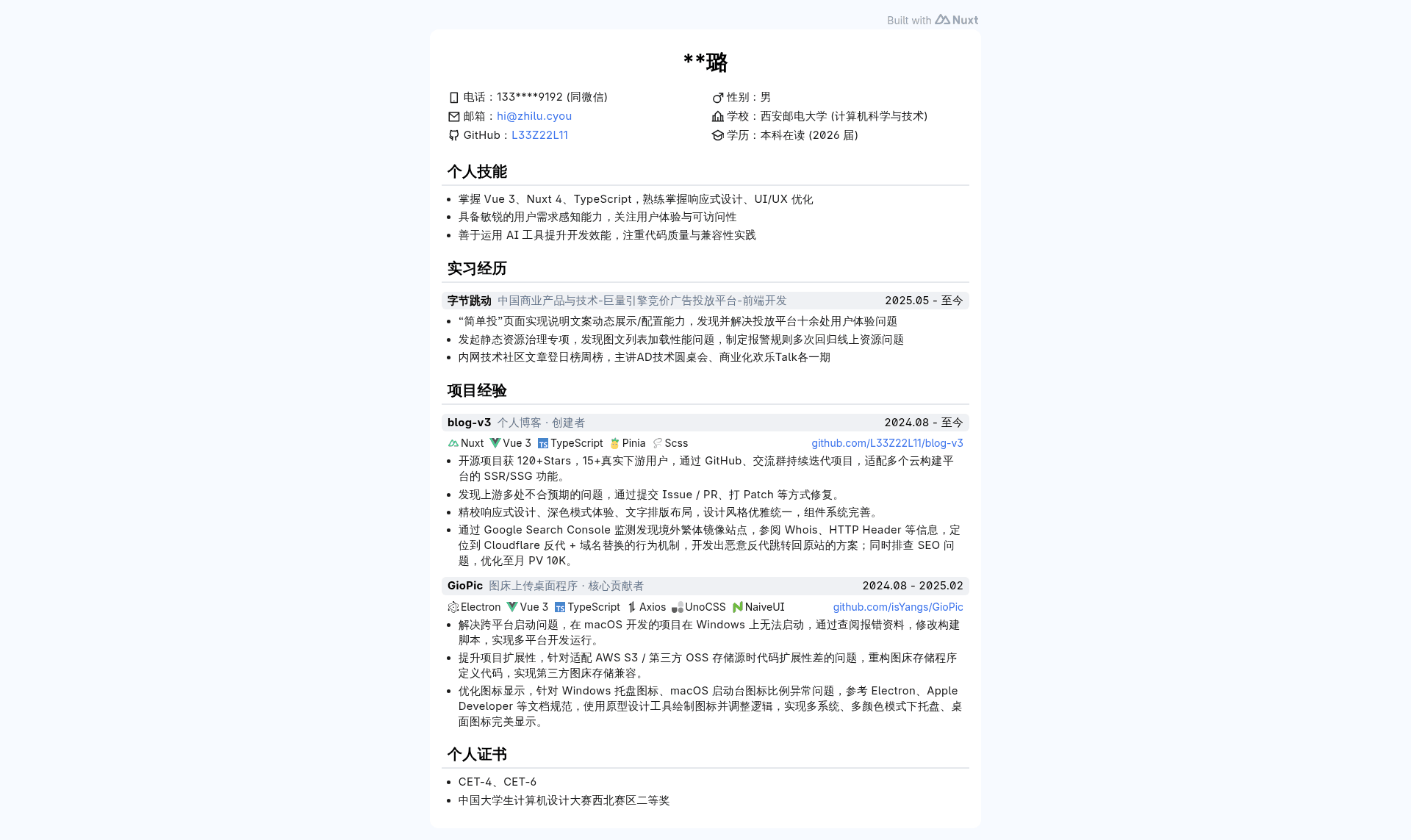
zhilu-cv is a Nuxt 4 personal resume template that turns a developer's profile into a static, deployable CV website with PDF export through the browser's print function.
What is zhilu-cv?
zhilu-cv is an open-source personal resume template built on Nuxt 4 and Vue 3, created by the developer 纸鹿 (Zhilu) as a web adaptation of their Word-format CV. The template takes personal information from a local .env file and structured Vue components, then renders a single-page resume website that can be deployed to Vercel, Netlify, or exported as a static site with pnpm run generate. The live preview is hosted at cv.zhilu.cyou.
Key Features
- Nuxt 4 + Vue 3 — The project runs on Nuxt 4 with Vue 3, configured through
nuxt.config.js, giving you a modern server-side-rendered or static site. - SCSS global styles — All global styling lives in
assets/main.scss, written in Sass, so you can adjust colors and layout in one place. - UnoCSS utilities — UnoCSS is integrated for on-demand utility class styling alongside SCSS, letting you write atomic classes without a full Tailwind setup.
- Iconify icon system — Icons come from Iconify via Nuxt Icon, with a mapping configuration in
utils/icon.ts; you can add new icons from Yesicon and get autocompletion with the Iconify IntelliSense plugin. - Reusable Vue components — The resume is composed of
InfoSection,InfoLi,InfoLink, andProjectcomponents, making it straightforward to rearrange sections or add portfolio entries. - Environment-based personalization — The
.envfile (excluded from Git) stores fields likeNAMEandPHONE; only local builds see those values. - PDF export via print — Starting the dev server and pressing
Ctrl + Pin the browser lets you save the page as a PDF, matching the print stylesheet. - Multiple deployment targets — The template works with Vercel, Netlify, and static hosting through
pnpm run generate.
Who should use zhilu-cv?
- Frontend developers — Build a tech-oriented resume that showcases projects using the
Projectcomponent and icon-based skill lists. - Job seekers in web development — Deploy the resume to a custom domain or export it to PDF for online and offline applications.
- Open-source learners — Study a clean Nuxt 4 project structure, including components, utils, and SCSS organization, and use it as a learning reference or base for custom portfolios.
What can you do with zhilu-cv?
- Launch a personal resume site — Run
pnpm devlocally, fill in your details, and deploy to Vercel or Netlify with your own domain. - Produce a print-ready PDF — Use the browser print dialog to generate a nicely formatted PDF version of the resume for job portals or email attachments.
- Customize the visual design — Modify
assets/main.scssand UnoCSS classes to match your brand, and add your own project entries through the existing Vue components.
How does zhilu-cv work?
- Install dependencies with
pnpm i. - Create a
.envfile with yourNAMEandPHONEvalues. - Add or modify icons via
utils/icon.tsand Yesicon, using the Nuxt Icon component. - Run
pnpm devto preview, orpnpm run generatefor a static build. - Export a PDF by pressing
Ctrl + Pin the browser.
Pricing
zhilu-cv is free and open-source under the MIT License, and the live preview is publicly accessible. No paid tiers are mentioned.
Alternatives
- resume.bikari.top — A similar resume website project by KazariEX that inspired this template; it also uses a Nuxt-based stack but has its own structure and design.
FAQ
How do I export a PDF from zhilu-cv?
Start the development server with pnpm dev, open http://localhost:3000 in your browser, press Ctrl + P, and choose "Save as PDF" as the destination. The print output matches the on-screen layout.
Can I deploy zhilu-cv to Vercel or Netlify?
Yes. The project is configured to work with both Vercel and Netlify, and you can also generate a fully static site using pnpm run generate for any static host.
Is zhilu-cv free to use?
Yes, it is released under the MIT License, so you can freely use, modify, and distribute it. The live preview at cv.zhilu.cyou is also publicly accessible.
How do I change the personal information on the resume?
Create a .env file in the project root with keys like NAME and PHONE and set your own values. This file is in .gitignore, so your data stays local and isn't committed to the repository.
What icon set does zhilu-cv use?
Icons are provided by Iconify through Nuxt Icon. You can search for icons on Yesicon, install a new set, and then reference it in components. A mapping for tech-stack icons is handled in utils/icon.ts.