Template details
Academic Pages
GitHub Pages template for personal and portfolio-oriented academic websites built on Jekyll and Markdown.
About this template
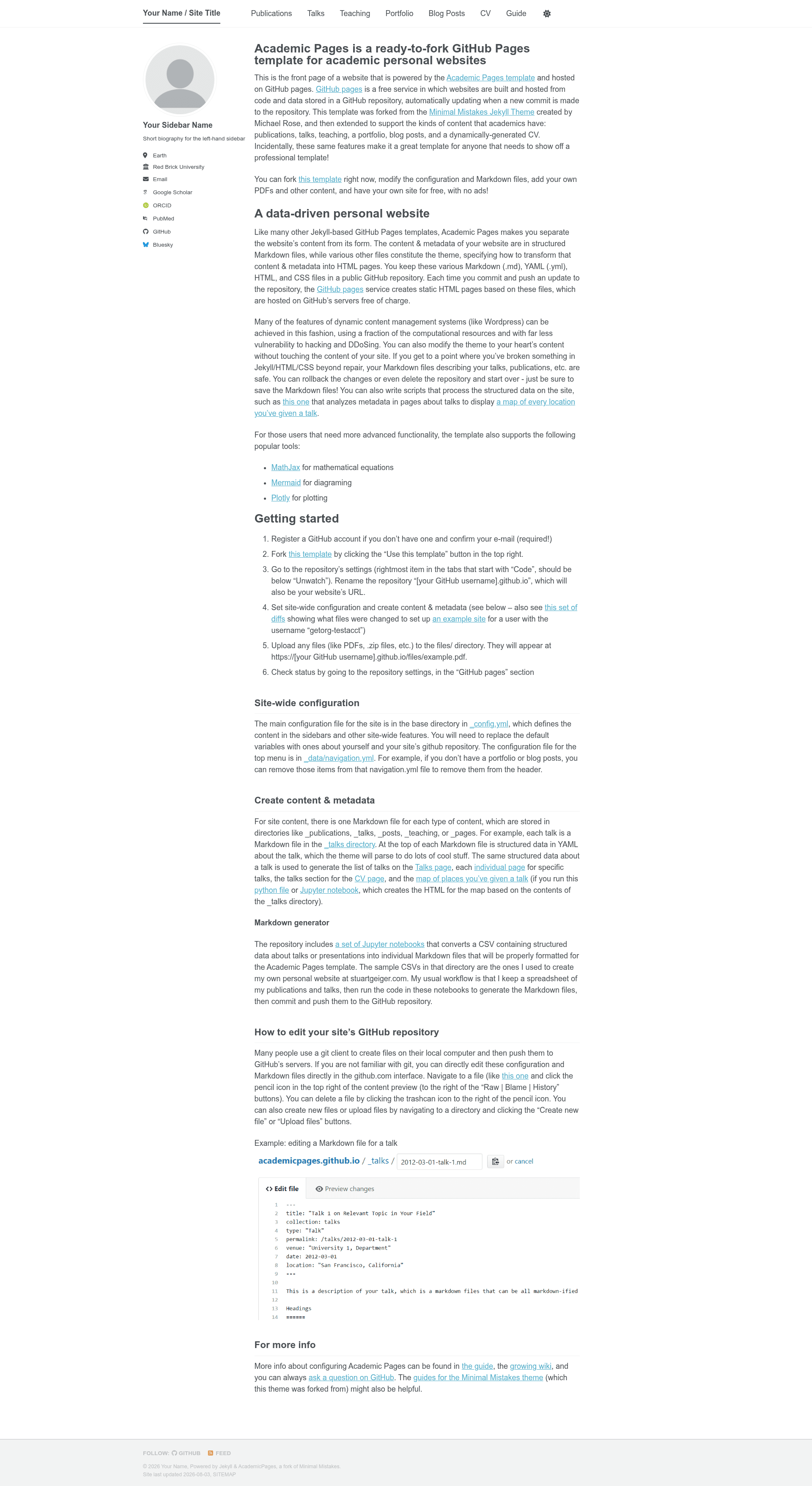
Academic Pages is a free GitHub Pages template for building personal and portfolio-oriented academic websites using Jekyll and Markdown.
What is Academic Pages?
Academic Pages is a Jekyll-based static site template designed to run on GitHub Pages. It takes Markdown content and a _config.yml configuration file as inputs and generates a complete personal website, including homepage, publications, talks, and portfolio sections. The template was forked by Stuart Geiger from the Minimal Mistakes Jekyll Theme and is currently maintained by Robert Zupko, with an MIT License.
Key Features
- GitHub Pages integration — Publish by pushing to a repository named
username.github.io; the template includes a pages-build-deployment GitHub Actions workflow that builds the site automatically. - Use this template workflow — Click "Use this template" on GitHub, set the repository name to your GitHub username plus
.github.io, and edit configuration in_config.ymlto get a live site. - Markdown generator — The
markdown_generatorfolder contains Jupyter notebooks and Python scripts that convert a TSV file into Markdown pages for publications and talks. - Files directory — Upload PDFs, zip archives, and other files to the
files/folder; they appear athttps://username.github.io/files/example.pdf. - Local preview — Run
jekyll serve -l -H localhostto serve the site at localhost:4000; Markdown and HTML changes rebuild automatically, though changes to_config.ymlrequire restarting Jekyll. - Docker support — A provided Dockerfile lets you run
docker compose upto serve the site on localhost:4000 without installing Ruby dependencies. - VS Code DevContainer — A development container configuration is included; reopening the repository in a container hosts the site locally with live updates.
- Theme foundation — Based on the Minimal Mistakes Jekyll Theme, released under MIT License.
Who is it for?
- Academic researchers and PhD students — create a personal homepage that lists publications, talks, and teaching experience.
- Postdocs and faculty — maintain an online portfolio of research output and professional activity.
- Graduate students — build a professional web presence ahead of job applications or conferences.
- Anyone needing a free personal site — use GitHub Pages hosting and Markdown authoring without paying for hosting or a domain.
What can you do with Academic Pages?
- Publish a resume-style site for free — host on GitHub Pages at a
username.github.ioURL with no server costs. - Generate publication pages from TSV — use the included notebooks/scripts to turn spreadsheet data into formatted Markdown pages.
- Share supplementary materials — drop PDFs and zips into
files/for direct, permanent links from your site. - Run a local development environment — preview your site with Jekyll, Docker, or a VS Code DevContainer before pushing changes.
How does Academic Pages work?
To get started, register a GitHub account, click "Use this template," and name the repository yourusername.github.io. Then edit _config.yml to set the site URL and repository path, add content as Markdown, and check the GitHub Pages status in repository settings. Optionally, run the markdown generator to create publication and talk pages, and use bundle install plus jekyll serve to preview locally.
Pros and cons
- Free and open source — no cost for the template or hosting on GitHub Pages.
- Easy version control — content is plain Markdown and YAML, fully tracked by Git.
- Flexible hosting — works on GitHub Pages, locally, or in Docker/VS Code containers.
- Upstream updates are hard to merge — customizing the template causes merge conflicts when syncing with the upstream repository; rebasing and cherry-picking recommended.
- Requires Ruby for local builds — installing ruby-dev, bundler, and nodejs is needed unless you use Docker.
FAQ
Is Academic Pages free?
Yes. The template is open source under the MIT License, and hosting it on GitHub Pages is free for public repositories. You only pay if you choose a custom domain or a private repository plan.
Do I need to know how to code to use it?
Basic familiarity with Git and YAML helps, but the quickstart is entirely click-based: use the template, edit _config.yml, and add Markdown files. The optional markdown generator scripts for TSV-to-Markdown require Python or Jupyter, but they are not required.
Can I use Academic Pages for a non-academic portfolio?
Yes, although the template is oriented to academics with built-in sections for publications and talks. The underlying Jekyll/Minimal Mistakes structure is general enough to be customized for any personal or portfolio website.
What is the difference between using it as a template and forking it?
Using it as a template makes it your own repository, but you cannot easily pull in upstream bug fixes later. Forking lets you sync changes from the original repository, but you must handle merge conflicts from your customizations.