Template details
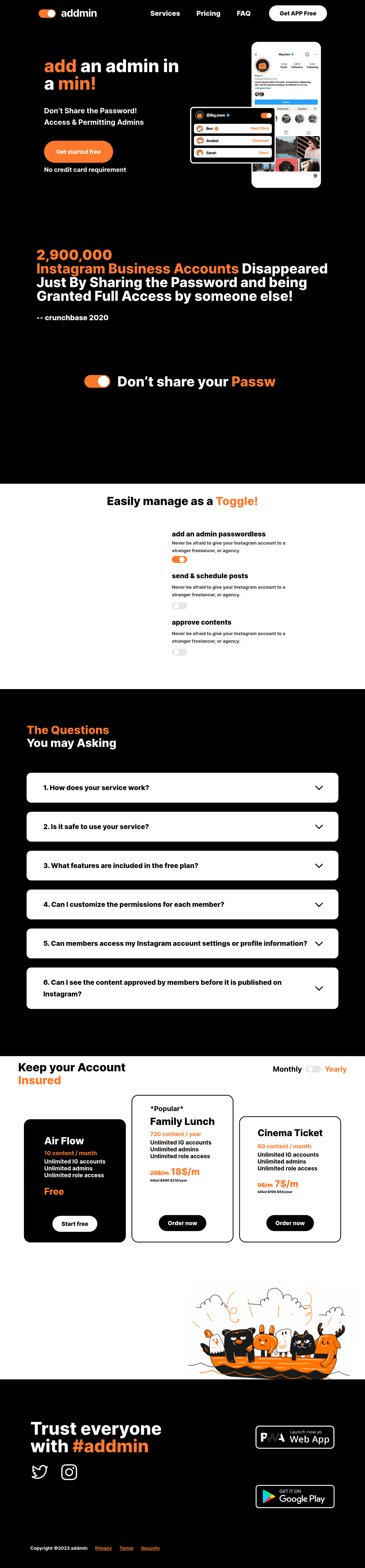
Addmin Landing
Freelance landing page implementation project built with Next.js, TypeScript, Tailwind CSS, and PostCSS.
About this template
Addmin Landing is a Next.js boilerplate for building freelancer landing pages, bundling the create-next-app starter with TypeScript, Tailwind CSS, and PostCSS.
What is Addmin Landing?
Addmin Landing is a freelance landing page implementation project bootstrapped with create-next-app. It runs on Next.js with the pages router, using pages/index.tsx for the main page and pages/api for serverless API routes. The template takes TypeScript and Tailwind CSS as its default stack and outputs a Vercel-deployable static or server-rendered landing page.
The repository metadata lists it as a "freelance landing page implementation project" and includes SonarLint among its topics, indicating static code analysis is part of the intended workflow. The standard create-next-app README is present, so the project inherits all the standard Next.js development commands and deployment paths.
Key Features
- Tailwind CSS styling — utility-first styling is configured via PostCSS, so you can build the landing page UI directly with utility classes.
- TypeScript support — all starter files use TypeScript, giving typed props for React components from the first edit.
- Next.js pages router — the project uses pages/index.tsx as the landing page and pages/api/hello.ts as a working API route example.
- Automatic font optimization — next/font loads the Inter Google Font with automatic optimization and no layout shift.
- Vercel deployment — one-click deploy to the Vercel Platform is the documented path, and the README links to Next.js deployment docs.
- API routes — any file placed in pages/api is mapped to an /api/* endpoint and runs as a serverless function.
- Multi-package manager support — development server can be started with npm run dev, yarn dev, or pnpm dev.
- SonarLint-friendly setup — the repository topics include SonarLint, which can be used for static code review during development.
Who is it for?
- Freelance developers who need a pre-configured Next.js and Tailwind base to start a client landing page without repeating boilerplate setup.
- Next.js learners who want a minimal pages-router project annotated with the official create-next-app README.
- Agencies deploying to Vercel who require a simple, standards-based starter that can be quickly customized and published.
What can you do with Addmin Landing?
- Create a landing page quickly: edit pages/index.tsx to replace the starter content with your own copy, and the browser hot-reloads via the development server.
- Test serverless functions: use pages/api/hello.ts as a template for adding your own API routes behind /api endpoints.
- Customize styling: apply Tailwind utility classes directly in the JSX to change colors, spacing, and layout without a separate CSS build step.
How does Addmin Landing work?
Run npm run dev (or yarn dev or pnpm dev) in the project root, open http://localhost:3000, and the landing page appears. Editing pages/index.tsx triggers automatic browser updates; adding a file to pages/api exposes it as a route under /api.
FAQ
How do I start the development server?
Run npm run dev, yarn dev, or pnpm dev in the project directory, then open http://localhost:3000 with your browser. The page auto-updates as you edit pages/index.tsx.
Where do I edit the landing page content?
The main landing page lives in pages/index.tsx. The endpoint for the sample API route is pages/api/hello.ts and is reachable at http://localhost:3000/api/hello.
How do I deploy Addmin Landing?
The README points to the Vercel Platform as the easiest deployment method. The Next.js deployment documentation link in the README covers alternative hosting options.
Does Addmin Landing use Tailwind CSS?
Yes. Tailwind CSS is part of the project stack along with PostCSS and TypeScript, as shown in the repository's source tags and topics.
What font does Addmin Landing use?
The project uses next/font to load the Inter Google Font, which is automatically optimized and self-hosted to avoid layout shift.