Template details
Solid
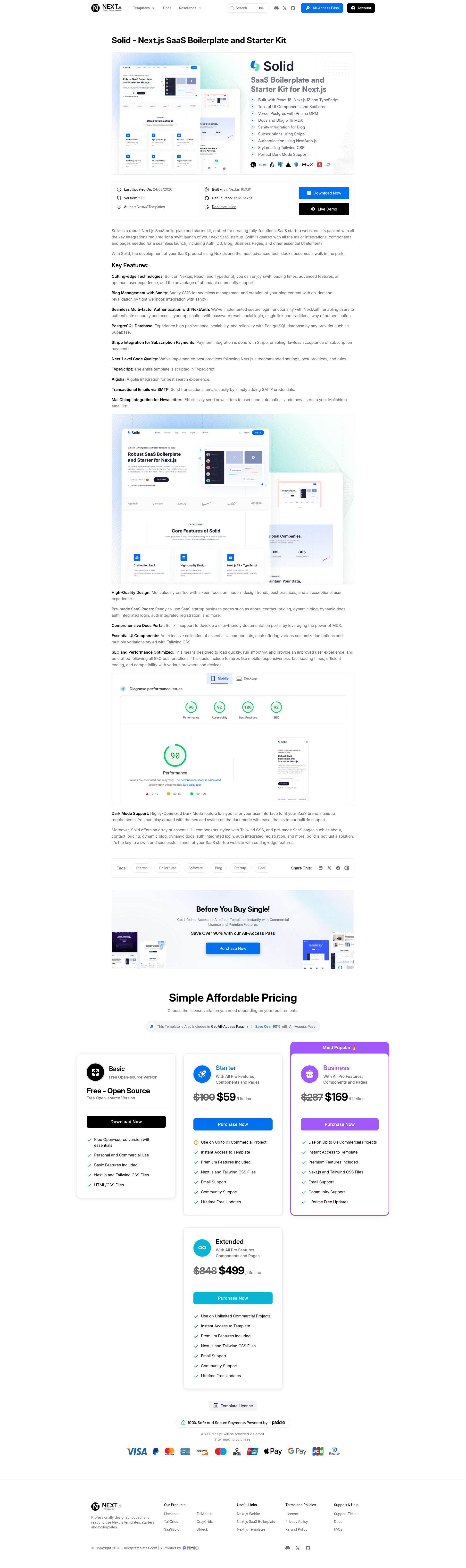
Solid is a free, open-source Next.js template for SaaS, software, and startup sites with pre-built sections.
About this template
Solid is a free, open-source Next.js web template from Next.js Templates for building complete marketing sites and landing pages for SaaS, software, and startup products.
What is Solid?
Solid is a free Next.js template specifically crafted for startups, SaaS, and software websites. It provides an extensive array of necessary sections, elements, and pages required to build a fully-equipped website, built with Next.js 16, React 19, TypeScript, and Tailwind CSS v4. The template is maintained by NextJSTemplates on GitHub and is licensed as 100% free and open-source for personal and commercial projects.
Key Features
- Modern framework stack — Built with Next.js 16, React 19, TypeScript, and Tailwind CSS v4, giving you server rendering, static generation, and utility-first styling.
- Homepage sections — The landing page includes a hero area, brand logo bar, features section, about section, tabbed features with counters and star ratings, integration options, call-to-action banners, an accordion-based FAQ, testimonials, pricing tables, a contact section, blog preview, and a distinctive footer.
- External pages — Ready-made login, registration, blog grid, and single blog post pages are included to extend the site beyond the landing page.
- One-click deployment — The README includes Deploy with Vercel and Deploy with Netlify buttons that clone the GitHub repository and start a production deployment.
- Free and commercial use — Solid Free is open-source and free to use in personal and commercial projects, with community support and free lifetime future updates.
- Pro upgrade path — A paid Solid Pro version adds integrations like Auth, DB, Stripe, MDX, and a functional Sanity blog, plus premium email support and functional external pages.
Who is it for?
- Startup founders — Launch a marketing site for a new SaaS or software product without hiring a designer, using the pre-built hero, pricing, and FAQ sections.
- SaaS developers — Use Solid as a starting point for a Next.js app; the free version provides the UI so you can integrate your own backend and authentication.
- Web designers and agencies — Customize the template to quickly deliver client sites for software companies, since it includes all the sections a typical SaaS landing page needs.
What can you do with Solid?
- SaaS teams: Publish a marketing site with feature highlights, pricing tables, testimonials, and FAQ sections to drive conversions.
- Indie hackers: Deploy a landing page to Vercel or Netlify in minutes by cloning the repo and using the one-click deploy buttons, then iterate on the copy and design.
- Agencies: Reuse the template as a base for multiple client projects by swapping the branding, colors, and content in the Tailwind-styled components.
How does Solid work?
Download the template, extract it, and run npm install --legacy-peer-deps to install dependencies, then npm run dev to start the project on localhost:3000. The --legacy-peer-deps flag is currently required because React 19 causes peer dependency conflicts with some packages. After customizing, deploy by connecting the GitHub repo to Vercel or Netlify.
Pricing
Solid Free is open-source and free for personal and commercial use. A paid Solid Pro tier adds integrations (Auth, DB, Stripe, MDX), a functional Sanity blog, and premium email support; the free version is UI-only with no integrations or functional blogging system.
FAQ
Is Solid free?
Yes, Solid Free is 100% free and open-source under a standard license that allows personal and commercial use. There is also a paid Pro version with additional integrations.
What is the difference between Solid Free and Solid Pro?
Solid Free is UI-only: it has no integrations, no functional blogging system, and its external pages are static. Solid Pro adds essential integrations like Auth, DB, Stripe, MDX, a fully functional Sanity blog, premium email support, and functional external pages.
How do I install Solid?
Extract the template, then run npm install --legacy-peer-deps in the directory to install dependencies. Run npm run dev to start the project on localhost:3000. Documentation is available on the Next.js Templates site.
Does the free version include a blog?
The free version includes blog grid and single post page templates, but they are not connected to a functional blogging system. The Pro version adds a ready-to-use Sanity blog support.
Can I deploy Solid with Vercel or Netlify?
Yes, one-click deployment buttons for Vercel and Netlify are included in the README. You can also deploy from the GitHub repository through the normal platforms.