Template details
Webtrotion
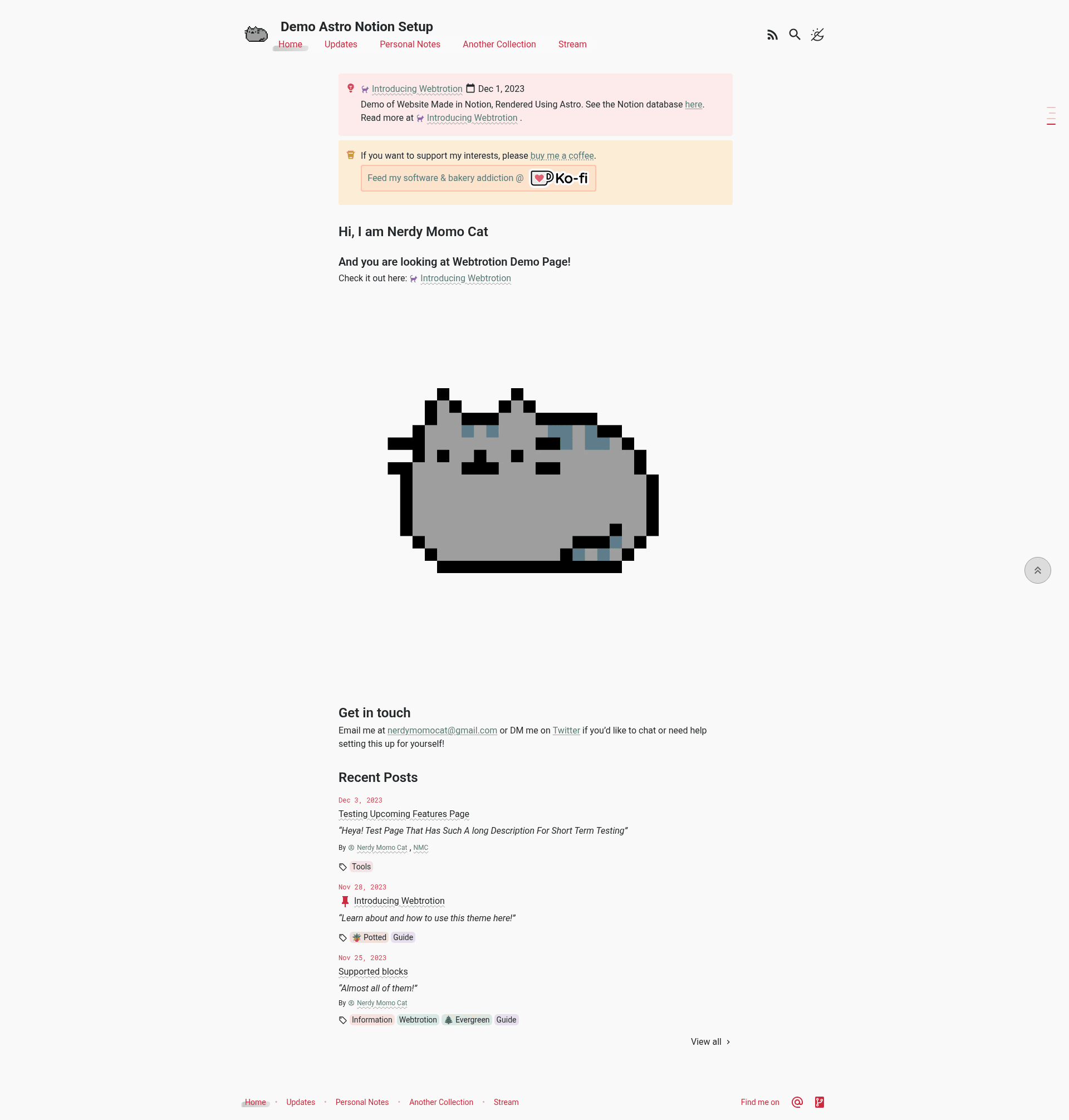
Webtrotion is an easy-to-install, highly-configurable starter built with Astro and Notion, perfect for a blog or a full website.
About this template
Webtrotion is an open-source, MIT-licensed starter template that combines Astro and Notion to produce a fully static website or blog that can be deployed for free on GitHub Pages.
What is Webtrotion?
Webtrotion is an easy-to-install, configurable starter built with Astro v5 and Tailwind v4 that uses Notion as its content source. It takes Notion pages and blog posts as input and outputs a fully static site that deploys to GitHub Pages via GitHub Actions. The template is maintained by Nerdy Momo Cat and is available on GitHub under the MIT license. Its single-file configuration centralizes theming and settings, avoiding the scattered code edits common with other Notion website builders.
Key Features
- Astro v5 and Tailwind v4 — the template is built on the Astro v5 framework with Tailwind v4 styling, and all Tailwind utility classes come with Notion color matching.
- Single-file configuration — all site settings live in one constants-config file; in version 2.0.0 this file uses the JSON5 format and controls everything from theme colors to dark/light mode.
- Notion as a CMS — connect a Notion workspace and manage both pages and blog posts there; the template renders them into a website, not just a blog.
- Automatic Open Graph images — Satori generates open graph PNG images that include your featured image for every page.
- RSS and sitemap generation — an RSS feed with full content and an XML sitemap are produced automatically during the build.
- Comments and social features — supports Giscus and Bluesky comments, Webmentions, pinned posts, and mini blog streams inspired by Linus's stream.
- Search and navigation — includes the Pagefind static search library, a floating table of contents, footnotes and citation support, and Wikipedia-like hover popovers for links to any block on any page.
- Build optimization — API request output is cached on GitHub Actions to keep build times fast, and related content plus pages that link to the current page are auto-generated.
Who is it for?
- Independent bloggers who want to write in Notion and publish a free, static blog with RSS, comments, and open graph images.
- Developers building personal or project sites who want a customizable Astro + Tailwind stack with single-file configuration and no paid hosting.
- Teams or creators looking for a Notion-powered CMS who want both pages and posts in Notion without the domain restrictions of services like super.so.
What can you do with Webtrotion?
- Publish a personal blog — write posts in Notion, then get a static site with pagination, related content, Giscus or Bluesky comments, and an RSS feed.
- Build a full website — use Notion to manage custom pages alongside posts, with a floating table of contents and wiki-like link popovers.
- Run a free documentation or news site — leverage the MIT license, GitHub Pages deployment, and built-in search to host content at no cost.
How does Webtrotion work?
Webtrotion uses GitHub Actions to query the Notion API, convert your Notion content into Astro pages, and build a static site that deploys to GitHub Pages. The build caches API request output so subsequent builds are faster. Configuration is done in a single constants-config file, which was changed to JSON5 in version 2.0.0.
Pros and cons
- Pro: Free static hosting on GitHub Pages with no custom domain required.
- Pro: MIT license means you can reuse and modify the template freely.
- Con: Upgrading to v2.0.0 requires migrating your constants-config to the new JSON5 format, or your setup may break.
Pricing
Webtrotion is free and open source under the MIT license. The author accepts optional support via Ko-fi at ko-fi.com/nerdymomocat.
Alternatives
- super.so — a proprietary Notion website builder that handles hosting for you but is less configurable.
- notion-astro-blog — another open-source Astro + Notion starter that Webtrotion is partly based on.
FAQ
Is Webtrotion free?
Yes, Webtrotion is open source under the MIT license. It deploys to GitHub Pages using GitHub Actions, so there are no hosting or platform fees. The author accepts optional donations via Ko-fi.
What does Webtrotion do?
Webtrotion turns a Notion workspace into a fully static website or blog. It uses Astro v5 and Tailwind v4 to render pages and posts, and includes automatic RSS, sitemap, open graph images, comments, search, and more.
Do I need a custom domain for Webtrotion?
No. The template is designed to work with the default GitHub Pages github.io domain. Custom domains are supported by GitHub Pages, but they are not required.
What changed in Webtrotion v2.0.0?
Version 2.0.0 updated the configuration format to JSON5. Existing constants-config files must be migrated to the new .json5 format, otherwise your setup or runtime behavior may break.
Can I use Webtrotion for a full website or just a blog?
Both. Webtrotion integrates Notion to create a website and not just a blog, with features like custom pages, mini blog streams, and a floating table of contents.