Template details
AdminKit
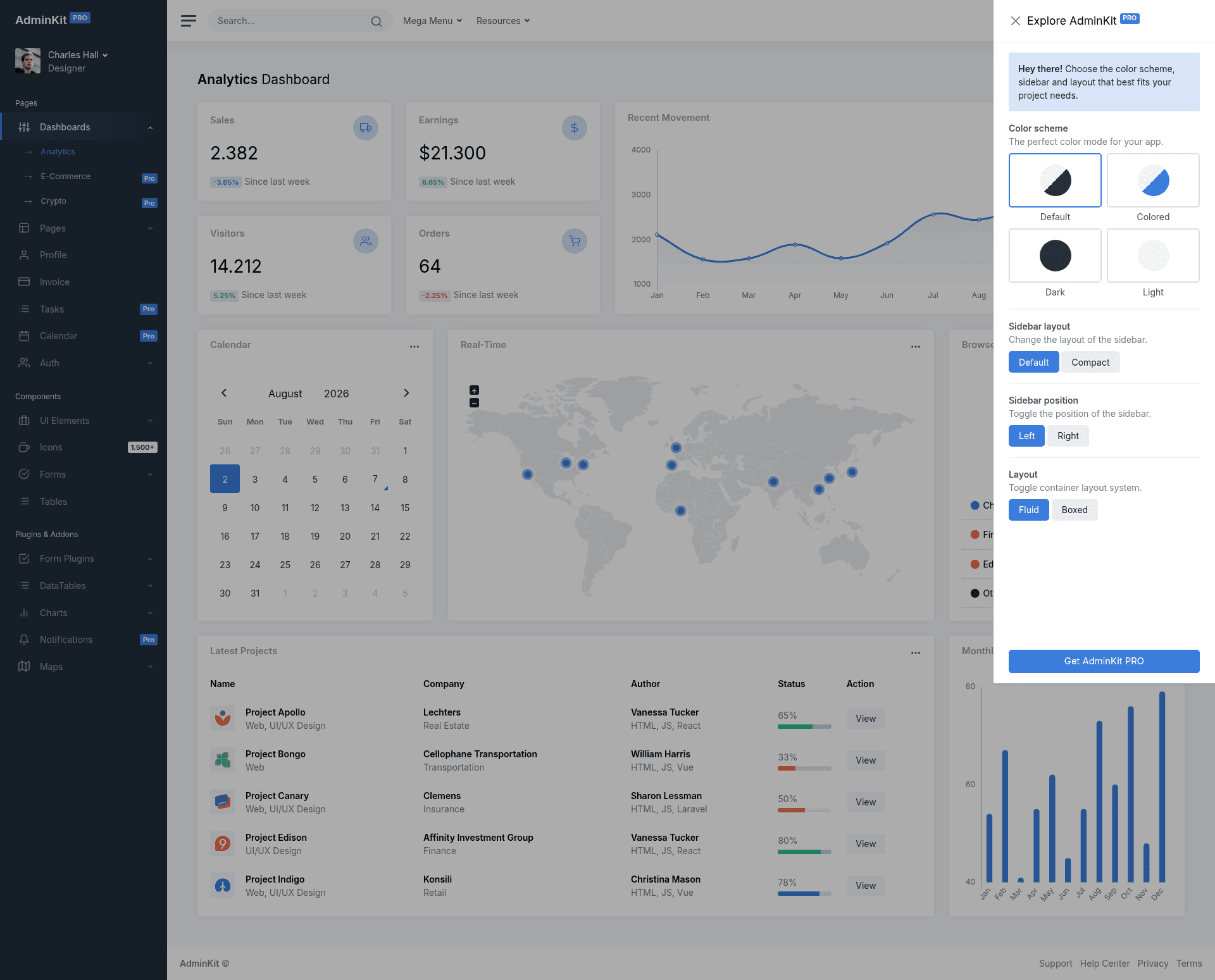
AdminKit is a free & open-source HTML dashboard & admin template based on Bootstrap 5.
About this template
AdminKit is a free and open-source HTML admin dashboard template built on Bootstrap 5, published on GitHub under the MIT license and distributed through npm as @adminkit/core. It provides hundreds of UI components, forms, tables, charts, pages, and icons in a jQuery-free package, with source files compiled by Webpack into a deployable dist folder.
What is AdminKit?
AdminKit is a Bootstrap 5 dashboard template that takes handwritten HTML, SCSS, and JavaScript source files as input and produces a responsive, browser-ready admin interface as output. It runs entirely in the browser, requires no server-side framework, and is maintained by the AdminKit team with a live demo at demo.adminkit.io and documentation at adminkit.io/docs. The template is free to use under the MIT license, with an optional paid PRO version that adds more pages and plugins.
Key Features
- No jQuery dependency — AdminKit and every third-party library it uses are written in vanilla JavaScript, so you can integrate it without pulling in jQuery.
- Webpack-based build tools — The repo includes a custom Webpack config that recompiles and minifies theme assets; run
npm installthennpm startfor a local server at localhost:8080, ornpm run buildto output optimized files todist/. - SCSS architecture — Source styles are organized into
1-variables,2-mixins,3-components,4-utilities, and5-vendorfolders insidesrc/scss, making theme customization straightforward. - CDN support — All files in the
@adminkit/corenpm package are available via unpkg, so you can link the CSS fromhttps://unpkg.com/@adminkit/core@latest/dist/css/app.cssand the JS from the matchingapp.jsURL without a build step. - Fully responsive — The layout supports mobile, tablet, and desktop viewports and is tested in Chrome, Firefox, Safari, Opera, and Edge (last two versions, with last version for Edge).
- Regular updates — The maintainers ship periodic updates with new components, improvements, and bug fixes, and the GitHub repository tracks open and closed issues publicly.
Who is it for?
- Front-end developers who need a Bootstrap 5 boilerplate for admin panels and can customize the SCSS variables without deep expertise.
- Agencies and freelancers building back-office interfaces for clients can use the 15 included demo pages as a starting point and deploy via the compiled
distfiles or CDN links. - Product teams that want to avoid a jQuery dependency can leverage AdminKit's vanilla JavaScript setup and Webpack integration to keep their dashboard lightweight.
- Developers learning Bootstrap 5 can study the readable, well-documented handwritten code and file structure to understand component patterns.
What can you do with AdminKit?
- Build an analytics dashboard: Use the included charts, tables, and UI components to assemble a data-heavy admin interface without designing from scratch.
- Create a custom back-office theme: Modify the SCSS variables, mixins, and utilities to match a client's brand, then rebuild with
npm run build. - Quickly prototype a web app's admin area: Link the CDN files directly into a prototype to get Bootstrap 5 styling and interactive components without a build step.
- Ship a production admin panel: Compile and minify assets with Webpack and deploy the
distfolder, knowing the layout is responsive and cross-browser tested.
How does AdminKit work?
Clone the repository or download the ZIP, install dependencies with npm install, then use npm start to launch the Webpack dev server at localhost:8080. The source lives in src/ with SCSS in src/scss and JavaScript modules in src/js/modules; running npm run build compiles and minifies everything into dist/css/app.css and dist/js/app.js, which you can also load directly from unpkg.
Pros and cons
- Pros: Free and open-source under MIT; no jQuery; well-documented code; responsive and cross-browser; includes a live demo and documentation site.
- Cons: The free version is limited to 15 demo pages, 1 plugin, and 1 color scheme; some sections such as calendar and advanced forms require the paid AdminKit PRO upgrade.
Pricing
AdminKit is free and open-source under the MIT license, with the source available on GitHub and the @adminkit/core package on npm. A commercial upgrade called AdminKit PRO adds 45+ demo pages, 10+ plugins, 3 color schemes, dark mode, calendar, advanced forms, drag and drop, toast notifications, and WYSIWYG editors; pricing is listed on adminkit.io/pricing.
FAQ
Is AdminKit free?
Yes, AdminKit is free and open-source, released under the MIT license. You can clone the GitHub repository, download the ZIP, or install the @adminkit/core npm package, and all core files and demo pages come without a license fee.
Does AdminKit require jQuery?
No. AdminKit and all of the third-party libraries it uses are written in vanilla JavaScript, so jQuery is not a dependency. This keeps the bundle smaller and removes a common compatibility concern.
How do I customize the theme?
The source uses SCSS organized into variables, mixins, components, utilities, and vendor folders under src/scss. Edit the variable files and run npm run build to recompile the CSS, or use npm start to see changes live on the Webpack dev server.
What is included in the free version?
The free version includes 15 demo pages, 1 plugin, and 1 color scheme. The PRO upgrade adds 45+ demo pages, 10+ plugins, 3 color schemes, dark mode, a compact sidebar, calendar, advanced forms, drag and drop, toast notifications, and WYSIWYG editors.
What browsers are supported?
AdminKit is tested in the latest version of Edge and the last two versions of Firefox, Chrome, Safari, and iOS Safari. The CSS and JavaScript are compiled to be compatible with those browsers.