Template details
Am Writing
A Hugo theme for authors to showcase books, run a blog, and connect with readers.
About this template
Am Writing is a free, MIT-licensed Hugo theme that lets authors and writers publish a personal website with a book catalog, an author blog, and reader-facing social links. It is built on the Hugo static site generator, so the input is Markdown content with front matter and the output is a fast, static HTML site with no database.
What is Am Writing?
Am Writing is a Hugo theme created by Wivik for authors who want an easy-to-maintain website. It takes Hugo content files — book pages with metadata like ISBN, page count, word count, and purchase links — and renders them into a public book catalog, along with optional blog posts and an About section. The theme includes French and English translations out of the box and can be configured for a single language or both.
Key Features
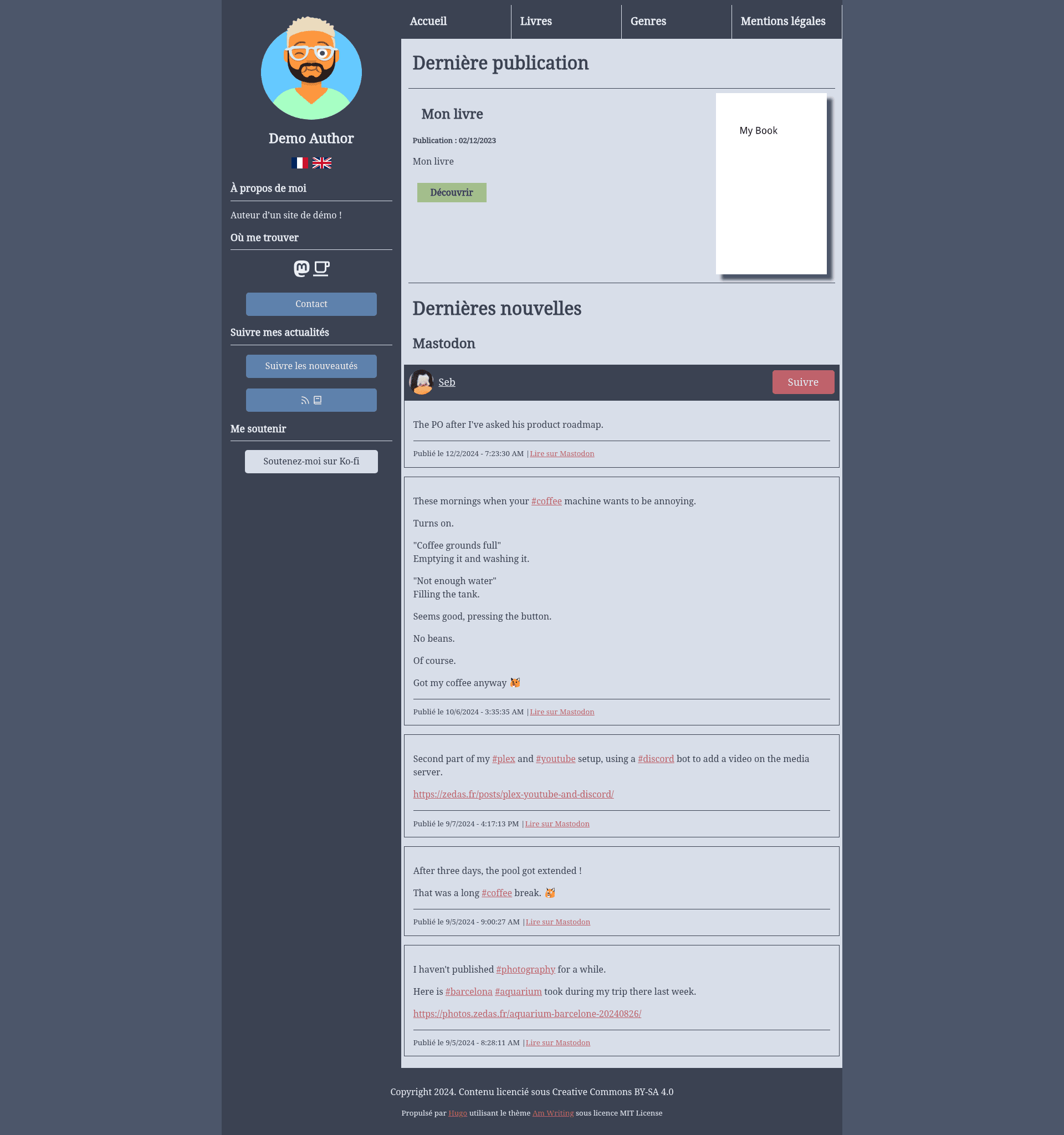
- Multiple color themes — Built-in nord, catpuccin-latte, catpuccin-frappe, and dark palettes, switchable through the
params.themesetting. - Multilingual support — Ships with French and English locales; language-specific content folders let you translate book titles, bios, and menu items.
- Book metadata display — Each book page can show cover, ISBN, pages, words, genres, and links to Amazon, Google Play, Neovel, Xinxii, Patreon, and a main purchase link.
- Mastodon feed integration — The sidebar pulls in your recent Mastodon posts, with the post count controlled by
params.mastodonMaxItems(default 5). - Author monetization links — Dedicated fields for Patreon, Ko-fi, Liberapay, and a commission status button, so readers know if you are open for commissions.
- Built-in author blog — Enable the blog in the config, create posts with
hugo new --kind blog, and it appears alongside your books. - Subscribe page — A ready-made page generated from shortcodes that aggregates RSS feeds, a newsletter signup form, and Mastodon follow link.
- RSS and genre taxonomy — Automatic RSS for book releases and blog posts, plus book genres with a dedicated taxonomy page.
- Two book list layouts — Choose between the default grid with descriptions and the older compact list layout via
params.bookListType.
Who is it for?
Am Writing targets self-published authors, indie writers, and author-bloggers who need a simple but professional web presence. It is especially useful for authors who publish across multiple platforms and want one place to direct readers to Amazon, Google Play, and other retailers, or who want to build a mailing list with a newsletter integration code from a provider like Mailchimp.
What can you do with Am Writing?
- Self-published authors: Build a complete book catalog with covers, buy links, and free EPUB downloads, and publish updates without writing any HTML.
- Writers with a blog: Turn the site into an author blog by enabling the blog feature and writing posts alongside book pages.
- Multilingual authors: Maintain the same book in French and English using matching file names across
content/frandcontent/en, with language-specific titles and menus. - Authors building an audience: Add a subscribe page that aggregates your RSS feeds, newsletter signup form, and Mastodon profile, so readers can follow you from one place.
How does Am Writing work?
After cloning the theme into themes/am-writing, you set theme: am-writing in your Hugo config and add the required taxonomies and language blocks. You then create a book by running hugo new content books/my-book.md --kind book and fill in the front matter; Hugo generates the static site. The blog uses a simple archetype (hugo new --kind blog blog/my-first-post.md), and the subscribe page is added by copying subscribe-example.md to content/subscribe.md.
FAQ
Is Am Writing free?
Yes. The theme is released under the MIT license, so you can use, modify, and redistribute it freely. The bundled fonts (Droid Serif and Droid Sans) and icon set (Remix Icons) are licensed under Apache 2.0, and the Catpuccin and Nord color schemes are MIT licensed.
How do I add my books?
You create a new book with Hugo's archetype: hugo new content books/my-book.md --kind book. Then edit the front matter fields like cover, ISBN, pages, words, genres, and retailer links. The theme expects the cover image to be placed in the /static folder.
Does Am Writing support multiple languages?
Yes. By default it includes French and English. You configure both languages in hugo.yaml under the languages key, and you put content in content/fr and content/en. For translated books, the Markdown file must have the same name in both folders; only the title and front matter change.
Can I add a newsletter signup?
Yes. Set params.newsletterIntegrationCode with your provider's embed code, and use the newsletter shortcode on the subscribe page. If you also set params.newsletterSubscriptionLink, that link takes precedence and the embedded form is not shown.
How do I display my Mastodon feed?
Set params.mastodon to your Mastodon profile URL. The theme then fetches and displays your recent posts in the sidebar, with the number controlled by params.mastodonMaxItems.