Template details
app-landing
100% vibe-coded mobile app landing page template built with Next.js, React, and Tailwind CSS — drop in your app's content and deploy.
About this template
app-landing is a free, MIT-licensed mobile app landing page template built with Next.js, React, and Tailwind CSS that compiles a single TypeScript config file into a static, deployable website.
What is app-landing?
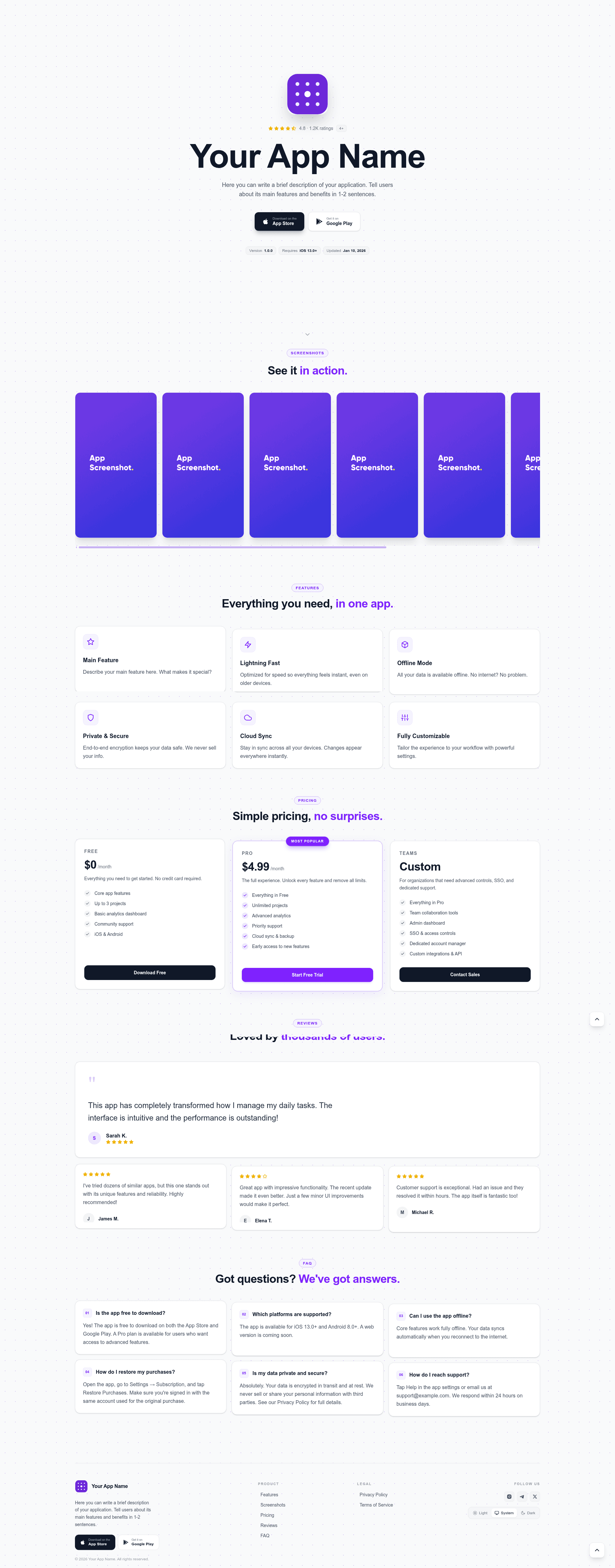
app-landing is a starter template for creating promotional pages for mobile apps. It takes your app's metadata (name, icon, App Store and Google Play links, rating, screenshots, pricing tiers, reviews, and FAQs) from one centralized config file and produces a static site with a hero section, gallery, pricing, reviews, and FAQ. The template runs on Next.js with the static export option, so output is plain HTML that can be hosted on any static file server. It was created by bohd4nx and published under the MIT license.
Key Features
- Hero section with app store buttons — Displays App Store and Google Play links, rating score and count, version, minimum OS, and release date pulled from the config.
- Screenshot gallery — Shows app screenshots from the
public/assets/screenshots/folder with a violet scrollbar that stays visible. - Pricing tiers — Renders Free, Pro, and Teams cards, with any card marked
highlighted: truevisually emphasized. - Review and FAQ sections — Includes customer review cards with star ratings and an accordion-style FAQ, all driven by array data in the config.
- Theme toggle — Light, Dark, and System modes with the choice persisted in localStorage.
- Legal pages from Markdown — Privacy Policy and Terms of Service render from editable
.mdfiles atsrc/app/privacy-policy/privacy.mdandsrc/app/terms-of-service/terms.md. - Optional App Store metadata fetch — Set
storeConfig.fetchRealDatatotrueand provide an App Store app ID to hydrate real listing data at build time. - Static export and small deployment footprint — Uses Next.js
output: 'export'inside a project that requires only Node.js 20+ and pnpm.
Who is it for?
app-landing suits indie app developers who need a server-less landing page with app store integration, startup teams that want a marketing page with predetermined sections, and designers who want a code-based starting point for a mobile app launch. It is also for developers who prefer editing everything in a single src/config.ts file rather than touching React components.
What can you do with it?
- Indie mobile developers: drop in your app's name, store links, screenshots, and rating, run
pnpm build, and deploy the resultingout/folder to GitHub Pages, Netlify, or any static host. - Product teams: customize pricing tiers and use the
highlightedflag to steer visitors toward a specific plan, and add customer testimonials to build social proof. - Open-source maintainers: fork the MIT-licensed repo and use its built-in Markdown-based Privacy Policy and Terms pages as legal scaffolding.
How does it work?
Clone the repository, install dependencies with pnpm install, then run pnpm dev for a live-reload development server. All site content lives in src/config.ts, and legal text lives in Markdown files; after editing, pnpm build statically exports the site to an out/ directory. Optional App Store metadata can be fetched at build time by enabling storeConfig.fetchRealData and supplying the numeric App Store app ID.
Pricing
The template is free to use, modify, and redistribute under the MIT license. It ships with example Free, Pro, and Teams pricing tiers for your app's own pricing section, editable through the pricingTiers array in the config.
FAQ
Is app-landing free?
Yes, the template is free and released under the MIT license, so you can use it for personal or commercial projects, modify it, and redistribute it.
What do I need to run it?
You need Node.js 20 or newer and pnpm. No database, backend, or API keys are required for the basic static export path.
Can I use my own screenshots and icons?
Yes. Place screenshots in public/assets/screenshots/ and point the screenshots array at those paths. The logo is set via site.logo and any SVG works.
Does app-landing require a server?
No. Because it uses Next.js static export, the output is pure HTML, CSS, and JavaScript that runs on any static file host.