Template details
Manduca
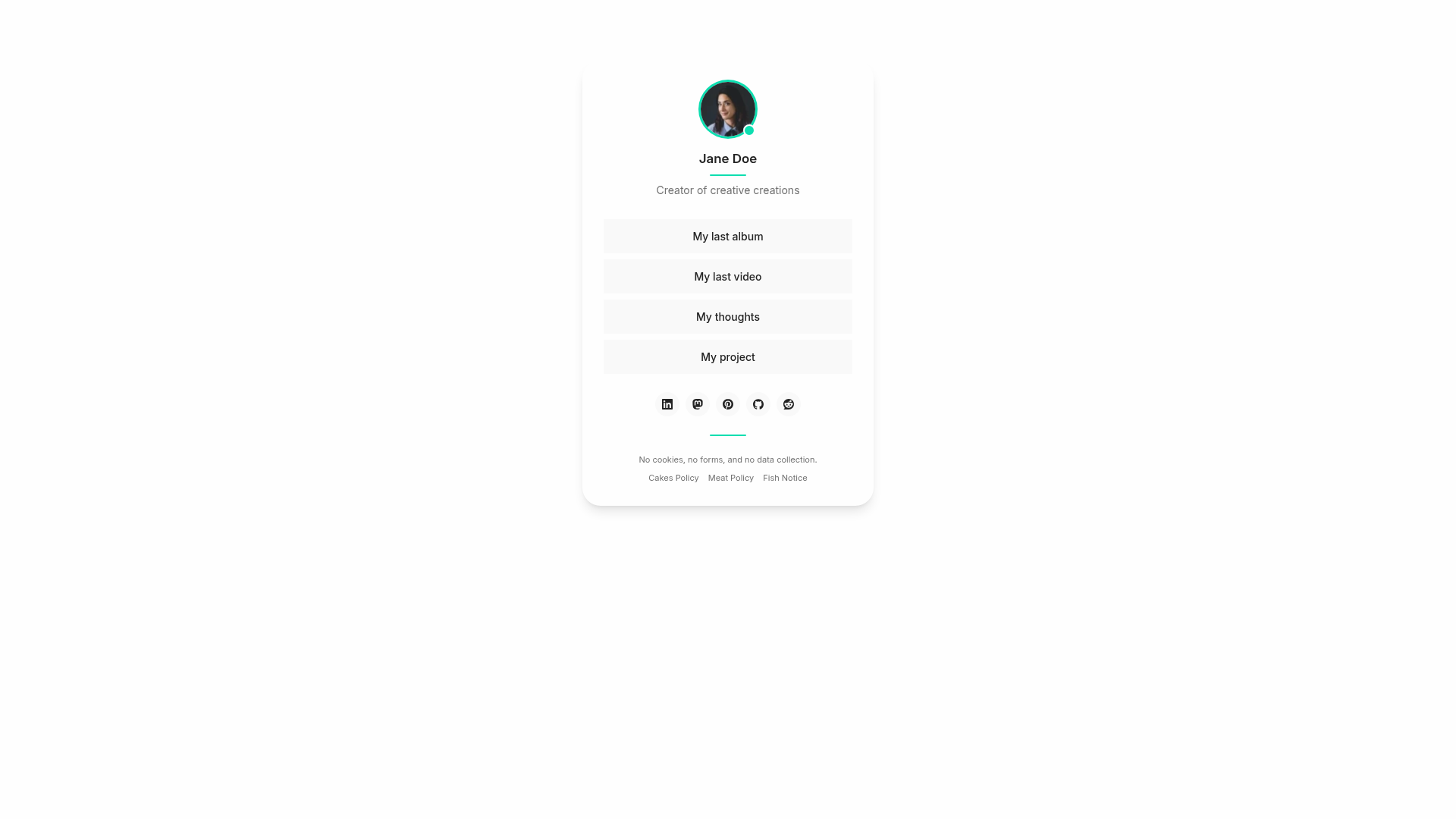
A self-hosted, accessible Link in Bio theme for Astro built with Tailwind CSS 4, customized via a single settings.json file.
About this template
Manduca is a fast, lightweight Link-in-Bio theme for Astro that produces a self-hosted, accessible links homepage from a single JSON settings file.
What is Manduca?
Manduca is a Link in Bio theme built on Astro and styled with Tailwind CSS 4. It takes a settings.json file containing your name, bio, avatar image, custom links, and social profiles and renders a static, self-hosted single-page site with large link buttons. The theme is published by jomorespi on GitHub and can be scaffolded with pnpm create astro --template jomorespi/manduca.
Key Features
- Tailwind CSS 4 styling — the layout uses Tailwind utility classes, and you can set a custom accent color in
src/assets/styles/theme.css; the README links to whocanuse.com for contrast checking. - Two layout modes — set Align to
centerorleftinsettings.jsonto switch the page alignment. - Four decoration options — choose Decoration from
avatar,lines,all, ornoneto control decorative elements. - Central settings file — edit
src/settings.jsonto change the name, bio, language code, avatar (saved inpublic/img), link buttons, footer text, and footer menu without touching layout code. - 32 social media icons — includes Linkedin, Mastodon, Bluesky, Threads, Twitter, Instagram, YouTube, TikTok, GitHub, GitLab, Discord, Spotify, and more; any custom link not in the list falls back to a generic link icon.
- Markdown content pages — add extra pages as
.mdfiles insrc/pagesusing thePageLayout.astrolayout, and link them from the footer menu with relative paths. - Static site output —
pnpm buildgenerates a plain./dist/folder deployable to Netlify, Vercel, GitHub Pages, or any static host.
Who is it for?
- Creators and artists — musicians, photographers, and video makers who want a single page linking out to Bandcamp, Vimeo, YouTube, and social profiles.
- Freelancers and professionals — build a minimal personal landing page with your name, bio, and contact links without a CMS.
- Developers — Astro users who want a hackable template: change a JSON file and a CSS file, add Markdown pages, and deploy.
- Privacy-minded users — people who prefer self-hosting their link-in-bio page over third-party hosted services like Linktree.
What can you do with Manduca?
- Musicians: publish your latest album on Bandcamp, music video on Vimeo, and tour links on social platforms as large buttons from one page.
- Content creators: centralize your YouTube, Twitch, Instagram, and TikTok profiles, with custom labels for each link button.
- Personal brands: create a no-frills homepage featuring your avatar, bio, and footer menu pages like About and Contact.
- Developers: start a new project with
pnpm create astrousing this template, then customize the theme CSS and settings file.
How does Manduca work?
Scaffold a project with pnpm create astro@latest my-project -- --template jomorespi/manduca (or clone the repository), then open src/settings.json to set style, content, header, links, social, and footer options. Edit src/assets/styles/theme.css for the accent color, run pnpm dev to preview on localhost:4321, and pnpm build to output the static site to ./dist/.
Alternatives
- Linktree — a hosted link-in-bio service that requires an account and offers analytics; Manduca is self-hosted and static.
FAQ
Is Manduca free to use?
The template is published on GitHub, and the README asks for a star as support; no pricing or license fee is mentioned on the page.
How do I change the links on my Manduca page?
Open src/settings.json and edit the Links section, adding key-value pairs like "My last album": "https://bandcamp.com/me/myalbum". Each entry automatically becomes a large button on the homepage.
Which social media icons does Manduca include?
Manduca ships with 32 icons: Linkedin, Mastodon, Bluesky, Threads, Twitter, Instagram, Pinterest, Snapchat, Facebook, Vimeo, YouTube, TikTok, Twitch, Bandcamp, SoundCloud, Tidal, Spotify, GitHub, GitLab, Codeberg, StackOverflow, Discord, Behance, Dribbble, Reddit, Quora, Substack, Medium, WordPress, WhatsApp, Telegram, and Strava.
Can I add extra pages like an About page?
Yes. Add Markdown files to src/pages using the PageLayout.astro layout in the front matter, then link them from the Footer Menu setting in settings.json using relative links without a leading slash.
How do I deploy Manduca?
Run pnpm build to create a static site in the ./dist/ folder, then upload that folder to any static host such as Netlify, Vercel, or GitHub Pages. The theme's live demo is hosted on Netlify.