Template details
Architectify Template
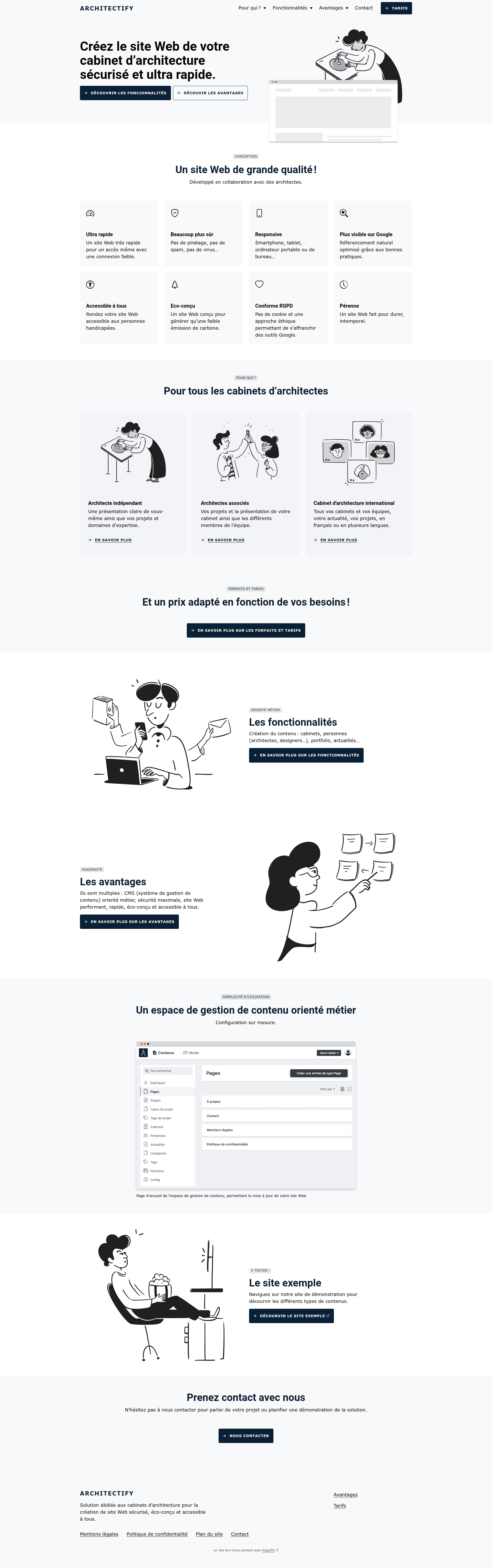
A Hugo template for architecture websites, built on Hugolify with Bootstrap and Netlify deployment.
About this template
Architectify Template is a Hugo-based website starter for architecture and design portfolios, built on the Hugolify theme system and available as a GitHub template.
What is Architectify Template?
Architectify Template is a GitHub template repository that scaffolds a Hugo static site for architecture and design projects. It takes a preconfigured Hugo project with content sections and taxonomies and produces a deployable website that runs on any Hugo-compatible host. The template is based on Hugolify, and its documentation points to the Hugolify template wiki. A live demo is hosted at demo.architectify.io with a Netlify deployment badge in the README.
Key Features
- Preconfigured Hugo sections — The template includes content types for pages, persons, places, posts, projects, and publications, so the site structure is ready before you add any content.
- Taxonomies built in — Posts have authors, categories, and tags; projects have tags and types; publications have categories and concerned taxonomy, all set up as Hugo taxonomies.
- Hugolify foundation — Built on the Hugolify theme system, which provides reusable Hugo components and an admin interface for managing content sections and taxonomies.
- Bootstrap — The repository includes the bootstrap topic, indicating Bootstrap is used as the CSS framework for responsive layout and components.
- GitHub template workflow — You can create a new repository from this template without copying files, then add your content to the existing section directories.
- Netlify-ready — The demo is deployed on Netlify, and the README shows a Netlify status badge, so the template is set up for Netlify builds and previews.
- MIT license — Hugolify is free for personal or commercial projects, so everything in this template can be used without licensing costs.
Who is it for?
- Architecture and design studios — Need a portfolio site with project galleries, team profiles, and publication listings without building a custom CMS.
- Hugo developers — Want a Hugolify starter with common content types and taxonomies preconfigured so they can focus on custom styling and content.
- Designers and small agencies — Look for a static-site template that can be deployed to Netlify and styled with Bootstrap.
What can you do with Architectify Template?
- Studio portfolios: Publish projects under the projects section and filter them by tags and types.
- Team profiles: Add staff and collaborators in the persons section to list their roles and bios.
- Blog and news: Use the posts section with authors, categories, and tags to publish updates and articles.
- Publications: Catalog books, papers, and reports in the publications section with categories and linked people via the concerned taxonomy.
How does Architectify Template work?
Because the repository is a GitHub template, creating a new project starts with the "Use this template" button on GitHub. The Hugo content directories and taxonomy definitions are already in place; you add markdown files to each section. The README links to the Hugolify wiki for documentation, and the included Netlify badge indicates the project is set up for continuous deployment on Netlify.
Pricing
Architectify Template is free. It is based on Hugolify, which is licensed under the MIT license, allowing free use for personal or commercial projects.
FAQ
Is Architectify Template free?
Yes. The template is based on Hugolify, which is MIT-licensed. You can use it for personal or commercial projects without paying anything.
What content sections does it include?
The template includes pages, persons, places, posts, projects, and publications. Posts have authors, categories, and tags; projects have tags and types; publications have categories and a concerned taxonomy.
How do I start a new site from this template?
Click the "Use this template" button on GitHub to create a new repository. Then clone it locally, add your content under the existing section folders, and deploy the Hugo site to a host like Netlify.
Can I deploy it on Netlify?
The demo site is deployed on Netlify, and the README includes a Netlify status badge. You can connect your generated repository to Netlify for automatic builds and previews.