Template details
Astro Component Starter
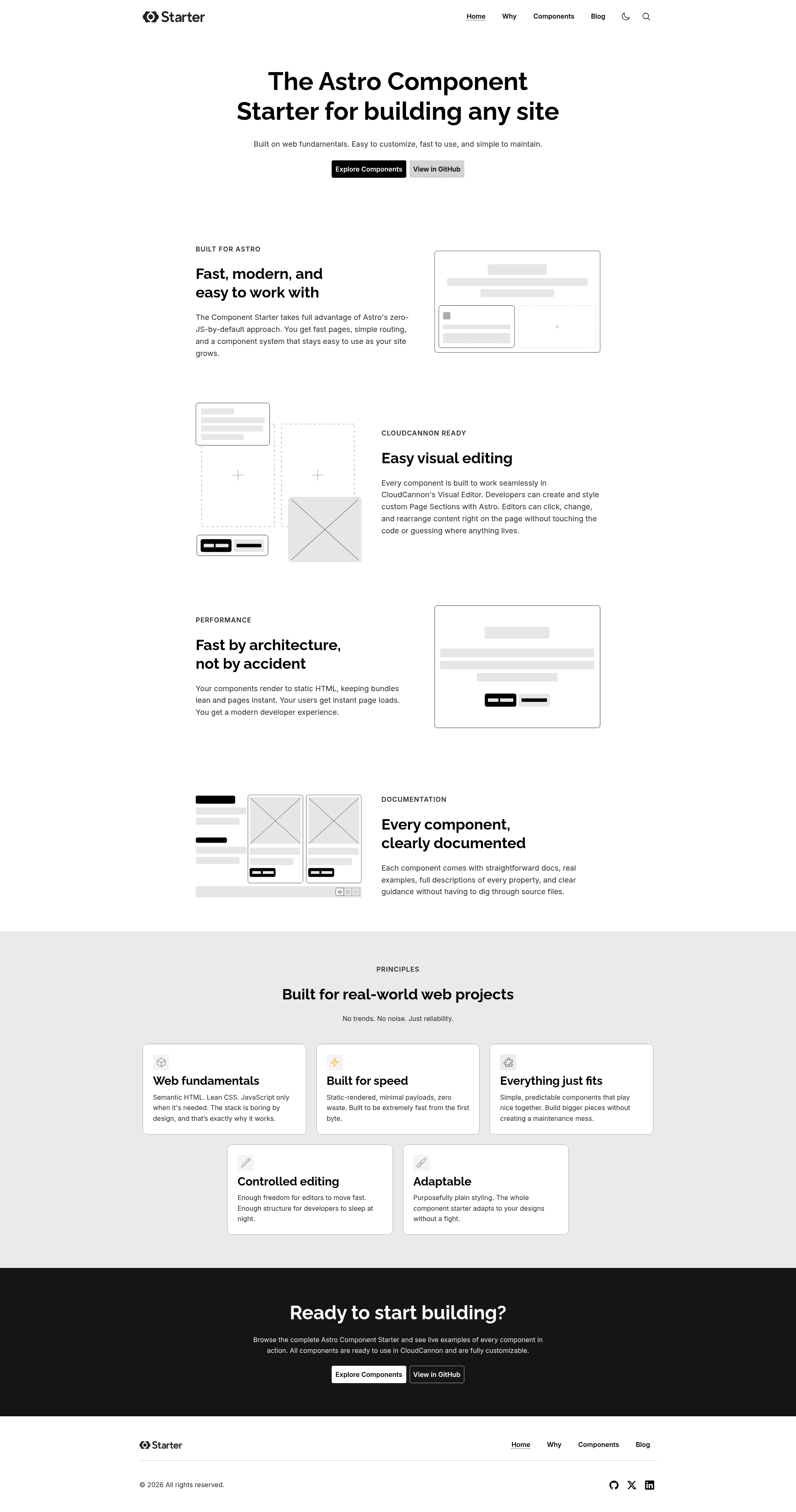
A starter template with 40+ Astro components built for visual editing in CloudCannon, using a three-file pattern so developers code and editors manage content.
About this template
Astro Component Starter is a boilerplate template for building Astro websites with 40+ prebuilt components designed for visual editing in CloudCannon. It takes a Git repository as input and produces a fully editable Astro site where content lives in Markdown/MDX files under src/content, and every component ships as your own source code to modify or delete. The starter is distributed as an npm initializer and is licensed under MIT.
What is Astro Component Starter?
Astro Component Starter is a boilerplate template for building Astro websites with 40+ prebuilt components designed for visual editing in CloudCannon. It takes a Git repository as input and produces a fully editable Astro site where content lives in Markdown/MDX files under src/content, and every component ships as your own source code to modify or delete. The starter is distributed as an npm initializer and is licensed under MIT.
Key Features
- Three-file component pattern — Each component (for example, a button) includes an
.astrofile, acloudcannon.inputs.ymlfile defining what editors can change, and acloudcannon.structure-value.ymlfile with defaults and picker metadata. - Visual editing via CloudCannon — Content and component props are exposed to your editors through CloudCannon's visual editor, while developers keep full control of the codebase in Git.
- Unbranded, themeable design — CSS variables under
src/styles/variables/control colors, fonts, spacing, and widths; light and dark themes live insrc/styles/themes/. Changing the variables restyles the entire site. - Web fundamentals styling — Components use vanilla CSS, semantic HTML, and minimal vanilla JS that only kicks in when CSS alone cannot handle the behavior, keeping performance and accessibility baked in.
- Structured component library —
src/components/organizes 40+ components intobuilding-blocks(buttons, headings, forms, layout wrappers),page-sections(heroes, features, CTAs), andnavigation(header, footer, mobile nav). - Built-in component docs — A live documentation site at
/component-docs/includes examples and a visual builder for every component; it is excluded from production builds by default vianpm run buildand can be included withnpm run build:with-library. - Automated dependency sync —
npm run deps:syncregeneratespackage-lock.jsonwith cross-platform resolutions (Linux, Windows, macOS) sonpm cisucceeds on GitHub Actions;npm run deps:checkverifies the lockfile is CI-ready. - Quick scaffolding —
npx create-astro-component-starter my-site-nameclones the starter, adds the original repo as a gitupstreamso you can pull future improvements, and installs dependencies automatically.
Who is it for?
- Astro developers — Build a new marketing site or blog without starting from scratch; customize the 40+ components and content structure directly in the source.
- Developer–editor teams — Hand a CloudCannon-connected site to content editors who can visually modify headings, buttons, and page sections through the YAML-defined inputs, while developers stay in Git.
- Agencies and freelancers — Use as a base for client projects; the unbranded, themeable design lets you match a client's brand by updating CSS variables, and the MIT license allows reuse and redistribution.
What can you do with Astro Component Starter?
- Launch a marketing site with blog — The demo includes pages, blog, and navigation; edit
src/content/pages/index.mdto change the hero heading and watch it update live in the browser. - Build a custom component library — Clone the starter and modify the
.astro, inputs, and structure-value files to create a reusable, editor-friendly component system for your team. - Prototype a branded design quickly — Swap CSS variables for your client's palette and typography, and the whole site recolorizes across both light and dark themes.
How does Astro Component Starter work?
Run npx create-astro-component-starter my-site-name, then cd my-site-name and npm run dev to start the dev server at http://localhost:4321. The scaffold creates a working demo site, sets the starter repository as upstream, and installs dependencies. From there, edit content in src/content/ and components in src/components/; optionally include the component docs in production by using npm run build:with-library.
FAQ
Is Astro Component Starter free?
Yes. The template is open source under the MIT license, so you can use, modify, and distribute it freely, including in commercial projects.
What Node.js version do I need?
Node.js version 24.0.0 or later is required. The project also provides deps:sync and deps:check scripts to keep the lockfile compatible across macOS, Linux, and Windows for CI.
How do I get the component docs?
The component docs are served by the dev server at http://localhost:4321/component-docs/ and are excluded from production builds by default. To include them in a production build, run npm run build:with-library.
Can I use this without CloudCannon?
Yes. CloudCannon is the visual editor that reads the YAML input files, but the components themselves are plain Astro, HTML, and CSS. You can use the starter as a standalone Astro site without connecting CloudCannon, though you'd lose the visual-editing workflow.