Template details
Astro Launchpad
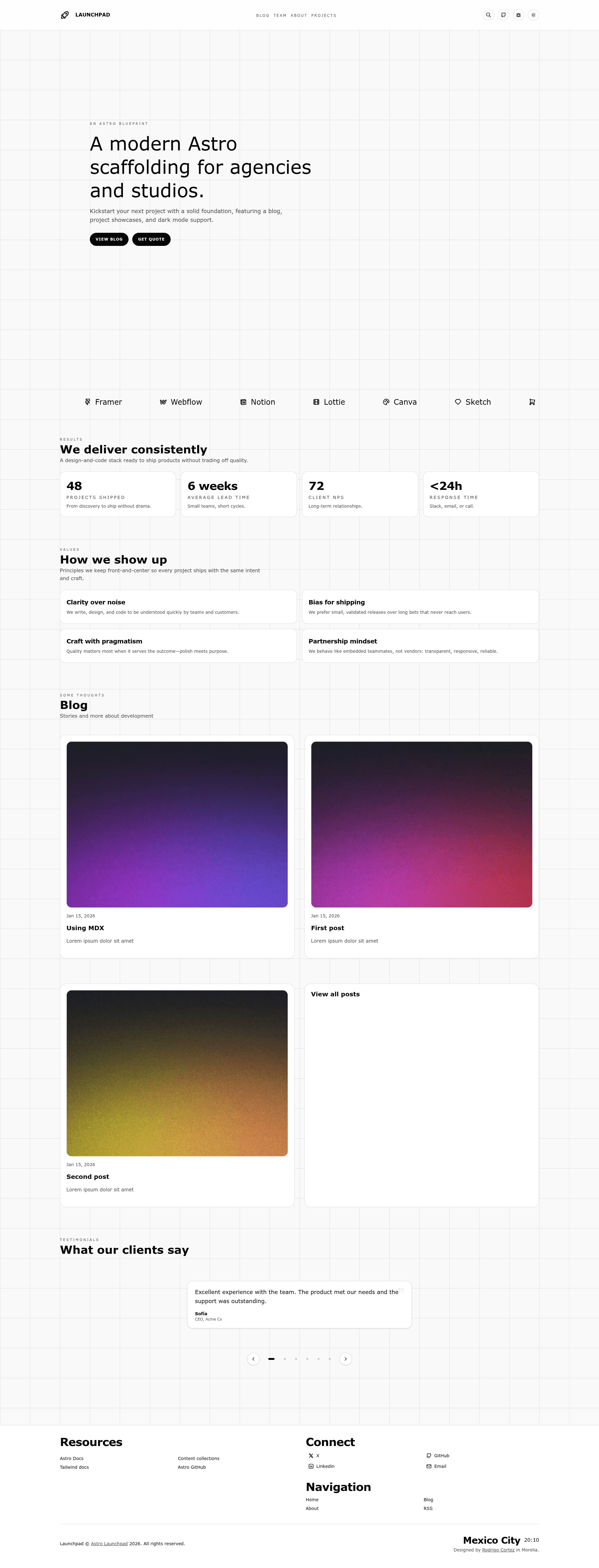
Astro starter for agencies and studios: MDX blog, Pagefind search, light/dark/blue themes, RSS, sitemap, and one-click deploys.
About this template
Astro Launchpad is an Astro starter template for agencies and studios that ships a content site with an MDX blog, global search, and SEO tooling out of the box.
What is Astro Launchpad?
Astro Launchpad is a static-site generator template built on Astro and styled with Tailwind CSS. It takes Markdown or MDX blog posts, author data, and social links as content inputs and produces a static dist/ folder ready to deploy to Netlify, Vercel, Cloudflare Pages, or any other static host. The project is authored by roicort and published as a GitHub repository named launchpad.
Key Features
- MDX blog — Write posts in
.mdor.mdxundersrc/content/blog; the schema validatestitle,description,pubDate, optionalupdatedDate,heroImage, andtags. - Typed content collections — Posts, authors, and socials are defined in
src/content.config.ts, giving build-time TypeScript validation. - Site-wide search — Pagefind search with an accessible modal in the header.
- Three color themes —
light,dark, andbluewith a persistent toggle, plus a debug toggle for layout borders. - SEO-ready — OpenGraph/Twitter meta tags, canonical links, and preloaded fonts in
src/components/BaseHead.astro. - Automatic RSS and sitemap — Generates
/rss.xmland/sitemap-index.xmlwithout extra configuration. - Lighthouse Score 100 — The README links to a PageSpeed Insights report showing a perfect score for the live demo.
- One-click deployment — Deploy directly to Railway, Netlify, or Vercel via buttons in the README.
Who is it for?
- Agencies that want to launch a marketing site with a blog quickly, using a template that already handles SEO, search, and RSS.
- Freelance studios that need a portfolio and content hub and want to customize colors and type in
src/styles/global.css. - Technical creators comfortable with Astro and Bun who want a typed content model and a modern build pipeline.
What can you do with Astro Launchpad?
- Publish a company blog — Add
.mdor.mdxposts insrc/content/blog; frontmatter fields likepubDateandtagsdrive featured posts and tag listing pages. - Set up a searchable knowledge base — Pagefind indexes all content, giving visitors a site-wide search modal with a keyboard-accessible interface.
- Deploy a static site in minutes — Use the built-in deploy buttons for Railway, Netlify, or Vercel, or upload the generated
dist/folder to any static host. - Rebrand the look — Change the site name and description in
src/consts.ts, and edit colors, typography, and utilities insrc/styles/global.css.
How does Astro Launchpad work?
The project uses Bun as its package manager. After running bun install, you start the dev server with bun run dev on port 4321, build with bun run build, and preview with bun run preview. Content lives in Markdown/MDX files plus authors.yml and socials.yml; the Astro pipeline validates them against TypeScript schemas at build time.
FAQ
What are the requirements for Astro Launchpad?
Bun, Astro latest, and Tailwind CSS. Installation is bun install.
How do I add a new blog post?
Create a .md or .mdx file under src/content/blog with frontmatter containing title, description, pubDate, and optional updatedDate, heroImage, and tags.
Can I change the theme colors?
Yes, colors, type, and utilities are defined in src/styles/global.css, and the site name and description live in src/consts.ts.
Does it generate RSS and sitemap automatically?
Yes, /rss.xml and /sitemap-index.xml are generated automatically.
What is the Lighthouse score?
The README reports a perfect 100 on PageSpeed Insights for the live demo.